@somik said: @AnthonySmith have you seen how the tierhive logo (your forum thumbnail) looks in the dark theme?
Cause I for sure cant see it
Looks like your new avatar is visible in dark theme now... Did you just change the CSS background of the forum threads instead of adjusting the avatar?
Looks like you got more CSS to edit?
I speak fluent sarcasm and broken logic. | I would agree with you, but thæn we’d both be wrong.
@somik said: @AnthonySmith have you seen how the tierhive logo (your forum thumbnail) looks in the dark theme?
Cause I for sure cant see it
Looks like your new avatar is visible in dark theme now... Did you just change the CSS background of the forum threads instead of adjusting the avatar?
Looks like you got more CSS to edit?
I have not touched anything, but thanks, i will check that out, on my low priority list
TierHive - Hourly VPS - NAT Native - /24 per customer - DE, UK, SG, CA, USA x3, FR, AU, PL, NL FREE tokens on sign up, try before you buy. | Static Hosting Free for life: https://tierhive.com/static-hosting/
@somik said: @AnthonySmith have you seen how the tierhive logo (your forum thumbnail) looks in the dark theme?
Cause I for sure cant see it
Looks like your new avatar is visible in dark theme now... Did you just change the CSS background of the forum threads instead of adjusting the avatar?
Looks like you got more CSS to edit?
I have not touched anything, but thanks, i will check that out, on my low priority list
Ya, my bad. Forgot read and unread threads have different backgrounds...
I speak fluent sarcasm and broken logic. | I would agree with you, but thæn we’d both be wrong.
So installed NetBSD on a small VPS (128 MB RAM and 1 GB disk) by writing the disk image from a netboot.xyz booted Alpine.
Can't get IPv6 working with NetBSD. The web interface tells me to use something like "2001:0db8:1234:5678::1" as the gateway, but what seems strange is that the neighbor advertisement then comes from IP6 2001:0db8:1000::1 with the target address 2001:0db8:1234:5678::1 (which NetBSD then seems to ignore).
@cmeerw said:
So installed NetBSD on a small VPS (128 MB RAM and 1 GB disk) by writing the disk image from a netboot.xyz booted Alpine.
Can't get IPv6 working with NetBSD. The web interface tells me to use something like "2001:0db8:1234:5678::1" as the gateway, but what seems strange is that the neighbor advertisement then comes from IP6 2001:0db8:1000::1 with the target address 2001:0db8:1234:5678::1 (which NetBSD then seems to ignore).
Ok, managed to get something working now by using the link-local address of the router (which I got by pinging ff02::2) - although even with that I can only reach a small subset of the outside IPv6 world. (btw, this is on the Roubaix, FR location)
I took it away because it was causing more trouble than it was worth but I can bring it back now then china storm is over I guess.
TierHive - Hourly VPS - NAT Native - /24 per customer - DE, UK, SG, CA, USA x3, FR, AU, PL, NL FREE tokens on sign up, try before you buy. | Static Hosting Free for life: https://tierhive.com/static-hosting/
TierHive - Hourly VPS - NAT Native - /24 per customer - DE, UK, SG, CA, USA x3, FR, AU, PL, NL FREE tokens on sign up, try before you buy. | Static Hosting Free for life: https://tierhive.com/static-hosting/
so the IPv6 addresses use some third-party tunneling provider? I guess that's why I am seeing significant worse pings (and packet loss) when using IPv6?
@cmeerw I don't know much, but it might seem like Tierhive wants to route IPv6 through an intermediate "sentry" VPS that monitors IPv6 spoofing and possibly other behavior ahead of the gateway.
On "friendly," my Alpine Tierhive VPS, all that seems required to get IPv6 going is something like
ip -6 address add $Assigned_IPv6_address/64 dev eth0
ip -6 route add default via $Assigned_Gateway6 dev eth0
But, if, after starting IPv6, an outgoing MTR is run, the first hop is "some unexpected IPv6 address" and the expected IPv6 gateway is the second hop.
A few days ago I saw "Wrst 732.5" and "StDev 231.2" on the first hop of an MTR to Google 8844 IPv6 DNS. Since then, the IPv6 performance has seemed better.
Just now I saw:
Loss%   Snt   Last   Avg  Best  Wrst StDev
0.0%    10    3.8  12.5   1.1  99.1  30.5 # First hop
0.0%    10    2.1   0.9   0.3   2.5   0.8 # Gateway6
  [ . . . ]
0.0%    10    5.5   3.9   2.7   5.9   1.1 # Gooogle ::8844 DNS
I took it away because it was causing more trouble than it was worth but I can bring it back now then china storm is over I guess.
No big deal, I just might skip a step … Was trying to get either a quick live image of Gentoo or an installer to run. But I seem to be getting kernel panic:
I tried increasing mem to 2 GB and disk to 4 GB, this is just after installer has unpacked the squashfs image and booted for a while …
I took it away because it was causing more trouble than it was worth but I can bring it back now then china storm is over I guess.
No big deal, I just might skip a step … Was trying to get either a quick live image of Gentoo or an installer to run. But I seem to be getting kernel panic:
I tried increasing mem to 2 GB and disk to 4 GB, this is just after installer has unpacked the squashfs image and booted for a while …
Try 4GB ram maybe? It has to store and unpack and install from ram.
In the next few weeks I am going to be doing more work on the templates. I can add a Gentoo one, it's been 6 months I have honestly lost track of what we have and what we don't.
TierHive - Hourly VPS - NAT Native - /24 per customer - DE, UK, SG, CA, USA x3, FR, AU, PL, NL FREE tokens on sign up, try before you buy. | Static Hosting Free for life: https://tierhive.com/static-hosting/
@flips said:
I tried increasing mem to 2 GB and disk to 4 GB, this is just after installer has unpacked the squashfs image and booted for a while …
Try 4GB ram maybe? It has to store and unpack and install from ram.
In the next few weeks I am going to be doing more work on the templates. I can add a Gentoo one, it's been 6 months I have honestly lost track of what we have and what we don't.
Quite funny, I haven't needed to boot Gentoo for a few years, not all of a sudden I needed to check something …
BTW: When I select Recue Mode and NetBoot.xyz, it doesn't autoconfigure network, I have to manually give it my 10.x.x.x IP, netmask, gw and DNS.
Increased to 4 GB and gave it another try.
Got a bit further (same as I got on a 2.5 GB Virmach VPS):
@flips said:
I tried increasing mem to 2 GB and disk to 4 GB, this is just after installer has unpacked the squashfs image and booted for a while …
Try 4GB ram maybe? It has to store and unpack and install from ram.
In the next few weeks I am going to be doing more work on the templates. I can add a Gentoo one, it's been 6 months I have honestly lost track of what we have and what we don't.
Quite funny, I haven't needed to boot Gentoo for a few years, not all of a sudden I needed to check something …
BTW: When I select Recue Mode and NetBoot.xyz, it doesn't autoconfigure network, I have to manually give it my 10.x.x.x IP, netmask, gw and DNS.
Increased to 4 GB and gave it another try.
Got a bit further (same as I got on a 2.5 GB Virmach VPS):
Did you enable DHCP in the panel?
TierHive - Hourly VPS - NAT Native - /24 per customer - DE, UK, SG, CA, USA x3, FR, AU, PL, NL FREE tokens on sign up, try before you buy. | Static Hosting Free for life: https://tierhive.com/static-hosting/
@flips said:
BTW: When I select Recue Mode and NetBoot.xyz, it doesn't autoconfigure network, I have to manually give it my 10.x.x.x IP, netmask, gw and DNS.
Did you enable DHCP in the panel?
Nope, that explains it. I didn't even know there was a DHCP thingie there.
(I don't think that's relevant for the Gentoo installer's "Could not boot" error, though.)
@flips said:
BTW: When I select Recue Mode and NetBoot.xyz, it doesn't autoconfigure network, I have to manually give it my 10.x.x.x IP, netmask, gw and DNS.
Did you enable DHCP in the panel?
Nope, that explains it. I didn't even know there was a DHCP thingie there.
(I don't think that's relevant for the Gentoo installer's "Could not boot" error, though.)
A quick search says if you only have 4GB Ram you need to add swap. So the method you are using is probably not suitable for TierHive.
I added the no operating system option back in and I will try and sort a Gentoo template next week.
TierHive - Hourly VPS - NAT Native - /24 per customer - DE, UK, SG, CA, USA x3, FR, AU, PL, NL FREE tokens on sign up, try before you buy. | Static Hosting Free for life: https://tierhive.com/static-hosting/
TierHive - Hourly VPS - NAT Native - /24 per customer - DE, UK, SG, CA, USA x3, FR, AU, PL, NL FREE tokens on sign up, try before you buy. | Static Hosting Free for life: https://tierhive.com/static-hosting/
TierHive - Hourly VPS - NAT Native - /24 per customer - DE, UK, SG, CA, USA x3, FR, AU, PL, NL FREE tokens on sign up, try before you buy. | Static Hosting Free for life: https://tierhive.com/static-hosting/
I have been spending the last two days playing with the system.
Trying to do HAProxy with geo dns, but couldn't manage to get it to work.
IPv6 has been working, but I couldn't manage to get ports other than 22 to open.
Came across two times of the same issue that when booting up the VPS, it failed to start as it seems to not be able to get an ip address. Deleting and recreating a VPS works, reinstalling doesn't.
I noticed with the same config, in different location, the CPU performance and network differs, I assume it's the different performance of the server?
I like the reinstall page because it shows which OSes are available and which OSes are not available given the existing RAM and disk configuration.
On the Create New VPS page, there is only the --Select OS-- drop down dialog, which shows only a list of OSes and doesn't show which OSes are available for the currently configured RAM and disk configuration.
On my Chromebook, the --Seect OS-- listing shows as almost invisibly light gray on bright white background. Additionally, my Chromebook refuses to take a screenshot showing the listing. If I take the screenshot with the listing showing, the listing does not appear in the screenshot, which somehow shows the page as it was before the drop down was activated:
Maybe it might be nice if the informative Reinstall page could be integrated into the Create New VPS process, replacing the drop down? Thanks for considering!
So a Chromebook screenshot somehow isn't really a screenshot? I am tempted to take a picture of my Chromebook screen with my phone. Does anyone know why my Chromebook won't do a screenshot which shows the open drop-down dialog? Thanks!
It's similar taking screenshots with wayland. Any drop-downs disappear (it's not just tierhive). I think it has something to do with the way the display system works.


Comments
I think this failure is not related to the recipe, but the host is out of space/resources while trying to create the VPS.
Looks like your new avatar is visible in dark theme now... Did you just change the CSS background of the forum threads instead of adjusting the avatar?
Looks like you got more CSS to edit?
I have not touched anything, but thanks, i will check that out, on my low priority list
TierHive - Hourly VPS - NAT Native - /24 per customer - DE, UK, SG, CA, USA x3, FR, AU, PL, NL
FREE tokens on sign up, try before you buy. | Static Hosting Free for life: https://tierhive.com/static-hosting/
Ya, my bad. Forgot read and unread threads have different backgrounds...
Derp.
"It's a hard life- to be a stick insect." - Karl Pilkington
Enticing! May we please have a little hint? Thanks!
Next funny project for tinkerers(?): Gentoo GNU/Hurd? Quite surprising that Hurd suddenly got a 64 bit Mach microkernel, IMO ... 😅
A different question, in this old comment: https://lowendspirit.com/discussion/comment/224280/#Comment_224280
Looks like I should be able to select "No Operating System". I don't see that …?
So installed NetBSD on a small VPS (128 MB RAM and 1 GB disk) by writing the disk image from a netboot.xyz booted Alpine.
Can't get IPv6 working with NetBSD. The web interface tells me to use something like "2001:0db8:1234:5678::1" as the gateway, but what seems strange is that the neighbor advertisement then comes from IP6 2001:0db8:1000::1 with the target address 2001:0db8:1234:5678::1 (which NetBSD then seems to ignore).
Ok, managed to get something working now by using the link-local address of the router (which I got by pinging
ff02::2) - although even with that I can only reach a small subset of the outside IPv6 world. (btw, this is on the Roubaix, FR location)I took it away because it was causing more trouble than it was worth but I can bring it back now then china storm is over I guess.
TierHive - Hourly VPS - NAT Native - /24 per customer - DE, UK, SG, CA, USA x3, FR, AU, PL, NL
FREE tokens on sign up, try before you buy. | Static Hosting Free for life: https://tierhive.com/static-hosting/
Not ready for that yet and it's always evolving, I am hoping to write a big guide.
TierHive - Hourly VPS - NAT Native - /24 per customer - DE, UK, SG, CA, USA x3, FR, AU, PL, NL
FREE tokens on sign up, try before you buy. | Static Hosting Free for life: https://tierhive.com/static-hosting/
Just noticing now:
so the IPv6 addresses use some third-party tunneling provider? I guess that's why I am seeing significant worse pings (and packet loss) when using IPv6?
@cmeerw I don't know much, but it might seem like Tierhive wants to route IPv6 through an intermediate "sentry" VPS that monitors IPv6 spoofing and possibly other behavior ahead of the gateway.
On "friendly," my Alpine Tierhive VPS, all that seems required to get IPv6 going is something like
But, if, after starting IPv6, an outgoing MTR is run, the first hop is "some unexpected IPv6 address" and the expected IPv6 gateway is the second hop.
A few days ago I saw "Wrst 732.5" and "StDev 231.2" on the first hop of an MTR to Google 8844 IPv6 DNS. Since then, the IPv6 performance has seemed better.
Just now I saw:
Hope this helps!
No big deal, I just might skip a step … Was trying to get either a quick live image of Gentoo or an installer to run. But I seem to be getting kernel panic:
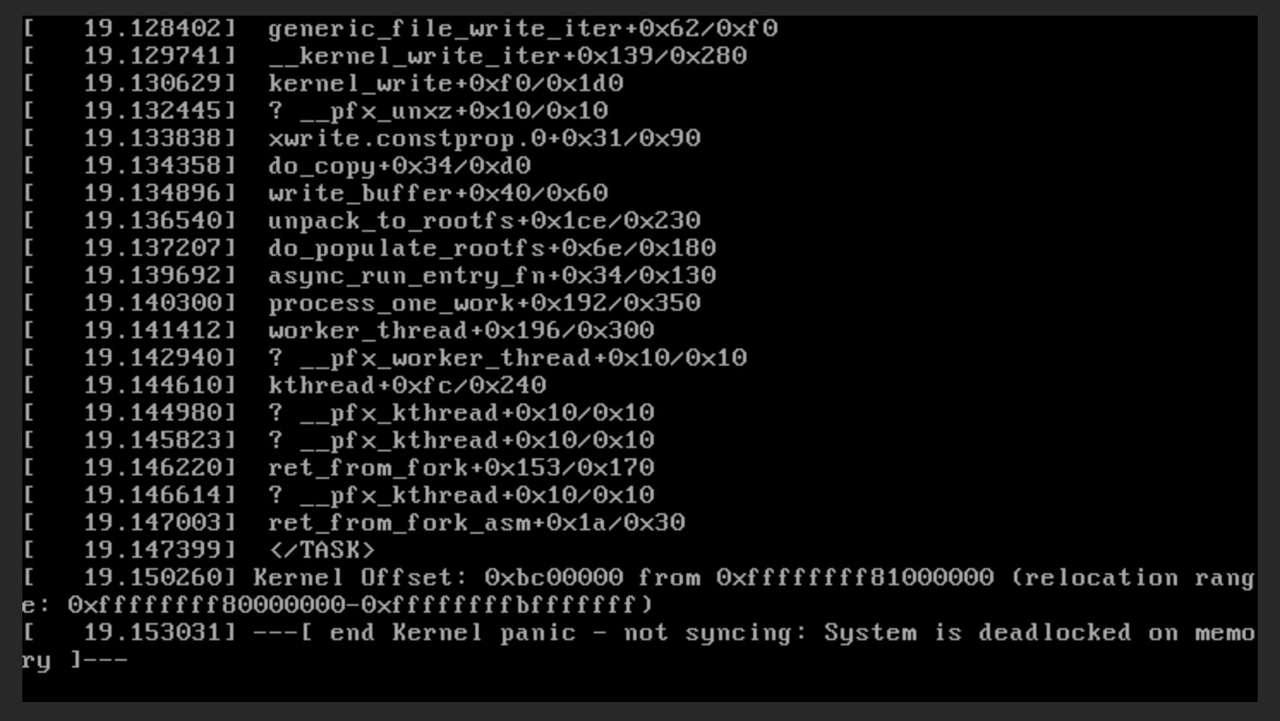
I tried increasing mem to 2 GB and disk to 4 GB, this is just after installer has unpacked the squashfs image and booted for a while …
Try 4GB ram maybe? It has to store and unpack and install from ram.
In the next few weeks I am going to be doing more work on the templates. I can add a Gentoo one, it's been 6 months I have honestly lost track of what we have and what we don't.
TierHive - Hourly VPS - NAT Native - /24 per customer - DE, UK, SG, CA, USA x3, FR, AU, PL, NL
FREE tokens on sign up, try before you buy. | Static Hosting Free for life: https://tierhive.com/static-hosting/
Quite funny, I haven't needed to boot Gentoo for a few years, not all of a sudden I needed to check something …
BTW: When I select Recue Mode and NetBoot.xyz, it doesn't autoconfigure network, I have to manually give it my 10.x.x.x IP, netmask, gw and DNS.
Increased to 4 GB and gave it another try.
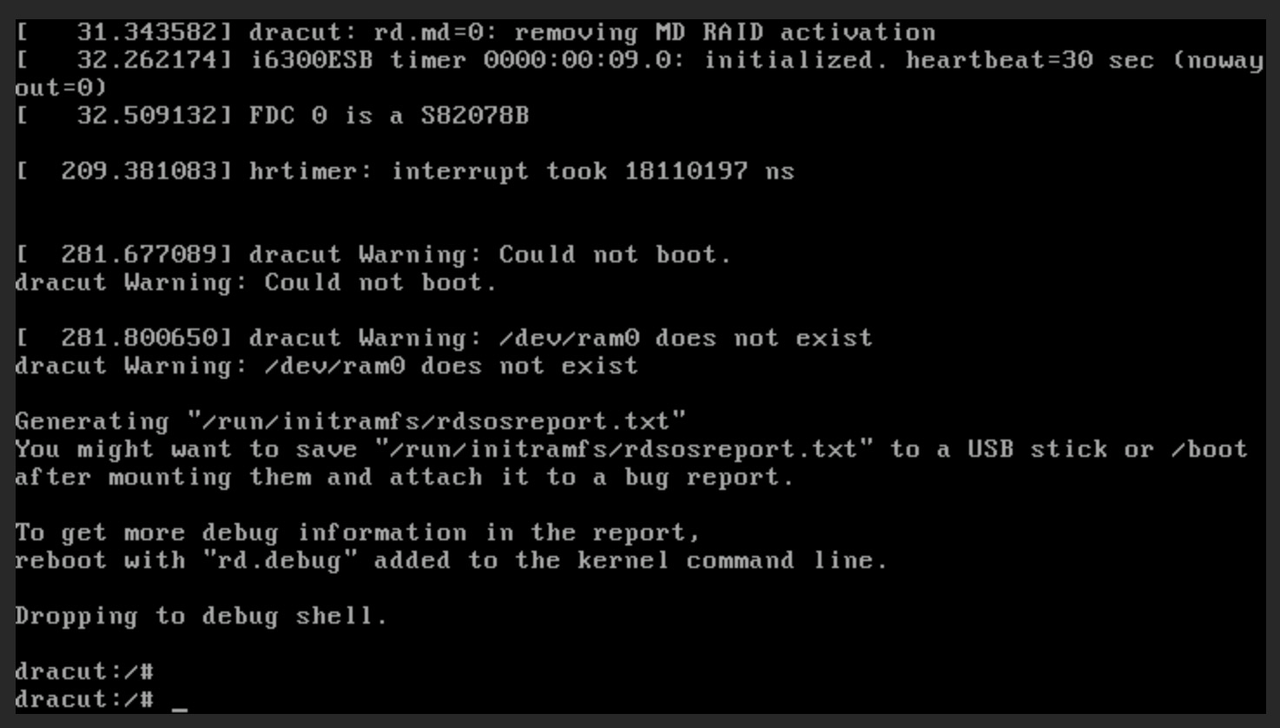
Got a bit further (same as I got on a 2.5 GB Virmach VPS):
Did you enable DHCP in the panel?
TierHive - Hourly VPS - NAT Native - /24 per customer - DE, UK, SG, CA, USA x3, FR, AU, PL, NL
FREE tokens on sign up, try before you buy. | Static Hosting Free for life: https://tierhive.com/static-hosting/
Nope, that explains it. I didn't even know there was a DHCP thingie there.
(I don't think that's relevant for the Gentoo installer's "Could not boot" error, though.)
A quick search says if you only have 4GB Ram you need to add swap. So the method you are using is probably not suitable for TierHive.
I added the no operating system option back in and I will try and sort a Gentoo template next week.
TierHive - Hourly VPS - NAT Native - /24 per customer - DE, UK, SG, CA, USA x3, FR, AU, PL, NL
FREE tokens on sign up, try before you buy. | Static Hosting Free for life: https://tierhive.com/static-hosting/
Thanks @AnthonySmith … And I thought Gentoo was lightweight …
Alpine is the option now for minimal
TierHive - Hourly VPS - NAT Native - /24 per customer - DE, UK, SG, CA, USA x3, FR, AU, PL, NL
FREE tokens on sign up, try before you buy. | Static Hosting Free for life: https://tierhive.com/static-hosting/
On the beach near here sometimes there are a lot of flies.
Two of the flies just buzzed past my Chromebook!
One fly said, "Gentoo next week!"
The second fly replied, "NetBSD too!"
Bzzzt! Right in your ear! . . . Okay, I will shut up now.
... And then GNU/Hurd the week after?
@flips It doesn't matter, since from me, but . . . you have been hurd! /s
@WSS basically threatened my life if I spend any time on NetBSD
Gentoo already maintain a cloud init compatible template so I am hoping I only need an hour or so to sort it out.
TierHive - Hourly VPS - NAT Native - /24 per customer - DE, UK, SG, CA, USA x3, FR, AU, PL, NL
FREE tokens on sign up, try before you buy. | Static Hosting Free for life: https://tierhive.com/static-hosting/
I have been spending the last two days playing with the system.
Trying to do HAProxy with geo dns, but couldn't manage to get it to work.
IPv6 has been working, but I couldn't manage to get ports other than 22 to open.
Came across two times of the same issue that when booting up the VPS, it failed to start as it seems to not be able to get an ip address. Deleting and recreating a VPS works, reinstalling doesn't.
I noticed with the same config, in different location, the CPU performance and network differs, I assume it's the different performance of the server?
i ran a free service -> CloudRAM.Download | Made with love | And I am a Chickenist -> Chicken.ist
Edit: all ports except 53 is working. Somehow port 53 is blocked.
i ran a free service -> CloudRAM.Download | Made with love | And I am a Chickenist -> Chicken.ist
More use cases for an existing feature. . . .
I like the reinstall page because it shows which OSes are available and which OSes are not available given the existing RAM and disk configuration.
On the Create New VPS page, there is only the --Select OS-- drop down dialog, which shows only a list of OSes and doesn't show which OSes are available for the currently configured RAM and disk configuration.
On my Chromebook, the --Seect OS-- listing shows as almost invisibly light gray on bright white background. Additionally, my Chromebook refuses to take a screenshot showing the listing. If I take the screenshot with the listing showing, the listing does not appear in the screenshot, which somehow shows the page as it was before the drop down was activated:
Maybe it might be nice if the informative Reinstall page could be integrated into the Create New VPS process, replacing the drop down? Thanks for considering!
So a Chromebook screenshot somehow isn't really a screenshot? I am tempted to take a picture of my Chromebook screen with my phone. Does anyone know why my Chromebook won't do a screenshot which shows the open drop-down dialog? Thanks!
It's similar taking screenshots with wayland. Any drop-downs disappear (it's not just tierhive). I think it has something to do with the way the display system works.