@msatt said:
Looks like things are stuck "Migration queued" - 2 VMs both with multiple IPs on AMSD018.
Duplicate emails received (very short notice) about IP change but only gave a single IP.
VMs are still running on 'old' ips.
Mike
This particular batch was a last minute change, mostly as a precaution due to previous node issues. I decided to use it as an opportunity to cluster everyone across more stable and emptier nodes. This did cause an additional delay on an already-behind-schedule change. I do apologize.
Theoretically this could ave been just an IP change and it would have been easier, it was a decision made on purpose.
The migration to IP change pipeline (and reverse) was reworked and unified, to add flexibility for some particular cases. That's an unintended side effect, it shouldn't be displaying that in this case. (It technically "should" be displaying it as coded, just an oversight.) I just need to add in a check to ensure it's not scheduled too far into the future when it shows that splash. It's obviously not helpful in that situation and was only intended for more immediate changes.
The additional IPs issue was my mistake, I used a feature on the system incorrectly but obviously it shouldn't even "allow" me to make that kind of mistake. It was just because I wanted to combine a particular type of scheduled migration WITH prior communication WITH no delay on change after migration, and that combination only supports single changes. Looking into it now. EDIT -- Actually I do believe I already fixed this issue pre-emptively, it just didn't get worked into the communication, as in it doesn't pre-reserve additional IPs/communicate them in this case. I'll double check.
I've already been looking into the duplicate communication bug, it likely has to do with a failsafe that was added some days ago to ensure we don't "miss" any communications as another bug caused some to never land in the past. I'll have to rethink it and clean it up properly for future cases. EDIT -- Yes, this was it.
Looks like my VM migrated (the wizard said it was completed), is now on AMSD030X, but it doesn't get the new IP (panel does not show the new IP). Manually setting the IP doesn't help. However the DHCP that hands out/offers the old IP, responds from .2 IP in the new IP range ...
@flips said:
Looks like my VM migrated (the wizard said it was completed), is now on AMSD030X, but it doesn't get the new IP (panel does not show the new IP). Manually setting the IP doesn't help. However the DHCP that hands out/offers the old IP, responds from .2 IP in the new IP range ...
In your case it's not done yet, being worked on now. (As in I'm aware.) Some delay.
My VM is seemingly migrated on AMSD013 (panel shows the new IP) but can't connect to the Internet. I ran 'Reconfigure networking' in the control panel which supposedly completed successfully but still can't reach the Internet. Are other people having the same issue?
@flips said:
Looks like my VM migrated (the wizard said it was completed), is now on AMSD030X, but it doesn't get the new IP (panel does not show the new IP). Manually setting the IP doesn't help. However the DHCP that hands out/offers the old IP, responds from .2 IP in the new IP range ...
In your case it's not done yet, being worked on now. (As in I'm aware.) Some delay.
Luckily not many affected.
Could you please handle the ticket #447726, the automatic IP change caused me an unnecessary disaster?
Wow - lots of IPs !!!
id=722166 AMSD018 > AMSD035 now has 12 ipv4 (sbe 4) . None appear to be working and are in the 'old' ip range i.e. 88.214.21.x
id=722545 AMSD018 > AMSD027 moved with 4 new working IPs (should only be 2) plus old ips.
Lost IPv6 on both
@M0nst3r said:
My VM is seemingly migrated on AMSD013 (panel shows the new IP) but can't connect to the Internet. I ran 'Reconfigure networking' in the control panel which supposedly completed successfully but still can't reach the Internet. Are other people having the same issue?
"Please ensure your virtual server is using the new IP before the old IP is removed. Our system will attempt to update the network configuration on your VPS automatically on finalization. If that fails for any reason, you can run "Reconfigure Network" from your control panel or set the new IP manually via VNC."
Only an IP address is specified. Last time I checked, IP address is only one of multiple parameters needed. Fine, I wait for it to "do the right thing", but this is a very silly email. Reconfigure Network does not change the IP address.
My TYCO038 seems to have been migrated to TACO032, but it still cannot be accessed. When I try to access it, I get a message saying “Migration is in queue”. This situation has persisted for over a week now.
RYZE.TYO-C031.VMS was working an hour ago, but suddenly the system crashed. The backend panel shows no hard drive. Reinstalling the system didn't work.
All of my VPS from location USA/NY received an 'upcoming IP address change' notification while they have a working IP address at the moment. Meanwhile I have two VM (ATLZ033, SJCZ006) without valid, working IP address, many-many months (technically they are unreachable, unusable). And my friendly questions, request - about the two mentioned node - always ignored by support (in ticket, and here also).
@flips said:
Looks like my VM migrated (the wizard said it was completed), is now on AMSD030X, but it doesn't get the new IP (panel does not show the new IP). Manually setting the IP doesn't help. However the DHCP that hands out/offers the old IP, responds from .2 IP in the new IP range ...
In your case it's not done yet, being worked on now. (As in I'm aware.) Some delay.
Luckily not many affected.
In addition to the IP switch about to happen (a few days ago), seems there's some other issue with the node:
@Virmach I previously paid $3 to migrate my service, but it hasn't taken effect. Could you help me migrate the service to any available node? Thank you.
Service ID: 618406
@msatt said:
Wow - lots of IPs !!!
id=722166 AMSD018 > AMSD035 now has 12 ipv4 (sbe 4) . None appear to be working and are in the 'old' ip range i.e. 88.214.21.x
id=722545 AMSD018 > AMSD027 moved with 4 new working IPs (should only be 2) plus old ips.
Lost IPv6 on both
I've been babysitting this all day and it's not going well, a lot to clean up. The node had some new weird situations the system did not account for properly and it got delayed into missing the IP change window, except some smart recovery system that works on regular IP changes was not very smart when combined with migrations, and it basically went "oh the IP that I needed isn't here, it must mean it's already used" and there's a fallback to pick available IPs, that broke out of the gating and gave you more on the old block since it never actually migrated.
@fran said: @VirMach I have a VPS in AMSD026 and status is unreachable, old IP still unchanged
Same batch as above, a bit different. I'm trying to make sure it doesn't go down the same path as AMSD018 so once that's done it should be smoother.
@VirMach
Hello, my VPS on TYO037 went offline after the new IP assigned, I didn't ask for an early assignment before the maintenance, and I can't do anything about it now. Anything wrong?
@toor said:
Yay! The networking on NYC metro node NYCB044 on subnet 185.213.19.0/24 just started working!
Sadly it's still not working on NYCB045; can't even ping the gateway from the VPS. Is this a known issue @VirMach or should I just accept that it's especially cursed and give up / reinstall / sacrifice a goat?
My VPS at AMSD030X came up for a few hours, but then something happened, so it's down again.
Running ifup ens3 returned unknown interface ens3, so I figured some script had changed my /etc/network/interfaces, and sure enough, it was replaced by SolusVM (setting up static for eth0) …
Adding GRUB_CMDLINE_LINUX="net.ifnames=0 biosdevname=0" to /etc/default/grub, running update-grub and rebooting got it back up …
(Doesn't seem like IPv6 works, but I'm not very stressed about that …)
Hey Virmach, any chance that you'll get reverse DNS delegations for the new IP blocks in NYC once things have calmed down? It'd be cool if I could fix my rDNS.
If your new IP is a QuickPacket-owned IP, we can delegate RDNS to @VirMach on request, he just needs to ticket or DM me on Discord when he has a chance and we can get it setup on our side (and then VirMach needs to set it up on his side).


Comments
This particular batch was a last minute change, mostly as a precaution due to previous node issues. I decided to use it as an opportunity to cluster everyone across more stable and emptier nodes. This did cause an additional delay on an already-behind-schedule change. I do apologize.
Theoretically this could ave been just an IP change and it would have been easier, it was a decision made on purpose.
The migration to IP change pipeline (and reverse) was reworked and unified, to add flexibility for some particular cases. That's an unintended side effect, it shouldn't be displaying that in this case. (It technically "should" be displaying it as coded, just an oversight.) I just need to add in a check to ensure it's not scheduled too far into the future when it shows that splash. It's obviously not helpful in that situation and was only intended for more immediate changes.
The additional IPs issue was my mistake, I used a feature on the system incorrectly but obviously it shouldn't even "allow" me to make that kind of mistake. It was just because I wanted to combine a particular type of scheduled migration WITH prior communication WITH no delay on change after migration, and that combination only supports single changes. Looking into it now. EDIT -- Actually I do believe I already fixed this issue pre-emptively, it just didn't get worked into the communication, as in it doesn't pre-reserve additional IPs/communicate them in this case. I'll double check.
I've already been looking into the duplicate communication bug, it likely has to do with a failsafe that was added some days ago to ensure we don't "miss" any communications as another bug caused some to never land in the past. I'll have to rethink it and clean it up properly for future cases. EDIT -- Yes, this was it.
Looks like my VM migrated (the wizard said it was completed), is now on AMSD030X, but it doesn't get the new IP (panel does not show the new IP). Manually setting the IP doesn't help. However the DHCP that hands out/offers the old IP, responds from .2 IP in the new IP range ...
my tokyo new IP was automatically applied without any hiccups 👍🏻
I bench YABS 24/7/365 unless it's a leap year.
In your case it's not done yet, being worked on now. (As in I'm aware.) Some delay.
Luckily not many affected.
My VM is seemingly migrated on AMSD013 (panel shows the new IP) but can't connect to the Internet. I ran 'Reconfigure networking' in the control panel which supposedly completed successfully but still can't reach the Internet. Are other people having the same issue?
Tokyo has never adopted IPv6? It has been waiting for many years.
same here today node TYOC035
VPS on AMSD026 still shows in migration queue in the panel, but is working fine under old IP. but is dead now.
Could you please handle the ticket #447726, the automatic IP change caused me an unnecessary disaster?
Wow - lots of IPs !!!
id=722166 AMSD018 > AMSD035 now has 12 ipv4 (sbe 4) . None appear to be working and are in the 'old' ip range i.e. 88.214.21.x
id=722545 AMSD018 > AMSD027 moved with 4 new working IPs (should only be 2) plus old ips.
Lost IPv6 on both
Get your FREE VPS if you develop Open Source software
same
@VirMach ticket #466068
too many Capcha, every time fails, give it up.
"Please ensure your virtual server is using the new IP before the old IP is removed. Our system will attempt to update the network configuration on your VPS automatically on finalization. If that fails for any reason, you can run "Reconfigure Network" from your control panel or set the new IP manually via VNC."
Only an IP address is specified. Last time I checked, IP address is only one of multiple parameters needed. Fine, I wait for it to "do the right thing", but this is a very silly email. Reconfigure Network does not change the IP address.
My TYCO038 seems to have been migrated to TACO032, but it still cannot be accessed. When I try to access it, I get a message saying “Migration is in queue”. This situation has persisted for over a week now.
@VirMach I have a VPS in AMSD026 and status is unreachable, old IP still unchanged
"Luckily not many affected."

RYZE.TYO-C031.VMS was working an hour ago, but suddenly the system crashed. The backend panel shows no hard drive. Reinstalling the system didn't work.
The machine ID is 635215
(https://billing.virmach.com/clientarea.php?action=productdetails&id=635215)
All of my VPS from location USA/NY received an 'upcoming IP address change' notification while they have a working IP address at the moment. Meanwhile I have two VM (ATLZ033, SJCZ006) without valid, working IP address, many-many months (technically they are unreachable, unusable). And my friendly questions, request - about the two mentioned node - always ignored by support (in ticket, and here also).

Hey! Can You give me only TWO of them?
Coz I have two VPS without working IPv4. (I joking only).
Yay! The networking on NYC metro node
NYCB044on subnet185.213.19.0/24just started working!mine also, Thank @Virmach
In addition to the IP switch about to happen (a few days ago), seems there's some other issue with the node:
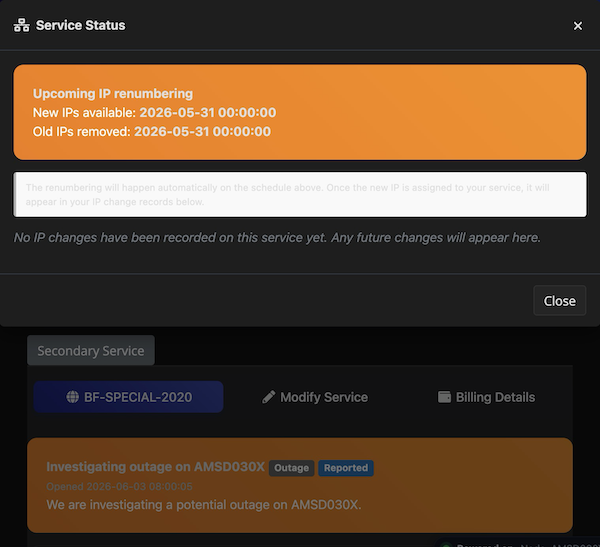
Hope your figure out the issues …
@Virmach I previously paid $3 to migrate my service, but it hasn't taken effect. Could you help me migrate the service to any available node? Thank you.
Service ID: 618406
TYOC035 IPV6 is unavailable
@VirMach
I've been babysitting this all day and it's not going well, a lot to clean up. The node had some new weird situations the system did not account for properly and it got delayed into missing the IP change window, except some smart recovery system that works on regular IP changes was not very smart when combined with migrations, and it basically went "oh the IP that I needed isn't here, it must mean it's already used" and there's a fallback to pick available IPs, that broke out of the gating and gave you more on the old block since it never actually migrated.
Same batch as above, a bit different. I'm trying to make sure it doesn't go down the same path as AMSD018 so once that's done it should be smoother.
@VirMach
Hello, my VPS on TYO037 went offline after the new IP assigned, I didn't ask for an early assignment before the maintenance, and I can't do anything about it now. Anything wrong?
Sadly it's still not working on
NYCB045; can't even ping the gateway from the VPS. Is this a known issue @VirMach or should I just accept that it's especially cursed and give up / reinstall / sacrifice a goat?My VPS at AMSD030X came up for a few hours, but then something happened, so it's down again.

Running
ifup ens3returnedunknown interface ens3, so I figured some script had changed my/etc/network/interfaces, and sure enough, it was replaced by SolusVM (setting up static foreth0) …Adding

GRUB_CMDLINE_LINUX="net.ifnames=0 biosdevname=0"to/etc/default/grub, runningupdate-gruband rebooting got it back up …(Doesn't seem like IPv6 works, but I'm not very stressed about that …)
Hey Virmach, any chance that you'll get reverse DNS delegations for the new IP blocks in NYC once things have calmed down? It'd be cool if I could fix my rDNS.
TYOC040 TYOC037 downed?
If your new IP is a QuickPacket-owned IP, we can delegate RDNS to @VirMach on request, he just needs to ticket or DM me on Discord when he has a chance and we can get it setup on our side (and then VirMach needs to set it up on his side).
QuickPacket - Dedicated Servers in Ashburn, Los Angeles, Chicago