

WireGuard automated installer | Ubuntu, Debian, CentOS, Fedora


Lightweight WireGuard installer, written entirely in bash.
GitHub:
https://github.com/Nyr/wireguard-install
One-liner:
wget https://github.com/Nyr/wireguard-install/raw/master/wireguard-install.sh && bash wireguard-install.sh
Supported distros:
- Ubuntu
- Debian
- Centos
- Fedora
- AlmaLinux
- Rocky Linux
FAQ:
Will it work in my Raspberry Pi?
Probably, I don't have one to test. Install the raspberrypi-kernel-headers package and hope for the best. But you should consider using a distribution with built-in kernel support when it becomes available.
OpenVZ support?
Yes, via boringtun.
Can you add x feature?
Maybe, if it's worth it. But I'll keep the installer simple and functional, so keep that in mind. Niche features are unlikely to be implemented.
I like the project, how can I help?
Tell other people about it! wireguard-install is new and many people do not yet know about it. Some other low-quality tools based on my openvpn-install work exist, with credits and copyright notices removed. It's a sad sight to me after nearly a decade maintaining openvpn-install.
Comments
How about IPv6? Is there an Angristan variant that does?
"It's a hard life- to be a stick insect." - Karl Pilkington
IPv6 is natively supported, same as openvpn-install.
None of my work has anything to do with him, he just created a dubious quality fork of my OpenVPN installer and last I checked, he was getting funded on Patreon for it. Attention to detail between the original work and the copy just can't be compared. One was created by someone who is competent at networking, security and system administration and the other was forked by someone who wanted a "secure" version of my work because the default RSA key length was "insecure" for him.
OpenVPN installer | WireGuard installer
I'm sorry, I was attempting to tease you. I had no idea the asshole was making money from this.
"It's a hard life- to be a stick insect." - Karl Pilkington
No problem man
OpenVPN installer | WireGuard installer
I've used your openvpn script more times than I can count for a quick VPN setup because it's just so easy, glad you've branched into wireguard too. Nice work!
Thanks for sharing!
Ympker's VPN LTD Comparison, Uptime.is, Ympker's GitHub.
Tweeted, will RS via my main account tomoz.
https://inceptionhosting.com
Please do not use the PM system here for Inception Hosting support issues.
Thank you very much for spending time into doing this. I've used your openvpn script many times in the past.
Thanks.
I am using this https://github.com/complexorganizations/wireguard-manager/blob/master/.github/README.md
Was waiting for your one.
@Nyr can have have a look at the above script if you have time?
Enjoy meditation without religion for one month.
That repository is based on Angristan+l-n-s, both of them are forks of my original work and the author is either unaware or trying to hide that fact. But whatever it is, my original copyright is not being respected. I will not go into the technical part of the scripts here, already did that over at LET in case you are interested, but his repo is forked from Angristan so to put it short I'd suggest not to waste your time.
If you want to experiment with other VPN installers, I'd suggest looking at the following ones:
https://github.com/StreisandEffect/streisand
https://github.com/trailofbits/algo
They use very different approaches than my minimalist bash script but work reasonably well and are well maintained by technically competent people. I'm sure there are even more options, but that's what I am aware of
OpenVPN installer | WireGuard installer
Got it.
Thanks. @Nyr
Enjoy meditation without religion for one month.
I tried it first time and it looks good. Please tell me, are my ports settings good? Add or remove anything? suggestion?
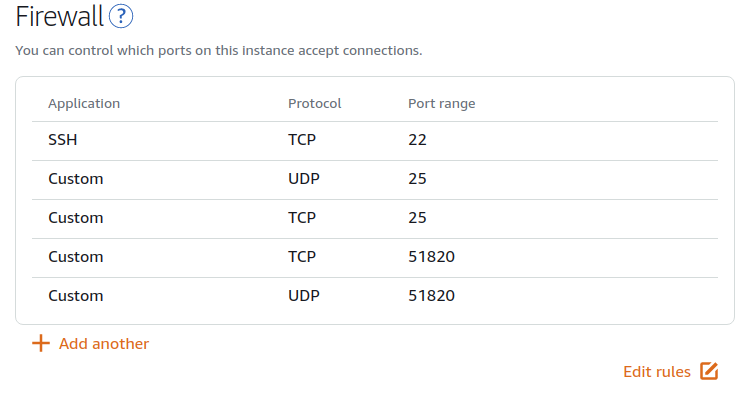
⚆ ͜ʖ ͡⚆ Thanked by (1281): verjinOnly UDP is required, you can remove the TCP port
OpenVPN installer | WireGuard installer
@Nyr I am searching for wg API which automates account creation or in short perform CRUD.
Do you know any? Right now I am looking at github.com/alectrocute/wg-api (beta) and github.com/suquant/wgrest (limited functionality)
⚆ ͜ʖ ͡⚆ Thanked by (1281): verjinNyr da MVP!
Trying this out on a vultr throwaway, before deploying to one of my 1Eur Arubacloud idlers. (2left)
You already know more than me! I'm new to the whole WireGuard scene and not familiar with third party projects (yet).
OpenVPN installer | WireGuard installer
I have something bookmarked for this.
Here it is: Subspace
It's crazy how well this WireGuard vpn performs, thanks for sharing the script @Nyr !!
Owned-Networks | VPS and Web Hosting for every project size and budget
DAL - LEN - LA - SEA - NYC - MIA - AMS - LON
Not sure if subspace still maintained, last I saw it there were multiple unsolved issues.
Enjoy meditation without religion for one month.
Until I read this thread, I’d somehow managed to miss wireguard going v1, so thanks!
Great @Nyr
If 127.0.0.1 is chosen for DNS, will users use the Unbound resolver on the server ?
@Nyr It would be great if you included Unbound on this script
What's Min ram on KVM vps required to work well?
I bench YABS 24/7/365 unless it's a leap year.
@cybertech
Worked on 512mb KVM.
Wireguard Go works on 128mb ovz
Enjoy meditation without religion for one month.
The script looks pretty good... Nice work.
I've got WireGuard running on a 256 MB KVM with no issues. On Linux, at runtime it's just a kernel module so the memory requirements are lower than other VPN apps that need userland apps to be running.
Daniel15 | https://d.sb/. List of all my VPSes: https://d.sb/servers
dnstools.ws - DNS lookups, pings, and traceroutes from 30 locations worldwide.
automagically both IPv4/IPv6 working
The "current system resolvers" option means exactly that: the resolvers currently used by the system, whatever it is in resolv.conf. So that's not necessarily 127.0.0.1, and even if it is, 127.0.0.1 would of course not be valid for VPN clients.
With that said, with WireGuard the DNS configuration is directly in the client.conf file, so you can easily configure 10.0.7.1 which is the server address.
Would you want the script to set up a recursor, or to integrate with an already running one? The second is very easy, read my comment just above this.
That depends on the OS and other factors, but others already explained what to expect. If you have only 256 MB, I'd suggest to use Debian.
OpenVPN installer | WireGuard installer
Works like a charm. And WireGuard is much faster than OpenVPS. Double the throughput.
Thanks for this script @Nyr
Used this to setup my vpn. Worked flawlessly, thanks.
Cloudflare DNS is good and no logging policy so it's OK to use them. Great option for small VPS!
Unbound DNS is lightweight, I would go with unbound if my VPS had more than 512 MB RAM
I guess what he want is ADBlocker DNS. You c> @sonic said:
One of the main reason I use vpn is that blocking ads through pihole.
Action and Reaction in history
My current setup: Wireguard + Unbound + Pihole and Adguard chrome extension (for blocking Youtube ads)
The installer includes an AdGuard option, not the same as Pi-hole but similar results.
OpenVPN installer | WireGuard installer
Is there a way to access the clients via their hostname and the .local domain?
Let's say I have both my PC and PI connected and I'd like to access the pi via it's hostname and the .local subdomain.
AMD EPYC / NVMe / 10GBPs KVM in Frankfurt - https://v6node.com
Looking for an unbeatable AMD EPYC Baremetal Server in Frankfurt? Drop me a PM
You'd need to be running a DNS server for that.
OpenVPN installer | WireGuard installer
Finally!
Thank you so much for your work!
Amitz, a very stable genius (it's true!) and Grand Rectumfier of the official LESLOS® (LES League of Shitposters).
Certified braindead since 1974 and still perfectly happy.
Can this and your OpenVPN script be configured side by side?
Of course!
OpenVPN installer | WireGuard installer
What speeds are you getting on wireguard and how did you speed it up?
I bench YABS 24/7/365 unless it's a leap year.
For me, wireguard seems to be much efficient than openvpn. I am using wireguard over 6 months now and main attraction for me is being energy friendly on mobile. It does not keep connection open so less battery drain. But no noticeable difference in ux.
Enjoy meditation without religion for one month.
On Android?
Yep
Enjoy meditation without religion for one month.
And seamless switching between wifi and mobile data.
Enjoy meditation without religion for one month.
What a sad situation that I had been so busy with work
To be honest no idea, I am so overworked lately that haven't used a WireGuard client yet in my personal devices.
Others report better speeds than OpenVPN and the protocol is certainly more efficient. If you are getting very low speeds that could be caused by MTU problems, but other than that there isn't much to be done by the end user to improve speeds. Just use a server in a quality network.
What client are you using? I'm on Shadowsocks currently which probably is as efficient as you can get, but I'm planing the switch to WireGuard in the near future.
OpenVPN installer | WireGuard installer
@Nyr
I'm using the official client. However, using the magisk wireguard module too. Not sure whether it makes a difference.
Enjoy meditation without religion for one month.
Anyone know Wireguard client for Ubuntu Desktop? I'm using command-line version, it works but it isnt as good as Windows desktop verison.
I didn't intend to send that half-prase lol, it sounds so edgy. I'm fine, not sad!
https://github.com/corrad1nho/qomui
I have no idea about how good it is, I don't use Linux on the desktop.
OpenVPN installer | WireGuard installer
Thanks for your script!
It works flawlessly.
Not much usage because the server from US when i'm in Asia
Does the script assume iptables(-legacy) to be present/default? (Wondering if I should try it on a Debian 10 VPS using nftables actively.)
As long as you have the iptables-nft compatibility layer (which is there by default) you're good to go.
OpenVPN installer | WireGuard installer