Rumor says this whole thread, including @VirMach@FrankZ and all other users, are LLM generated.
The LES code has a special bypass that routes requests to this thread to the VirBot LLM.
Each user is interacting with their own edition of this thread.
We've seen the artifacts in the flan.
@yoursunny said:
Rumor says this whole thread, including @VirMach@FrankZ and all other users, are LLM generated.
The LES code has a special bypass that routes requests to this thread to the VirBot LLM.
Each user is interacting with their own edition of this thread.
We've seen the artifacts in the flan.
..... but there is probably even more to the story.
I feel like either all Virmach clients are now either fully used to their server being ephemeral or left already. So no one around to start drama... What happened to the guy who used to post AI generated clown to complain?
I speak fluent sarcasm and broken logic. | I would agree with you, but thæn we’d both be wrong.
I’ve been digging into the persistent issue regarding the incorrect GeoIP localization for VirMach’s Netherlands-based infrastructure (operated under Virtual Machine Solutions LLC) and why manual correction submissions to MaxMind have been consistently reverted or ineffective.
Here is the root cause of the issue:
The Downstream Geofeed Dependency
Modern GeoIP database providers (such as MaxMind, Google, Cloudflare, etc.) heavily rely on automated ingestion pipelines that periodically pull RFC 8805-compliant Geofeed files maintained by network operators.
Downstream providers operating under xTom (ASN 3214)—including VirMach (Virtual Machine Solutions LLC), Hizakura B.V., and GreenCloud—frequently lease or route their IP space directly from xTom. Consequently, major GeoIP platforms default to reading the upstream Geofeed published by xTom rather than individual downstream correction requests.
The Flaw in the Upstream Database
The breakdown occurs because xTom’s official, centralized Geofeed repository contains incorrect metadata for these specific subnets. You can verify this by checking their publicly exposed CSV file:
In this file, the subnets deployed in Amsterdam are mislabeled with incorrect country/city attributes. Every time MaxMind or Google recrawls this upstream file, any manual overrides or corrections previously submitted by users or downstream VPS providers are automatically overwritten and reverted back to the incorrect location.
Moving Forward
Submitting individual tickets to MaxMind is a temporary band-aid that will inevitably get overridden during the next sync cycle.
The definitive solution requires xTom’s Network Operations Center (NOC) to correct the metadata rows inside as-xtom.csv.
I am currently reaching out to their NOC ([email protected]) to report this routing and geolocation mismatch. (Although I don't think they'll reply or make any changes LOL.)
If you are a downstream provider affected by this, I highly recommend opening a ticket with xTom as well to accelerate the update.
Here’s the wall of text breakdown of my situation:
TYOC007 went offline for over a month before my billing cycle end. Since you were basically ghosting LES at the time, I assumed the ship was finally sinking and submitted a cancellation. But since the node was dead and couldn't talk to WHMCS, the cancellation request didn't went through, it just sat there until it got auto-suspended for non-payment.
Last month you finally returned to LES, building the classical walls of text and actively fixing dead nodes. I felt the "Make VirMach Great Again" energy surging through my veins, canceled my cancellation request, and paid the invoice.
WHMCS emailed me saying the service was unsuspended. But because the node was still down, SolusVM never triggered the unsuspend hook from WHMCS. My VPS is still suspended.
I opened support ticket a month ago (not complaining about the wait, I know the drill). I even tried closing my old unanswered tickets and opening a new one multiple times, as I was trying to guess the exact time you logs into WHMCS to clear the ticket queue, hoping my fresh ticket would sit at the top of the pile. Obviously, my timing was way off and that failed.
I apologize for my opportunistic ship-jumping. I should have held the line. Now, I'm fully back on the MVGA train!
Whenever you have a minute, could you please hit the unsuspend button in SolusVM for me? Thanks!
@tuc said:
Do you think that @VirMach vps servers are now safe for production apps?
Absolutely. Netflix spends millions on engineers to simulate random "pull-the-plug" chaos engineering scenarios just to test infrastructure resilience.
Meanwhile, Virmach includes that exact feature out of the box for $7/year.
Here’s the wall of text breakdown of my situation:
TYOC007 went offline for over a month before my billing cycle end. Since you were basically ghosting LES at the time, I assumed the ship was finally sinking and submitted a cancellation. But since the node was dead and couldn't talk to WHMCS, the cancellation request didn't went through, it just sat there until it got auto-suspended for non-payment.
Last month you finally returned to LES, building the classical walls of text and actively fixing dead nodes. I felt the "Make VirMach Great Again" energy surging through my veins, canceled my cancellation request, and paid the invoice.
WHMCS emailed me saying the service was unsuspended. But because the node was still down, SolusVM never triggered the unsuspend hook from WHMCS. My VPS is still suspended.
I opened support ticket a month ago (not complaining about the wait, I know the drill). I even tried closing my old unanswered tickets and opening a new one multiple times, as I was trying to guess the exact time you logs into WHMCS to clear the ticket queue, hoping my fresh ticket would sit at the top of the pile. Obviously, my timing was way off and that failed.
I apologize for my opportunistic ship-jumping. I should have held the line. Now, I'm fully back on the MVGA train!
Whenever you have a minute, could you please hit the unsuspend button in SolusVM for me? Thanks!
I'll try to remember to work in a fix for this, our new system has the capability to technically correct these glitched states when they happen in the future. Sorry you had to wait so long.
@VirMach Is there any new update for the TYOC027 node? It's been down for over six months, almost a year now. If it can't be fixed, can everything be migrated to a new node?
Reading the post above reminded me that Chicago subnet (89.33.192.0/24) is also stuck with Romania GeoIP.
Is there any real-world downside to this? As far as I know, the only annoying thing is speedtest.net defaulting to a server in Romania instead of Chicago.
@tototo said:
Reading the post above reminded me that Chicago subnet (89.33.192.0/24) is also stuck with Romania GeoIP.
Is there any real-world downside to this? As far as I know, the only annoying thing is speedtest.net defaulting to a server in Romania instead of Chicago.
If you proxy though it you get ads in languages you can't understand.
@ahnlak said:
IP address changes seem to have finally killed my until-now-reliable VPS in NY.
Honestly not sure if I can be bothered in trying to resolve it or just accept that it's time has come /sigh
Same thing on my servers. I applied new IP on two of my servers and both are now unreachable from outside the network.
@ahnlak said:
IP address changes seem to have finally killed my until-now-reliable VPS in NY.
Honestly not sure if I can be bothered in trying to resolve it or just accept that it's time has come /sigh
Which server?
Asking a stupid question, the new IPs are supposed to be live? I tried one yesterday ( don't remember which server ), it didn't work so I went back to the old one. Is there any process I needed to follow before trying? I'll try again and let you know which ones work / don't work.
@ahnlak said:
IP address changes seem to have finally killed my until-now-reliable VPS in NY.
Honestly not sure if I can be bothered in trying to resolve it or just accept that it's time has come /sigh
Same thing on my servers. I applied new IP on two of my servers and both are now unreachable from outside the network.
@ahnlak said:
IP address changes seem to have finally killed my until-now-reliable VPS in NY.
Honestly not sure if I can be bothered in trying to resolve it or just accept that it's time has come /sigh
Which server?
Asking a stupid question, the new IPs are supposed to be live? I tried one yesterday ( don't remember which server ), it didn't work so I went back to the old one. Is there any process I needed to follow before trying? I'll try again and let you know which ones work / don't work.
It could potentially be an upstream routing issue on specific routes. They're supposed to be live. It could also be human error. I should've done more extensive testing globally, I'm looking into it now and contacting the provider.
At least two subnets could have some other issue, looking into them now. Node names would still be helpful as it it could technically also be a node issue.
I'm going to disable early changes for now and focus on the nodes getting changes today.
EDIT --- These were an error on my end, I likely forgot to commit after testing.
NYCB043
NYCB040
NYCB014
NYCB013
Any remaining issues are likely either (1) weird node configuration for specific node(s) causing problems, (2) upstream and I'm waiting for a response.
@VirMach When you get 10-15 min time , could you have a look at #206392 and #535002? If I missed something on policies, sorry - let me know and will try to correct it.
I did an IP change yesterday on TYOC039. Both IPs, new and old were on the same subnet. I was able to add the new IP and remove the old ip without issue. Everything worked fine.
Suggestion would be to show the new gateway IP in the IP change email. On previous IP changes I've been guessing that the new gateway is xx.xx.xx.1 and it has worked out so far, but if you are not using a whole /24 it could get messier.
@imok said:
I arrived at home on time to update the IP of my storage VPS (PBS). Tried automatically but it didn't work, the script changed the interface names.
So I did it manually and it worked fine.
@virmach about the dead 4TB nvme in my dedi in OKH, does it have a replacement? Just asking to see if I should open a ticket or not.
I know I'll regret asking, but how much are you paying for the dedi with 4tb nvme?
I speak fluent sarcasm and broken logic. | I would agree with you, but thæn we’d both be wrong.
@VirMach If you have some time please look at Ticket #306930
It's about the new IPs that waas supposed to be activated by 25/5 but I still couldn't ping them.
@imok said:
I arrived at home on time to update the IP of my storage VPS (PBS). Tried automatically but it didn't work, the script changed the interface names.
So I did it manually and it worked fine.
@virmach about the dead 4TB nvme in my dedi in OKH, does it have a replacement? Just asking to see if I should open a ticket or not.
I know I'll regret asking, but how much are you paying for the dedi with 4tb nvme?
I don't remember for real. Around $400 I think.
And it is 2x4TB NVMe.
@imok said:
I arrived at home on time to update the IP of my storage VPS (PBS). Tried automatically but it didn't work, the script changed the interface names.
So I did it manually and it worked fine.
@virmach about the dead 4TB nvme in my dedi in OKH, does it have a replacement? Just asking to see if I should open a ticket or not.
I know I'll regret asking, but how much are you paying for the dedi with 4tb nvme?
I don't remember for real. Around $400 I think.
And it is 2x4TB NVMe.
@imok said:
I arrived at home on time to update the IP of my storage VPS (PBS). Tried automatically but it didn't work, the script changed the interface names.
So I did it manually and it worked fine.
@virmach about the dead 4TB nvme in my dedi in OKH, does it have a replacement? Just asking to see if I should open a ticket or not.
I know I'll regret asking, but how much are you paying for the dedi with 4tb nvme?
I don't remember for real. Around $400 I think.
And it is 2x4TB NVMe.
@somik said:
But $400 per year for 8TB nvme storage... that's quite a good deal...
I wait for the $7/y/TB.
Nah, ok, will buy 2TB at $14/y/TB.
Spinning rust? oh yeaahhhh just put raidz-360 or something like that.
What are you taking about man? I got 2TB of spinning rust dedi from CC for $100/year and I am happy with it. . . well, I was until I saw @imok got 8TB of nvme for $400/year
I speak fluent sarcasm and broken logic. | I would agree with you, but thæn we’d both be wrong.
@ahnlak said:
IP address changes seem to have finally killed my until-now-reliable VPS in NY.
Honestly not sure if I can be bothered in trying to resolve it or just accept that it's time has come /sigh
Same thing on my servers. I applied new IP on two of my servers and both are now unreachable from outside the network.
@ahnlak said:
IP address changes seem to have finally killed my until-now-reliable VPS in NY.
Honestly not sure if I can be bothered in trying to resolve it or just accept that it's time has come /sigh
Which server?
Mine are on NYCB038 and NYCB045.
When it doesn't work, if anyone sees my message here, please specify between you cannot ping it and if you checked it globally. If you cannot reach it, ticket with MTR (both directions preferred or one way to a public test server we can test back from) would be best and provide ID here.
It's pretty much confirmed from my investigations that it's an upstream issue. Seems like one of the edge routers is doing something wrong, so if that path gets handled by that router, that's where it runs into problems. It's been reported to them.
The reason I need to know if you checked globally (ping.pe) or not is so I can differentiate with it being this issue or potentially another issue that's on OUR end (as in, I did something stupid personally.)
@imok said: @virmach about the dead 4TB nvme in my dedi in OKH, does it have a replacement? Just asking to see if I should open a ticket or not.
They exist.
I don't know if I made my comment earlier or not but if you want to speed up the process can you do some of the general confirmations for me? Like does it show up in BIOS, what does OS display, what kernel parameters set?
@truemagic said: @VirMach If you have some time please look at Ticket #306930
It's about the new IPs that waas supposed to be activated by 25/5 but I still couldn't ping them.
Thanks
This appears to be the same issue that's being discussed on this page by others.
Yours is pinging, but not on all routes. So it's possible the route to you specifically is one of the ones not working. See my message above for more information.
Hi @VirMach ,
My server IP is 83.147.242.217 on node SJCZ012. Could you please check what issues it has and tell me the approximate repair time?
I haven't used this server for a very long time, and I'd like to start using it again now. By the way, this server was originally hosted on a Japan node before being migrated to the current one.
I don't need the data inside the server anymore. Please just help me power it on. Thank you!
@ahnlak said:
IP address changes seem to have finally killed my until-now-reliable VPS in NY.
Honestly not sure if I can be bothered in trying to resolve it or just accept that it's time has come /sigh
Same thing on my servers. I applied new IP on two of my servers and both are now unreachable from outside the network.
@ahnlak said:
IP address changes seem to have finally killed my until-now-reliable VPS in NY.
Honestly not sure if I can be bothered in trying to resolve it or just accept that it's time has come /sigh
Which server?
Mine are on NYCB038 and NYCB045.
When it doesn't work, if anyone sees my message here, please specify between you cannot ping it and if you checked it globally. If you cannot reach it, ticket with MTR (both directions preferred or one way to a public test server we can test back from) would be best and provide ID here.
It's pretty much confirmed from my investigations that it's an upstream issue. Seems like one of the edge routers is doing something wrong, so if that path gets handled by that router, that's where it runs into problems. It's been reported to them.
The reason I need to know if you checked globally (ping.pe) or not is so I can differentiate with it being this issue or potentially another issue that's on OUR end (as in, I did something stupid personally.)
I'm on NYCB045 too - totally unreachable from all sources on ping.pe.
mtr from the outside reaches as far as 45.59.169.xxx (something in royalehosting)
Annoyingly don't have mtr installed on the VPS (and I can't install it because... no network) but a ping to anywhere just gives "Destination is unreachable".
@ahnlak said: I'm on NYCB045 too - totally unreachable from all sources on ping.pe.
mtr from the outside reaches as far as 45.59.169.xxx (something in royalehosting)
Annoyingly don't have mtr installed on the VPS (and I can't install it because... no network) but a ping to anywhere just gives "Destination is unreachable".
If it is 100% unreachable from everywhere, that's a different issue.
On NYCB045, I see some virtual servers that are definitely receiving connectivity (with the routing issue) but I also see at least one that got an early change and it's not pinging.
The one that I am checking, requires a manual reconfiguration (or at least clicking the reconfigure button, but it could be that it actually cannot reconfigure the OS.)
@ahnlak said: I'm on NYCB045 too - totally unreachable from all sources on ping.pe.
mtr from the outside reaches as far as 45.59.169.xxx (something in royalehosting)
Annoyingly don't have mtr installed on the VPS (and I can't install it because... no network) but a ping to anywhere just gives "Destination is unreachable".
If it is 100% unreachable from everywhere, that's a different issue.
On NYCB045, I see some virtual servers that are definitely receiving connectivity (with the routing issue) but I also see at least one that got an early change and it's not pinging.
The one that I am checking, requires a manual reconfiguration (or at least clicking the reconfigure button, but it could be that it actually cannot reconfigure the OS.)
That's probably not mine then - I clicked the reconfigure, and the network settings look ... reasonable?
@VirMach said: The one that I am checking, requires a manual reconfiguration (or at least clicking the reconfigure button, but it could be that it actually cannot reconfigure the OS.)
Tried setting the new IP locally, dead. Reverted back to the original IP and things are working.
Setting the machine to the new IP + reconfigure, dead.
Reverting back to the the original IP and reconfigure networking works.
Speaking for NYCB015, ping.pe has some routes fine and others 100% loss. The interesting part to me is that I appear to be able to get to one server but not the other on the same subnet in Chicago at both Hosthatch and TNA Hosting.


Comments
Did I miss something? Why did that guy suddenly got banned?
We have history.
Ooo, elaborate! I got my popcorn ready
Thread getting a little slow ....
Rumor says this whole thread, including @VirMach @FrankZ and all other users, are LLM generated.
The LES code has a special bypass that routes requests to this thread to the VirBot LLM.
Each user is interacting with their own edition of this thread.
We've seen the artifacts in the flan.
The last flan is taken. 🍮 affbrr
..... but there is probably even more to the story.
As usual, I finished my popcorn before the show/movie begun...
I feel like either all Virmach clients are now either fully used to their server being ephemeral or left already. So no one around to start drama... What happened to the guy who used to post AI generated clown to complain?
Hi @FrankZ
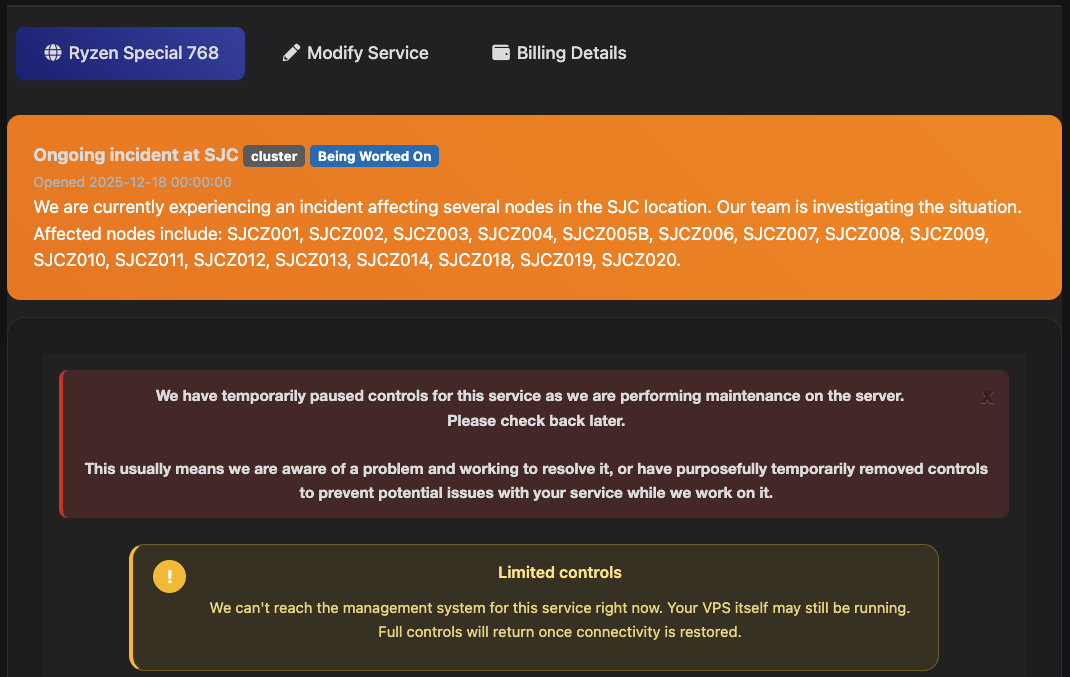
When do you think my San Jose small plate chicken will be resurrected?
The Ultimate Speedtest Script | Get Instant Alerts on new LES/LET deals | Cheap VPS Deals | VirMach Flash Sales Notifier
FREE KVM VPS - FreeVPS.org | FREE LXC VPS - MicroLXC
On the OGF harassing other providers. I expect he might run a service for hire.
Hi !! good to see you.
Let's see if some magic fingers will help ......
I’ve been digging into the persistent issue regarding the incorrect GeoIP localization for VirMach’s Netherlands-based infrastructure (operated under Virtual Machine Solutions LLC) and why manual correction submissions to MaxMind have been consistently reverted or ineffective.
Here is the root cause of the issue:
Modern GeoIP database providers (such as MaxMind, Google, Cloudflare, etc.) heavily rely on automated ingestion pipelines that periodically pull RFC 8805-compliant Geofeed files maintained by network operators.
Downstream providers operating under xTom (ASN 3214)—including VirMach (Virtual Machine Solutions LLC), Hizakura B.V., and GreenCloud—frequently lease or route their IP space directly from xTom. Consequently, major GeoIP platforms default to reading the upstream Geofeed published by xTom rather than individual downstream correction requests.
The breakdown occurs because xTom’s official, centralized Geofeed repository contains incorrect metadata for these specific subnets. You can verify this by checking their publicly exposed CSV file:
Upstream Geofeed URL: https://geofeed.xtom.de/files/as-xtom.csv
In this file, the subnets deployed in Amsterdam are mislabeled with incorrect country/city attributes. Every time MaxMind or Google recrawls this upstream file, any manual overrides or corrections previously submitted by users or downstream VPS providers are automatically overwritten and reverted back to the incorrect location.
Submitting individual tickets to MaxMind is a temporary band-aid that will inevitably get overridden during the next sync cycle.
The definitive solution requires xTom’s Network Operations Center (NOC) to correct the metadata rows inside as-xtom.csv.
I am currently reaching out to their NOC ([email protected]) to report this routing and geolocation mismatch. (Although I don't think they'll reply or make any changes LOL.)
If you are a downstream provider affected by this, I highly recommend opening a ticket with xTom as well to accelerate the update.
Do you think that @VirMach vps servers are now safe for production apps?
Virmach Deals
How are you defining "production"?
Hi @VirMach, please check Ticket #491077
Thanks!
Here’s the wall of text breakdown of my situation:
TYOC007 went offline for over a month before my billing cycle end. Since you were basically ghosting LES at the time, I assumed the ship was finally sinking and submitted a cancellation. But since the node was dead and couldn't talk to WHMCS, the cancellation request didn't went through, it just sat there until it got auto-suspended for non-payment.
Last month you finally returned to LES, building the classical walls of text and actively fixing dead nodes. I felt the "Make VirMach Great Again" energy surging through my veins, canceled my cancellation request, and paid the invoice.
WHMCS emailed me saying the service was unsuspended. But because the node was still down, SolusVM never triggered the unsuspend hook from WHMCS. My VPS is still suspended.
I opened support ticket a month ago (not complaining about the wait, I know the drill). I even tried closing my old unanswered tickets and opening a new one multiple times, as I was trying to guess the exact time you logs into WHMCS to clear the ticket queue, hoping my fresh ticket would sit at the top of the pile. Obviously, my timing was way off and that failed.
I apologize for my opportunistic ship-jumping. I should have held the line. Now, I'm fully back on the MVGA train!
Whenever you have a minute, could you please hit the unsuspend button in SolusVM for me? Thanks!
Absolutely. Netflix spends millions on engineers to simulate random "pull-the-plug" chaos engineering scenarios just to test infrastructure resilience.
Meanwhile, Virmach includes that exact feature out of the box for $7/year.
haha, MVGA
@VirMach might allow users to restore canceled instances, or he might not.
I'll try to remember to work in a fix for this, our new system has the capability to technically correct these glitched states when they happen in the future. Sorry you had to wait so long.
MVGA = Must Virmache Go Again
Get your FREE VPS if you develop Open Source software
@VirMach Is there any new update for the TYOC027 node? It's been down for over six months, almost a year now. If it can't be fixed, can everything be migrated to a new node?
Reading the post above reminded me that Chicago subnet (89.33.192.0/24) is also stuck with Romania GeoIP.

Is there any real-world downside to this? As far as I know, the only annoying thing is speedtest.net defaulting to a server in Romania instead of Chicago.
If you proxy though it you get ads in languages you can't understand.
If a provider is using geoip blocking it may be an issue although I would expect Romania to be pretty neutral.
Get your FREE VPS if you develop Open Source software
IP address changes seem to have finally killed my until-now-reliable VPS in NY.
Honestly not sure if I can be bothered in trying to resolve it or just accept that it's time has come /sigh
Same thing on my servers. I applied new IP on two of my servers and both are now unreachable from outside the network.
Which server?
Asking a stupid question, the new IPs are supposed to be live? I tried one yesterday ( don't remember which server ), it didn't work so I went back to the old one. Is there any process I needed to follow before trying? I'll try again and let you know which ones work / don't work.
It could potentially be an upstream routing issue on specific routes. They're supposed to be live. It could also be human error. I should've done more extensive testing globally, I'm looking into it now and contacting the provider.
At least two subnets could have some other issue, looking into them now. Node names would still be helpful as it it could technically also be a node issue.
I'm going to disable early changes for now and focus on the nodes getting changes today.
EDIT --- These were an error on my end, I likely forgot to commit after testing.
NYCB043
NYCB040
NYCB014
NYCB013
Any remaining issues are likely either (1) weird node configuration for specific node(s) causing problems, (2) upstream and I'm waiting for a response.
@VirMach When you get 10-15 min time , could you have a look at #206392 and #535002? If I missed something on policies, sorry - let me know and will try to correct it.
Get some hosting at https://drserver.net .
I did an IP change yesterday on TYOC039. Both IPs, new and old were on the same subnet. I was able to add the new IP and remove the old ip without issue. Everything worked fine.
Suggestion would be to show the new gateway IP in the IP change email. On previous IP changes I've been guessing that the new gateway is xx.xx.xx.1 and it has worked out so far, but if you are not using a whole /24 it could get messier.
Mine are on NYCB038 and NYCB045.
I arrived at home on time to update the IP of my storage VPS (PBS). Tried automatically but it didn't work, the script changed the interface names.
So I did it manually and it worked fine.
@virmach about the dead 4TB nvme in my dedi in OKH, does it have a replacement? Just asking to see if I should open a ticket or not.
I know I'll regret asking, but how much are you paying for the dedi with 4tb nvme?
@VirMach If you have some time please look at Ticket #306930
It's about the new IPs that waas supposed to be activated by 25/5 but I still couldn't ping them.
Thanks
I don't remember for real. Around $400 I think.
And it is 2x4TB NVMe.
Did I kill your drive @virmach?
$400/mo?
And I, for one, welcome our new insect overlords.
WTF I'm not rich. It's per year.
Rich people... Paid $400 but "cant remember"
But $400 per year for 8TB nvme storage... that's quite a good deal...
I wait for the $7/y/TB.
Nah, ok, will buy 2TB at $14/y/TB.
Spinning rust? oh yeaahhhh just put raidz-360 or something like that.
What are you taking about man? I got 2TB of spinning rust dedi from CC for $100/year and I am happy with it. . . well, I was until I saw @imok got 8TB of nvme for $400/year
When it doesn't work, if anyone sees my message here, please specify between you cannot ping it and if you checked it globally. If you cannot reach it, ticket with MTR (both directions preferred or one way to a public test server we can test back from) would be best and provide ID here.
It's pretty much confirmed from my investigations that it's an upstream issue. Seems like one of the edge routers is doing something wrong, so if that path gets handled by that router, that's where it runs into problems. It's been reported to them.
The reason I need to know if you checked globally (ping.pe) or not is so I can differentiate with it being this issue or potentially another issue that's on OUR end (as in, I did something stupid personally.)
They exist.
I don't know if I made my comment earlier or not but if you want to speed up the process can you do some of the general confirmations for me? Like does it show up in BIOS, what does OS display, what kernel parameters set?
This appears to be the same issue that's being discussed on this page by others.
Yours is pinging, but not on all routes. So it's possible the route to you specifically is one of the ones not working. See my message above for more information.
@VirMach have same issue with mine - pinging on few routes, checked on ping.pe
Get some hosting at https://drserver.net .
Hi @VirMach ,
My server IP is 83.147.242.217 on node SJCZ012. Could you please check what issues it has and tell me the approximate repair time?
I haven't used this server for a very long time, and I'd like to start using it again now. By the way, this server was originally hosted on a Japan node before being migrated to the current one.
I don't need the data inside the server anymore. Please just help me power it on. Thank you!
I'm on NYCB045 too - totally unreachable from all sources on ping.pe.
mtr from the outside reaches as far as 45.59.169.xxx (something in royalehosting)
Annoyingly don't have mtr installed on the VPS (and I can't install it because... no network) but a ping to anywhere just gives "Destination is unreachable".
If it is 100% unreachable from everywhere, that's a different issue.
On NYCB045, I see some virtual servers that are definitely receiving connectivity (with the routing issue) but I also see at least one that got an early change and it's not pinging.
The one that I am checking, requires a manual reconfiguration (or at least clicking the reconfigure button, but it could be that it actually cannot reconfigure the OS.)
That's probably not mine then - I clicked the reconfigure, and the network settings look ... reasonable?
Ticket #425233 if it helps
mine on NYCB044 also in unreachable from anywhere, it is not even able to ping the gateway .1 but I can ping the gateway from outside.
If you can't even ping your own gateway are you sure the reconfigure button used the proper interface name?
it is configuring from DHCP no issues, even manually configuring the IP same issue.
even booting systemrescuecd configures from DHCP without any access to the outside world
Tried setting the new IP locally, dead. Reverted back to the original IP and things are working.
Setting the machine to the new IP + reconfigure, dead.
Reverting back to the the original IP and reconfigure networking works.
Speaking for NYCB015, ping.pe has some routes fine and others 100% loss. The interesting part to me is that I appear to be able to get to one server but not the other on the same subnet in Chicago at both Hosthatch and TNA Hosting.