@yoursunny said:
Netboot.xyz is not a solution as it needs 2GB RAM to start Ubuntu 22.04 installer.
I don't usually do Ubuntu on servers, but is there a low memory option for it like there is for debian installer? Might be fix for now
Ubuntu ISO can start in 1GB RAM or maybe less.
Netboot.xyz wants to download the entirety of Ubuntu ISO into RAM before starting it, which leaves less than 300MB available RAM.
We accept Karma donations for the last flan. 🍮 affbrr
ATLZ010 has fallen.
My vps7 went offline since 5 hours ago and still hasn't recovered.
I did cancel this service but there's still two weeks until the cancellation date.
Ticket #276668.
I don't expect a reply.
It's opened just to collect automated service credit.
We accept Karma donations for the last flan. 🍮 affbrr
@VirMach Just to bring this to your attention
Node: FFME001.VIRM.AC
is also one of the node which is affected by the downtime and haven't gone up/online for months, also no update about this node was published anywhere.
Please if possible, could you also give some updates about this node too if it got missed out?
@Kaito said: @VirMach Just to bring this to your attention
Node: FFME001.VIRM.AC
Yup I got a ticket #189699 same node, closed unceremoniously, no resolution. VPS offline since Aug 23. Had just renewed it- existing plan ends on Sept 18 or so. Might just cancel this pain in the ass and call it a day. Looks like this is beyond repair.
Below was the last status message on the ticket.
Posted by System on 08/24/2022 (17:55)
Your ticket has been flagged directly to the technical support department so it may sometimes take longer than usual to receive a response than a general question. We thank thank you for your patience. To speed up the process, please provide any login credentials or additional information that may be required to troubleshoot your issue.
Please do not create another ticket or a chat regarding the same issue.
@Kaito said: @VirMach Just to bring this to your attention
Node: FFME001.VIRM.AC
is also one of the node which is affected by the downtime and haven't gone up/online for months, also no update about this node was published anywhere.
Please if possible, could you also give some updates about this node too if it got missed out?
SolusVM is currently having issues with that node, but VPS's on it are not down and have been up for 1.5 months.
@Kaito said: @VirMach Just to bring this to your attention
Node: FFME001.VIRM.AC
Yup I got a ticket #189699 same node, closed unceremoniously, no resolution. VPS offline since Aug 23. Had just renewed it- existing plan ends on Sept 18 or so. Might just cancel this pain in the ass and call it a day. Looks like this is beyond repair.
For me it was down from the time when migration to ryzen started. After the migration. I never knew the new assigned IP or node name since I never got into the solusvm panel(timeout after xxx secs). It was few days ago when I fortunately able to reload the page of service which led me to the solusvm panel for sometime where I saw the vps and it's details. But at that time too, it was down(new IP gave connection timeout & control panel was not operable)
So in a nut shell I never able to use the vps from the time it got migrated.
I even had created ticket regarding this #598958 mentioning the situation, and asked for extension of validity to compensate my situation. Which I guess didn't reach to @VirMach due to already large amount of tickets probably.
@VirMach said:
All* templates have been re-syncing all day and should be done by tomorrow. Templates also have been changed to the correct group on SolusVM (previously completed) and most if not all services on WHMCS should also now have the correct templates selected for the re-install tool. Please feel free to report if your service still has any incorrect or non-functional templates after tomorrow. We'd need the following information for your report to be completed: [1] service package name such as "SSD1G", [2] service node name such as "LAXA024", [3] whether it's on SolusVM and/or WHMCS, [4] the full template name exactly as it appears.
@virmach, DALZ009 has been unavailable since 6/27. OS now appears OK via VNC console. Have run Troubleshooting and Network Reconfigure numerous times still no joy. There appears to be no connection to the outside world, network interface is not found. Can this be rectified or a is a migration required? Ticket(s) have been opened since 6/28. Is there any time line for restoration of service?
@vyas said:
Yup I got a ticket #189699 same node, closed unceremoniously, no resolution. VPS offline since Aug 23. Had just renewed it- existing plan ends on Sept 18 or so. Might just cancel this pain in the ass and call it a day. Looks like this is beyond repair.
It's been mentioned before in this thread, but if you go to load the page for a solusvm disconnected vm, it will eventually time out with Operation Timed Out After 90001 Milliseconds With 0 Bytes Received.
Along the left side will be a box with Actions, under that Management. Click it and let that page also timeout for the main part of the page.
In the middleish column of that one though will be a link called "VPS Control Panel" which will load up the solusvm control panel directly. It won't let you do much but it will show you the assigned ip of the vm which should be accurate and let you get into the vm through ssh.
@vyas said:
Yup I got a ticket #189699 same node, closed unceremoniously, no resolution. VPS offline since Aug 23. Had just renewed it- existing plan ends on Sept 18 or so. Might just cancel this pain in the ass and call it a day. Looks like this is beyond repair.
It's been mentioned before in this thread, but if you go to load the page for a solusvm disconnected vm, it will eventually time out with Operation Timed Out After 90001 Milliseconds With 0 Bytes Received.
Along the left side will be a box with Actions, under that Management. Click it and let that page also timeout for the main part of the page.
In the middleish column of that one though will be a link called "VPS Control Panel" which will load up the solusvm control panel directly. It won't let you do much but it will show you the assigned ip of the vm which should be accurate and let you get into the vm through ssh.
Appreciate the friendly note.
However, does not work.
A deep dive indicates since maybe because English is my nth language, the AI technology thinks maybe my VPS does not understand English either. Maybe I will change the instructions to my native Marathi or Kannada, lingua franca of where I live.
Below status has been this way since Aug 23. I don't care at this stage about ip and/ or passwords showing if any.
Best regards,
Screenshot ping https://img.gaatha.me/WmUrNN
This still contains your ip and the vnc prob won't work. But for me with mine in LAX, i was still able to connect via direct ip so thought it was worth a chance, others have had it work as well.
The problems are getting less but now it's getting to ones where the boxes themselves have issues / are bugged / etc so it involves non standard work arounds or things that can be done I guess and unfortunately, yours is one of those.
This still contains your ip and the vnc prob won't work. But for me with mine in LAX, i was still able to connect via direct ip so thought it was worth a chance, others have had it work as well.
The problems are getting less but now it's getting to ones where the boxes themselves have issues / are bugged / etc so it involves non standard work arounds or things that can be done I guess and unfortunately, yours is one of those.
Glad it worked for you!
For some (including self, I suppose) this is turning into a case of
My vps7 went offline since 5 hours ago and still hasn't recovered.
I did cancel this service but there's still two weeks until the cancellation date.
Not offline but overloading. Added to list.
@Kaito said: @VirMach Just to bring this to your attention
Node: FFME001.VIRM.AC
is also one of the node which is affected by the downtime and haven't gone up/online for months, also no update about this node was published anywhere.
Please if possible, could you also give some updates about this node too if it got missed out?
@Kaito said: @VirMach Just to bring this to your attention
Node: FFME001.VIRM.AC
is also one of the node which is affected by the downtime and haven't gone up/online for months, also no update about this node was published anywhere.
Please if possible, could you also give some updates about this node too if it got missed out?
SolusVM is currently having issues with that node, but VPS's on it are not down and have been up for 1.5 months.
@soulchief is correct here, I'm going to bump this up with SolusVM to try to fix these permanently but it's been a series of trying to get it stop blocking the connection to that specific node and a few others.
@VirMach said:
All* templates have been re-syncing all day and should be done by tomorrow. Templates also have been changed to the correct group on SolusVM (previously completed) and most if not all services on WHMCS should also now have the correct templates selected for the re-install tool. Please feel free to report if your service still has any incorrect or non-functional templates after tomorrow. We'd need the following information for your report to be completed: [1] service package name such as "SSD1G", [2] service node name such as "LAXA024", [3] whether it's on SolusVM and/or WHMCS, [4] the full template name exactly as it appears.
@capnjb said: @virmach, DALZ009 has been unavailable since 6/27. OS now appears OK via VNC console. Have run Troubleshooting and Network Reconfigure numerous times still no joy. There appears to be no connection to the outside world, network interface is not found. Can this be rectified or a is a migration required? Ticket(s) have been opened since 6/28. Is there any time line for restoration of service?
If you guys want quick information regarding your service you need to provide more information than the node name and saying it's unavailable as if it's the entire node. At this point pretty much every node actually offline gets listed on the Network Status page now as we have in the past. I know we didn't for some time but we've been able to catch up to doing that.
I believe we've already fixed all LVM issues meaning all virtual servers should have basic functionality and only network could still have a problem. We went through all connection issue - network down tickets already as well outside of maybe 4 or 5 of them and are still manually going through any remainder we detect independently where it may have an issue on our end (rare but some exist.)
Need some feedback: We're acquiring additional IPv4 and trying to avoid Cogent. Does anyone from China have any opinion or useful information regarding Alibaba Cloud IPv4 in case we decide to lease them?
I've been trying to Ryzen Migrate outta there, for over a month, even though in the past it has been a good locale.
In stasis until the shitposting stops/abates.
Than=compare;then=sequence:brought=bring;bought=buy:staffs=pile of sticks:informations/infos=no plural. It wisnae me! A big boy done it and ran away. || NVMe2G for life! until death (the end is nigh).
NYC (and slightly lesser degree AMS) has/ve been good to me. My sole CHI instance just quietly gets on with serving DNS queries.
Moral of the story: keep as far away as possible from typical Asian traffic.
In stasis until the shitposting stops/abates.
Than=compare;then=sequence:brought=bring;bought=buy:staffs=pile of sticks:informations/infos=no plural. It wisnae me! A big boy done it and ran away. || NVMe2G for life! until death (the end is nigh).
TLDR: From what I've seen / experienced myself, NY & Frankfurt maybe Atlanta / Chi / Miami? Though overall summary, most locations are working at this point, having severe hardware issues that replacements are being sent out for or seem to be trying to get sorted by DC / replaced by moving to diff provider in same area. So you could go for one near your required spot and then move later when Virmach fixes it (either by beating people with rack rails into competence or moving hardware).
NYC has majority of mine currently and has been solid for myself with a few random hosts having brief issues from what I can remember for others but I don't remember seeing any others about it for a bit now.
Frankfurt had a glitch for a day or two for me and I think one other system for others but otherwise been solid for quite a while.
Dallas is busy flapping like crazy today for me and the DC inspires zero confidence, so I'll end up moving out of there until a diff provider comes in at some point I think. It's been up and down before this as well but from what I can tell by uptime stats, it's more lack of stable network than the host crashing.
Atlanta had a host (maybe two?) with issues but mine has been fine for quite a while. However, same provider as Dallas I think so yeah when shit happens, it prob won't be good.
LA has had some bad hosts and mine is borked, can't do anything Solus wise but the system itself eventually got online and has been semi stable when it's got network.
Miami & Chicago I've been on the least time so not much personal history but overall both seem to be working well from comments I've seen anyway.
SJC & Seattle I have nothing in but saw a lot of issues and attempted in person attempts by Virmach to get there due to remote hands without brains being an issue.
Everyone and their dog seems to want to be in Toyko which has caused some issues and grumblings but unless you had storage there I think everything has been online, nothing of mine is there and it's overloaded so prob won't be for now.
@Kaito said: @VirMach Just to bring this to your attention
Node: FFME001.VIRM.AC
is also one of the node which is affected by the downtime and haven't gone up/online for months, also no update about this node was published anywhere.
Please if possible, could you also give some updates about this node too if it got missed out?
I'm going to bump this up with SolusVM to try to fix these permanently but it's been a series of trying to get it stop blocking the connection to that specific node and a few others.
But I am still unable to access the vps from the time it got migrated since after the IP change I never able to get into the vps panel to atleast know the new IP, and now when I finally got the new IP, its giving connection timeout (probably offline) and no way to interact with the vps and restart (if possible) via solusvm.
So I want to ask whether I am eligible for the refund from the time this issue started which I guess around 1.5-2 months?
Note: I don't want to cancel the service, rather I just want to get the refund so I can able to extend its validity which I lost during those period.
Well..
Something's now working that didn't before. I just tried a Dallas to Chicago paid migration (no data) and it worked flawlessly and quick! Not that I particularly wanted another VPS in CHI - SEA might've been a better choice - but at least it's away from troublesome DLS.
[The 2.44 PB bandwidth might be a wee bit limiting though. ]
In stasis until the shitposting stops/abates.
Than=compare;then=sequence:brought=bring;bought=buy:staffs=pile of sticks:informations/infos=no plural. It wisnae me! A big boy done it and ran away. || NVMe2G for life! until death (the end is nigh).
@Daevien said:
Everyone and their dog seems to want to be in Toyko which has caused some issues and grumblings but unless you had storage there I think everything has been online, nothing of mine is there and it's overloaded so prob won't be for now.
Tokyo storage has been mostly okay through all of this too, the network hasn't been super consistent but I've had zero downtime on it since it was delivered. It's been better than my regular VPS there, I assume because there's no random virbot deal transfers or 384mb plan users on the node. I'll probably cancel or migrate my regular VPS in Tokyo, it hasn't been super useful to me, but the storage is definitely staying.
@VirMach said: I believe we've already fixed all LVM issues meaning all virtual servers should have basic functionality and only network could still have a problem.
My VPS in DALZ004 still has a corrupted /dev/vda. Per your other message, I DMed you all the info I could dig up but I will dig deeper if I can help you help me get my data back...
@bakageta said:
Tokyo storage has been mostly okay through all of this too, the network hasn't been super consistent but I've had zero downtime on it since it was delivered. It's been better than my regular VPS there, I assume because there's no random virbot deal transfers or 384mb plan users on the node. I'll probably cancel or migrate my regular VPS in Tokyo, it hasn't been super useful to me, but the storage is definitely staying.
Ah, I thought there were some issues with it. Perhaps it was a different storage location then. I don't have any storage vps with Virmach at this time so haven't been tracking it as closely.
@VirMach said: I don't know if they truly believe 40 reports in a month on a /17 IPv4 block is excessive compared to other leases.
You're looking at this wrong. You're at least 1 reseller deep into this. Cogent isn't treating each of the resellers sub clients as their own 'pool of abuse'. The reseller as a whole is grouped together for all of their leases.
You might have exactly 0 abuse on a /17, but i bet the reseller has a few /22's that are nothing but abuse, pushing his total abuse % over Cogent's limits.
As for Alibaba, I would seriously confirm what IP's you're getting. If they're just cloudinnovation space, those IP's are stolen/hijacked and at some point will be returned to AFRINIC.
@capnjb said: @virmach, DALZ009 has been unavailable since 6/27....
I believe we've already fixed all LVM issues meaning all virtual servers should have basic functionality and only network could still have a problem. We went through all connection issue - network down tickets already as well outside of maybe 4 or 5 of them and are still manually going through any remainder we detect independently where it may have an issue on our end (rare but some exist.)
"It looks like your server's networking is broken, but it should still be accessible via VNC. Try clicking the re-configure network button and wait 15 minutes. If you're still unable to connect, access your server via VNC and check the network config files for any errors. This error may also occur if you are not booted into a working operating system.
If none of the suggested solutions work, or if nothing was suggested, create a technical support ticket describing your issue. Please also provide us with your server's login info by clicking the 'add sensitive data' button so that we may access your server and investigate.
If you contact support, provide debug data:
Main IP pings: false
Node Online: true
Service online: online
Operating System:
Service Status:Active
Registration Date:2022-05-21"
No Network connectivity. I have run the network reconfigure tool many times with no joy.
As noted access via the VNC Console indicates everything but networking appears to be OK. You cannot ping the IP address nor can you ping anything but the localhost.
Latest Open Ticket #457866 all private details were provided.
This VM was working fine prior to the commencement of migration on 6/27, but has been unavailable since.
@capnjb said: I have run the network reconfigure tool many times with no joy.
The traditional 'eth0' isn't always mapped to the 'modern' equivalent..
Seeing as you haven't stated the OS: cat /proc/net/dev
or ip a
.. redact the 2nd & 3rd octect of IP addresses cat /etc/resolv.conf
and/or ip r
.. redact the 2nd/3rd octect.
If you're daft enough to use Ubuntu on a server, then nmcli connection show
or sudo nmcli -p dev status
.. might show you the actual network device.
Go into SolusVM (Control Panel) and see what IP is assigned in Network. Does it match with the above? Likely not: change it in your OS.
In stasis until the shitposting stops/abates.
Than=compare;then=sequence:brought=bring;bought=buy:staffs=pile of sticks:informations/infos=no plural. It wisnae me! A big boy done it and ran away. || NVMe2G for life! until death (the end is nigh).
@capnjb said: I have run the network reconfigure tool many times with no joy.
The traditional 'eth0' isn't always mapped to the 'modern' equivalent..
Seeing as you haven't stated the OS: cat /proc/net/dev
or
@AlwaysSkint you da man! The OS is Debian 10 and the inderface was named ens3. Editing the network config fixed the problem.
Using the VNC terminal I changed eth0 to ens3 and bam! it started working. However you will see that the SolusVM in the migration tool broke it.
There is sometimes a symbolic link created at boot up, that maps ens3 to eth0. It possibly depends on exactly how the OS is installed i.e. via template or minimal ISO. The other cause of a name change could be the type of network device (VirtIO) chosen in SolusVM.
In stasis until the shitposting stops/abates.
Than=compare;then=sequence:brought=bring;bought=buy:staffs=pile of sticks:informations/infos=no plural. It wisnae me! A big boy done it and ran away. || NVMe2G for life! until death (the end is nigh).
^ For completeness.. Within 'dmesg' on my Linux Mint (of course!) laptop: e1000e 0000:00:19.0 enp0s25: renamed from eth0
(It's not an e1000e NIC though uses that driver.) I have seen similar elsewhere, perhaps it was CentOS - too senile to remember!
In stasis until the shitposting stops/abates.
Than=compare;then=sequence:brought=bring;bought=buy:staffs=pile of sticks:informations/infos=no plural. It wisnae me! A big boy done it and ran away. || NVMe2G for life! until death (the end is nigh).
@AlwaysSkint said:
^ For completeness.. Within 'dmesg' on my Linux Mint (of course!) laptop: e1000e 0000:00:19.0 enp0s25: renamed from eth0
(It's not an e1000e NIC though uses that driver.) I have seen similar elsewhere, perhaps it was CentOS - too senile to remember!
You can keep the old behavior by setting a couple flags ( primarily net.ifnames=0, biosdevname=0 for Dell hardware ). Otherwise RHEL-variants will map them to whatever is in the config file/NetworkManager file. Used to do it in udev but systemd has taken that over.
I did a $3 migration from Tampa (Node TPA-Z002) to Miami (Node MIA-Z012) on the 12th of August. After migration I ended up with two VMs in SolusVM. They were both broken, Tampa showed status "unknown" in SolusVM and would not boot. Miami showed a "No bootable device" error in VNC. After multiple attempts to fix the Miami VM myself I noted the issues on August 15th in the low priority ticket #863906 that had been automatically opened by the system at the time of migration. Toward the end of August the Tampa VM started working again. The ticket was closed in the beginning of September and can not be reopened. The Miami VM was fixed on the 4th of September. I now have the two working VMs in SolusVM, but only one (Miami) in the billing panel. I don't wish to appear to be taking advantage of you by having two working VMs but only being billed for one.
@VirMach I expect you should delete the Tampa VM on TPA-Z002 with the id #632291.
Please DO NOT delete the Miami VM on MIA-Z012 with same id #.
This action is not a priority, and I did not want to add to your ticket queue, so I am noting it here first. If you want me to open another ticket, please let me know.
@cybertech said:
which is the most stable location now?
For me Amsterdam, Denver, Frankfurt, Los Angeles, Miami, NYC, and Tokyo have all been stable and had consistent disk and network performance. I have been real happy with the VMs I have in these locations.
My problem children are in Atlanta (stability- currently down), Phoenix (network- some packet loss and high ping times), San Jose (stability/inconsistent network), Seattle (blippy network at times), Tampa (network). These VMs have not been anything to complain/ticket about but they are not as reliably consistent like the other locations I showed above.


Comments
try text based installer.
I bench YABS 24/7/365 unless it's a leap year.
Ubuntu ISO can start in 1GB RAM or maybe less.
Netboot.xyz wants to download the entirety of Ubuntu ISO into RAM before starting it, which leaves less than 300MB available RAM.
We accept Karma donations for the last flan. 🍮 affbrr
ATLZ010 has fallen.
My vps7 went offline since 5 hours ago and still hasn't recovered.
I did cancel this service but there's still two weeks until the cancellation date.
Ticket #276668.
I don't expect a reply.
It's opened just to collect automated service credit.
We accept Karma donations for the last flan. 🍮 affbrr
dnscry.pt - Public DNSCrypt resolvers hosted by LowEnd providers • Need a free NAT LXC? -> https://microlxc.net/
@VirMach Just to bring this to your attention
Node: FFME001.VIRM.AC
is also one of the node which is affected by the downtime and haven't gone up/online for months, also no update about this node was published anywhere.
Please if possible, could you also give some updates about this node too if it got missed out?
Yup I got a ticket #189699 same node, closed unceremoniously, no resolution. VPS offline since Aug 23. Had just renewed it- existing plan ends on Sept 18 or so. Might just cancel this pain in the ass and call it a day. Looks like this is beyond repair.
Below was the last status message on the ticket.
blog archives
SolusVM is currently having issues with that node, but VPS's on it are not down and have been up for 1.5 months.
For me it was down from the time when migration to ryzen started. After the migration. I never knew the new assigned IP or node name since I never got into the solusvm panel(timeout after xxx secs). It was few days ago when I fortunately able to reload the page of service which led me to the solusvm panel for sometime where I saw the vps and it's details. But at that time too, it was down(new IP gave connection timeout & control panel was not operable)
So in a nut shell I never able to use the vps from the time it got migrated.
I even had created ticket regarding this #598958 mentioning the situation, and asked for extension of validity to compensate my situation. Which I guess didn't reach to @VirMach due to already large amount of tickets probably.
No Ryzen Debian or other Ryzen/Linux flavour template available.
Powerful AMD Ryzen VPS (aff)
The white-on-white text in that image reads "Note: Only functions on Ryzen nodes at this time." so I'm pretty sure those are Ryzen templates.
@virmach, DALZ009 has been unavailable since 6/27. OS now appears OK via VNC console. Have run Troubleshooting and Network Reconfigure numerous times still no joy. There appears to be no connection to the outside world, network interface is not found. Can this be rectified or a is a migration required? Ticket(s) have been opened since 6/28. Is there any time line for restoration of service?
It's been mentioned before in this thread, but if you go to load the page for a solusvm disconnected vm, it will eventually time out with Operation Timed Out After 90001 Milliseconds With 0 Bytes Received.
Along the left side will be a box with Actions, under that Management. Click it and let that page also timeout for the main part of the page.
In the middleish column of that one though will be a link called "VPS Control Panel" which will load up the solusvm control panel directly. It won't let you do much but it will show you the assigned ip of the vm which should be accurate and let you get into the vm through ssh.
What is wrong with RYZE.SJC-Z005.VMS?
Appreciate the friendly note.
However, does not work.
A deep dive indicates since maybe because English is my nth language, the AI technology thinks maybe my VPS does not understand English either. Maybe I will change the instructions to my native Marathi or Kannada, lingua franca of where I live.
Below status has been this way since Aug 23. I don't care at this stage about ip and/ or passwords showing if any.
Best regards,
Screenshot ping
https://img.gaatha.me/WmUrNN
Video, for visual consumers
https://img.gaatha.me/7NSlXu
blog archives
You might want to remove your VPS IP in the screenshot.
Thanks
blog archives
Delete
https://microlxc.net/
This still contains your ip and the vnc prob won't work. But for me with mine in LAX, i was still able to connect via direct ip so thought it was worth a chance, others have had it work as well.
The problems are getting less but now it's getting to ones where the boxes themselves have issues / are bugged / etc so it involves non standard work arounds or things that can be done I guess and unfortunately, yours is one of those.
Glad it worked for you!
For some (including self, I suppose) this is turning into a case of
"If --> then --> else"
Best rgds,
blog archives
My vps7 went offline since 5 hours ago and still hasn't recovered.
I did cancel this service but there's still two weeks until the cancellation date.
Not offline but overloading. Added to list.
@soulchief is correct here, I'm going to bump this up with SolusVM to try to fix these permanently but it's been a series of trying to get it stop blocking the connection to that specific node and a few others.
Those are all Ryzen templates, it doesn't get marked as [Ryzen] on WHMCS.
If you guys want quick information regarding your service you need to provide more information than the node name and saying it's unavailable as if it's the entire node. At this point pretty much every node actually offline gets listed on the Network Status page now as we have in the past. I know we didn't for some time but we've been able to catch up to doing that.
I believe we've already fixed all LVM issues meaning all virtual servers should have basic functionality and only network could still have a problem. We went through all connection issue - network down tickets already as well outside of maybe 4 or 5 of them and are still manually going through any remainder we detect independently where it may have an issue on our end (rare but some exist.)
i still have #975541 Awaiting Billing Department - no answer
i guess i will keep reminding @VirMach and annoy him every time i see him post
hey virmach, please check my ticket and let me be happy again.
Remember- @ehab is the push up guy as the picture shows.
blog archives
@vyas i do nude pushups only.
with genitals hidden in between thighs or embracing the gravitational pull?
I bench YABS 24/7/365 unless it's a leap year.
Need some feedback: We're acquiring additional IPv4 and trying to avoid Cogent. Does anyone from China have any opinion or useful information regarding Alibaba Cloud IPv4 in case we decide to lease them?
We need at least 12 tags across 5+ pages to be able to see your message.
(edit) I processed 1/3rd of refund queue a couple days ago, I'm trying to process the rest soon but a few other things came up as they always do...
Delay is fine, knowing you respond to the frustration/ smartypants/ even some aggressive comments with aplomb. Keeps things interesting
I will remember the 12 / 5 rule from now on.
So here goes
@virmach my tiket #189699 please..
blog archives
VPS on DALZ005 was unstable today, now control panel say
Operation Timed Out After 90001 Milliseconds With 0 Bytes Received
now is up but SLOOOWWW waiting still to ssh in
I concur; DALZ007 ain't much better it seems.
I've been trying to Ryzen Migrate outta there, for over a month, even though in the past it has been a good locale.
In stasis until the shitposting stops/abates.
Than=compare;then=sequence:brought=bring;bought=buy:staffs=pile of sticks:informations/infos=no plural.
It wisnae me! A big boy done it and ran away. || NVMe2G for life! until death (the end is nigh).
blog archives
which is the most stable location now?
I bench YABS 24/7/365 unless it's a leap year.
NYC (and slightly lesser degree AMS) has/ve been good to me. My sole CHI instance just quietly gets on with serving DNS queries.
Moral of the story: keep as far away as possible from typical Asian traffic.
In stasis until the shitposting stops/abates.
Than=compare;then=sequence:brought=bring;bought=buy:staffs=pile of sticks:informations/infos=no plural.
It wisnae me! A big boy done it and ran away. || NVMe2G for life! until death (the end is nigh).
TLDR: From what I've seen / experienced myself, NY & Frankfurt maybe Atlanta / Chi / Miami? Though overall summary, most locations are working at this point, having severe hardware issues that replacements are being sent out for or seem to be trying to get sorted by DC / replaced by moving to diff provider in same area. So you could go for one near your required spot and then move later when Virmach fixes it (either by beating people with rack rails into competence or moving hardware).
NYC has majority of mine currently and has been solid for myself with a few random hosts having brief issues from what I can remember for others but I don't remember seeing any others about it for a bit now.
Frankfurt had a glitch for a day or two for me and I think one other system for others but otherwise been solid for quite a while.
Dallas is busy flapping like crazy today for me and the DC inspires zero confidence, so I'll end up moving out of there until a diff provider comes in at some point I think. It's been up and down before this as well but from what I can tell by uptime stats, it's more lack of stable network than the host crashing.
Atlanta had a host (maybe two?) with issues but mine has been fine for quite a while. However, same provider as Dallas I think so yeah when shit happens, it prob won't be good.
LA has had some bad hosts and mine is borked, can't do anything Solus wise but the system itself eventually got online and has been semi stable when it's got network.
Miami & Chicago I've been on the least time so not much personal history but overall both seem to be working well from comments I've seen anyway.
SJC & Seattle I have nothing in but saw a lot of issues and attempted in person attempts by Virmach to get there due to remote hands without brains being an issue.
Everyone and their dog seems to want to be in Toyko which has caused some issues and grumblings but unless you had storage there I think everything has been online, nothing of mine is there and it's overloaded so prob won't be for now.
DALZ005 is up now, looks like network had issues but duno
Still waiting for JP storage deployment…
But I am still unable to access the vps from the time it got migrated since after the IP change I never able to get into the vps panel to atleast know the new IP, and now when I finally got the new IP, its giving connection timeout (probably offline) and no way to interact with the vps and restart (if possible) via solusvm.
So I want to ask whether I am eligible for the refund from the time this issue started which I guess around 1.5-2 months?
Note: I don't want to cancel the service, rather I just want to get the refund so I can able to extend its validity which I lost during those period.
Well.. ]
]
Something's now working that didn't before. I just tried a Dallas to Chicago paid migration (no data) and it worked flawlessly and quick! Not that I particularly wanted another VPS in CHI - SEA might've been a better choice - but at least it's away from troublesome DLS.
[The 2.44 PB bandwidth might be a wee bit limiting though.
In stasis until the shitposting stops/abates.
Than=compare;then=sequence:brought=bring;bought=buy:staffs=pile of sticks:informations/infos=no plural.
It wisnae me! A big boy done it and ran away. || NVMe2G for life! until death (the end is nigh).
Tokyo storage has been mostly okay through all of this too, the network hasn't been super consistent but I've had zero downtime on it since it was delivered. It's been better than my regular VPS there, I assume because there's no random virbot deal transfers or 384mb plan users on the node. I'll probably cancel or migrate my regular VPS in Tokyo, it hasn't been super useful to me, but the storage is definitely staying.
My VPS in DALZ004 still has a corrupted
/dev/vda. Per your other message, I DMed you all the info I could dig up but I will dig deeper if I can help you help me get my data back...Ah, I thought there were some issues with it. Perhaps it was a different storage location then. I don't have any storage vps with Virmach at this time so haven't been tracking it as closely.
You're looking at this wrong. You're at least 1 reseller deep into this. Cogent isn't treating each of the resellers sub clients as their own 'pool of abuse'. The reseller as a whole is grouped together for all of their leases.
You might have exactly 0 abuse on a /17, but i bet the reseller has a few /22's that are nothing but abuse, pushing his total abuse % over Cogent's limits.
As for Alibaba, I would seriously confirm what IP's you're getting. If they're just cloudinnovation space, those IP's are stolen/hijacked and at some point will be returned to AFRINIC.
Francisco
"It looks like your server's networking is broken, but it should still be accessible via VNC. Try clicking the re-configure network button and wait 15 minutes. If you're still unable to connect, access your server via VNC and check the network config files for any errors. This error may also occur if you are not booted into a working operating system.
If none of the suggested solutions work, or if nothing was suggested, create a technical support ticket describing your issue. Please also provide us with your server's login info by clicking the 'add sensitive data' button so that we may access your server and investigate.
If you contact support, provide debug data:
Main IP pings: false
Node Online: true
Service online: online
Operating System:
Service Status:Active
Registration Date:2022-05-21"
No Network connectivity. I have run the network reconfigure tool many times with no joy.
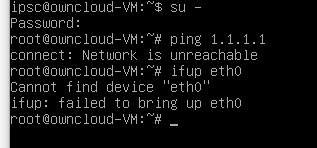
As noted access via the VNC Console indicates everything but networking appears to be OK. You cannot ping the IP address nor can you ping anything but the localhost.
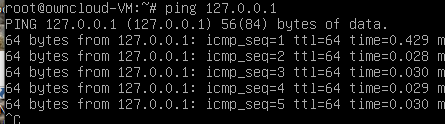
Latest Open Ticket #457866 all private details were provided.
This VM was working fine prior to the commencement of migration on 6/27, but has been unavailable since.
Regards,
Jon
The traditional 'eth0' isn't always mapped to the 'modern' equivalent..
Seeing as you haven't stated the OS:
cat /proc/net/devor
ip a.. redact the 2nd & 3rd octect of IP addresses
cat /etc/resolv.confand/or
ip r.. redact the 2nd/3rd octect.
If you're daft enough to use Ubuntu on a server, then
nmcli connection showor
sudo nmcli -p dev status.. might show you the actual network device.
Go into SolusVM (Control Panel) and see what IP is assigned in Network. Does it match with the above? Likely not: change it in your OS.
In stasis until the shitposting stops/abates.
Than=compare;then=sequence:brought=bring;bought=buy:staffs=pile of sticks:informations/infos=no plural.
It wisnae me! A big boy done it and ran away. || NVMe2G for life! until death (the end is nigh).
@AlwaysSkint
@AlwaysSkint you da man! The OS is Debian 10 and the inderface was named ens3. Editing the network config fixed the problem.
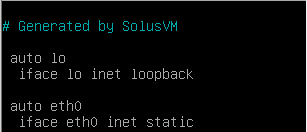
Using the VNC terminal I changed eth0 to ens3 and bam! it started working. However you will see that the SolusVM in the migration tool broke it.
Thank you so much!
Regards,
capnjb
There is sometimes a symbolic link created at boot up, that maps ens3 to eth0. It possibly depends on exactly how the OS is installed i.e. via template or minimal ISO. The other cause of a name change could be the type of network device (VirtIO) chosen in SolusVM.
In stasis until the shitposting stops/abates.
Than=compare;then=sequence:brought=bring;bought=buy:staffs=pile of sticks:informations/infos=no plural.
It wisnae me! A big boy done it and ran away. || NVMe2G for life! until death (the end is nigh).
^ For completeness.. Within 'dmesg' on my Linux Mint (of course!) laptop:
e1000e 0000:00:19.0 enp0s25: renamed from eth0(It's not an e1000e NIC though uses that driver.) I have seen similar elsewhere, perhaps it was CentOS - too senile to remember!
In stasis until the shitposting stops/abates.
Than=compare;then=sequence:brought=bring;bought=buy:staffs=pile of sticks:informations/infos=no plural.
It wisnae me! A big boy done it and ran away. || NVMe2G for life! until death (the end is nigh).
You can keep the old behavior by setting a couple flags ( primarily net.ifnames=0, biosdevname=0 for Dell hardware ). Otherwise RHEL-variants will map them to whatever is in the config file/NetworkManager file. Used to do it in udev but systemd has taken that over.
I did a $3 migration from Tampa (Node TPA-Z002) to Miami (Node MIA-Z012) on the 12th of August. After migration I ended up with two VMs in SolusVM. They were both broken, Tampa showed status "unknown" in SolusVM and would not boot. Miami showed a "No bootable device" error in VNC. After multiple attempts to fix the Miami VM myself I noted the issues on August 15th in the low priority ticket #863906 that had been automatically opened by the system at the time of migration. Toward the end of August the Tampa VM started working again. The ticket was closed in the beginning of September and can not be reopened. The Miami VM was fixed on the 4th of September. I now have the two working VMs in SolusVM, but only one (Miami) in the billing panel. I don't wish to appear to be taking advantage of you by having two working VMs but only being billed for one.
@VirMach I expect you should delete the Tampa VM on TPA-Z002 with the id #632291.
Please DO NOT delete the Miami VM on MIA-Z012 with same id #.
This action is not a priority, and I did not want to add to your ticket queue, so I am noting it here first. If you want me to open another ticket, please let me know.
For me Amsterdam, Denver, Frankfurt, Los Angeles, Miami, NYC, and Tokyo have all been stable and had consistent disk and network performance. I have been real happy with the VMs I have in these locations.
My problem children are in Atlanta (stability- currently down), Phoenix (network- some packet loss and high ping times), San Jose (stability/inconsistent network), Seattle (blippy network at times), Tampa (network). These VMs have not been anything to complain/ticket about but they are not as reliably consistent like the other locations I showed above.