Hooray !!!
I got IPv6 working on node FFME006 as well now. So cool that IPv6 works on both Frankfurt nodes.
FYI the template setup for IPv6 on Alma8 does not work out of the box. There is one IPv6 from a /40 and a /48 subnet assigned to my VPS.
Originally a random IPv6 from the /48 was assigned as the main IPv6 and the default route was set as [the /48]::0001.
This did not work and I could not even ping the gateway. By setting the single IPv6 from the /40 as the main IPv6, and some IPv6 from the /48 as secondaries, and setting the IPv6 gateway IPv6 to [the /40]::0001, it works for not only the main IPv6 but also the secondaries in the /48.
@FrankZ said:
Hooray !!!
I got IPv6 working on node FFME006 as well now. So cool that IPv6 works on both Frankfurt nodes.
FYI the template setup for IPv6 on Alma8 does not work out of the box. There is one IPv6 from a /40 and a /48 subnet assigned to my VPS.
Originally a random IPv6 from the /48 was assigned as the main IPv6 and the default route was set as [the /48]::0001.
This did not work and I could not even ping the gateway. By setting the single IPv6 from the /40 as the main IPv6, and some IPv6 from the /48 as secondaries, and setting the IPv6 gateway IPv6 to [the /40]::0001, it works for not only the main IPv6 but also the secondaries in the /48.
I think that's basically going to be how it ends up working,. It's very much going to be "you're on your own to figure it out, advanced users only" at least until we make guides and start mass advertising it as included.
@VirMach said: I think that's basically going to be how it ends up working,. It's very much going to be "you're on your own to figure it out, advanced users only" at least until we make guides and start mass advertising it as included.
Will we maybe see a "Add IPv6" button in the future ?
I have working IPv6 on the two Frankfurt nodes and the Tokyo storage VPS.
I would have no objections to trying to figure out how to make some other locations work and post my findings here.
Not trying to pressure you about IPv6, just saying I'm still a glutton for punishment .
@VirMach
hi , my vps in Node CHIZ002, is down More than 3 month.
I have sent support tickets, but No answer and close.
I boot ,reboot,reinstall, can't fix this and I can't send a support ticket
my vps id=634698
Please take time to fix it.
thank you .
We're going to have a flash sale test soon, I'll post it here and it'll only run for a couple hours. The plans will be real (as in you can purchase and use them normally) and we're going to basically measure what goes wrong and how many tickets created from it and multiply it out to estimate it for the whole sale.
@VirMach said:
We're going to have a flash sale test soon, I'll post it here and it'll only run for a couple hours. The plans will be real (as in you can purchase and use them normally) and we're going to basically measure what goes wrong and how many tickets created from it and multiply it out to estimate it for the whole sale.
It gotta be more difficult.
Generate two five-digit PIDs, X and Y.
Publish X+Y and X*Y.
The solution would be unique, but only smart people can figure out.
It gotta be more difficult.
Generate two five-digit PIDs, X and Y.
Publish X+Y and X*Y.
The solution would be unique, but only smart people can figure out.
Can't, it would skew the results.
measure what goes wrong and how many tickets created from it
Had another incident of apt-get upgrade wedging my VPS. (Edited) I was able to succesfully reboot from client area, but this happening repeatedly makes me think something is busted at the other end.
I don't think this can be the VM running out of memory. The VM has 768MB of ram and it is a fairly stock Debian install. I've run Debian just fine on much smaller VM's.
In stasis until the shitposting stops/abates.
Than=compare;then=sequence:brought=bring;bought=buy:staffs=pile of sticks:informations/infos=no plural. It wisnae me! A big boy done it and ran away. || NVMe2G for life! until death (the end is nigh).
@VirMach said:
We're going to have a flash sale test soon, I'll post it here and it'll only run for a couple hours. The plans will be real (as in you can purchase and use them normally) and we're going to basically measure what goes wrong and how many tickets created from it and multiply it out to estimate it for the whole sale.
FFFFFFFFFFFFFFFFFFFFFFFFFFFFFFFFFFFFFFFFFFFFFFFLASH what
I see 255MB of swap, but don't understand why any at all should be needed. In the great early LES days, I had Debian boxes as small as 32MB, though they were OpenVZ. I had a 256MB KVM for a while though, and have a 384MB now.
@willie said:
I see 255MB of swap, but don't understand why any at all should be needed. In the great early LES days, I had Debian boxes as small as 32MB, though they were OpenVZ. I had a 256MB KVM for a while though, and have a 384MB now.
@willie said:
Had another incident of apt-get upgrade wedging my VPS. (Edited) I was able to succesfully reboot from client area, but this happening repeatedly makes me think something is busted at the other end.
I don't think this can be the VM running out of memory. The VM has 768MB of ram and it is a fairly stock Debian install. I've run Debian just fine on much smaller VM's.
I've seen issues pop up with 1GB RAM as early as like 3 years ago where it previously was completely fine, and this was on the same servers with same RAM amount for previous few years. It needed maybe 1.5GB RAM IIRC in that particular instance for it not to get killed.
We have older versions of the same operating system that do fine but past maybe Debian 7 or CentOS 5-6 everything basically went from needing 64MB-128MB memory to function properly for some light use cases to having constant kernel panic with 384MB and other issues with 512MB to 1GB. Of course it could be something on our end but in the end it'd be some super complicated kernel function that we can't do much about. Like I'm sure we could modify OOM killer but at the same time it could open up a world of other issues if we don't leave it alone in relation to memory management.
ChatGPT wrote the frontend for the sale a little bit weird so I was working on that and then had to focus on something else. I'll get him to recode it later tonight.
@willie said:
I see 255MB of swap, but don't understand why any at all should be needed. In the great early LES days, I had Debian boxes as small as 32MB, though they were OpenVZ. I had a 256MB KVM for a while though, and have a 384MB now.
@willie said:
Had another incident of apt-get upgrade wedging my VPS. (Edited) I was able to succesfully reboot from client area, but this happening repeatedly makes me think something is busted at the other end.
I don't think this can be the VM running out of memory. The VM has 768MB of ram and it is a fairly stock Debian install. I've run Debian just fine on much smaller VM's.
I've seen issues pop up with 1GB RAM as early as like 3 years ago where it previously was completely fine, and this was on the same servers with same RAM amount for previous few years. It needed maybe 1.5GB RAM IIRC in that particular instance for it not to get killed.
We have older versions of the same operating system that do fine but past maybe Debian 7 or CentOS 5-6 everything basically went from needing 64MB-128MB memory to function properly for some light use cases to having constant kernel panic with 384MB and other issues with 512MB to 1GB. Of course it could be something on our end but in the end it'd be some super complicated kernel function that we can't do much about. Like I'm sure we could modify OOM killer but at the same time it could open up a world of other issues if we don't leave it alone in relation to memory management.
Strongly recommend that you offer Alpine Linux in your standard installs. It uses about 64MB of RAM by itself. The min memory for installation is stated as 256MB though, for the full version, but there is a VPS version that is lighter. I try to install it all my machines but apparently ISO mount requests are strictly verboten for BF deals.
I doubt the OOM killer was involved in that crash. I had almost nothing running on the VM when I did the upgrade. Plus, I just did the same upgrade on a similarly configured 384MB VM and it didn't crash. Something seems weird about the 768MB VM or its host node or location or something.
@FrankZ said: @nutjob you can get Alpine ISO in the billing panel.
Thanks! Is that new? Or did I just miss it?
ISOs have been on the billing panel since July IIRC. I did not check specifically for Alpine Linux until you mentioned it so I could not tell you how long that ISO has been there.
@FrankZ said: @nutjob you can get Alpine ISO in the billing panel.
Actually was looking for the Alpine Virtual version which has a slimmed down kernel and is virtio only, but I'm sure I can upgrade to that from the full version. I think the virtual version would still be a useful addition to that list.
@FrankZ said: @nutjob you can get Alpine ISO in the billing panel.
Actually was looking for the Alpine Virtual version which has a slimmed down kernel and is virtio only, but I'm sure I can upgrade to that from the full version. I think the virtual version would still be a useful addition to that list.
Is it on netboot.xyz ISO ? If so, than that is there as well.
@FrankZ said: @nutjob you can get Alpine ISO in the billing panel.
Actually was looking for the Alpine Virtual version which has a slimmed down kernel and is virtio only, but I'm sure I can upgrade to that from the full version. I think the virtual version would still be a useful addition to that list.
Is it on netboot.xyz ISO ? If so, than that is there as well.
@willie said:
I doubt the OOM killer was involved in that crash. I had almost nothing running on the VM when I did the upgrade. Plus, I just did the same upgrade on a similarly configured 384MB VM and it didn't crash. Something seems weird about the 768MB VM or its host node or location or something.
[Ryzen Compatible] OpenVPN & SOCKS5 (Debian 11 Desktop)
Debian 11 (Bullseye.) Generation 2 w/ ext4 filesystem. VirtIO disk driver. Host Passthrough CPU. Has OpenVPN and Dante (SOCKS5) set up on default settings, as well as KDE Plasma desktop environment. Fail2Ban basic configuration. SSH will not work by default, apt-get remove openssh-server and then apt-get install openssh-server SSH Port: 6000
That is new!
relatively of course, I haven't reinstalled template via solusvm for long time :P -
Haven't bought a single service in VirMach Great Ryzen 2022 - 2023 Flash Sale.
@FrankZ said:
Hooray !!!
I got IPv6 working on node FFME006 as well now. So cool that IPv6 works on both Frankfurt nodes.
FYI the template setup for IPv6 on Alma8 does not work out of the box. There is one IPv6 from a /40 and a /48 subnet assigned to my VPS.
Originally a random IPv6 from the /48 was assigned as the main IPv6 and the default route was set as [the /48]::0001.
This did not work and I could not even ping the gateway. By setting the single IPv6 from the /40 as the main IPv6, and some IPv6 from the /48 as secondaries, and setting the IPv6 gateway IPv6 to [the /40]::0001, it works for not only the main IPv6 but also the secondaries in the /48.
I think that's basically going to be how it ends up working,. It's very much going to be "you're on your own to figure it out, advanced users only" at least until we make guides and start mass advertising it as included.
I think its way too advanced for me atleast. My VPS on FFME006 doesn't have IPv6 address listed in clientpanel or solus so its pretty hard to figure out that thing by yourself
[Ryzen Compatible] OpenVPN & SOCKS5 (Debian 11 Desktop)
Debian 11 (Bullseye.) Generation 2 w/ ext4 filesystem. VirtIO disk driver. Host Passthrough CPU. Has OpenVPN and Dante (SOCKS5) set up on default settings, as well as KDE Plasma desktop environment. Fail2Ban basic configuration. SSH will not work by default, apt-get remove openssh-server and then apt-get install openssh-server SSH Port: 6000
That is new!
relatively of course, I haven't reinstalled template via solusvm for long time :P -
It doesn't work very well. I have like several versions of it and it's also synced randomly based on the node you're on. Making version... 17 or so soon and hopefully going to have it actually work as intended.
As the page you linked says, you can switch to the kernel before running the setup as one method.
You could even go as far as writing your own script for the Alpine setup, which I did and specify the virt kernel with one of the flags. Makes it very simple if you have the same basic setup. https://wiki.alpinelinux.org/wiki/Alpine_setup_scripts
@FrankZ IPv6 request button added. We'll collect all the requests and label them by nodes and do them in batches since original idea of doing it for all unfortunately didn't play out how we wanted.
@VirMach said: @FrankZ IPv6 request button added. We'll collect all the requests and label them by nodes and do them in batches since original idea of doing it for all unfortunately didn't play out how we wanted.
I expect that I/we should not request IPv6 for the HiVelocity locations in Chicago, Los Angeles, or Miami based on what you said earlier about how much they were going to charge you per IPv6 /64 subnet.
I think the peering did change a bit on phoenix node:
3  91.200.240.5 (91.200.240.5) [AS23959/AS24013]  0.696 ms  0.856 ms  0.820 ms
 4  * * *
 5  69.25.116.17 (69.25.116.17) [AS35913/AS7029/AS13789/AS10910]  138.783 ms  138.771 ms  138.759 ms
 6  69.25.116.19 (69.25.116.19) [AS35913/AS7029/AS13789/AS10910]  117.816 ms  125.508 ms  125.367 ms
 7  69.25.116.17 (69.25.116.17) [AS35913/AS7029/AS13789/AS10910]  137.958 ms  253.946 ms  253.923 ms
 8  69.25.116.19 (69.25.116.19) [AS35913/AS7029/AS13789/AS10910]  125.661 ms  125.781 ms  118.421 ms
 9  69.25.116.17 (69.25.116.17) [AS35913/AS7029/AS13789/AS10910]  253.761 ms  120.086 ms  142.198 ms
10  69.25.116.19 (69.25.116.19) [AS35913/AS7029/AS13789/AS10910]  126.178 ms  126.172 ms  126.008 ms
...
 6  e1-8.cr1.tyo1.jp.unitasglobal.net (50.115.90.120) [AS17819/AS9304]  2.467 ms  2.015 ms  2.357 ms
 7  e0-4.cr1.sea1.us.unitasglobal.net (50.115.90.33) [AS17819/AS9304]  95.234 ms  95.566 ms  95.767 ms
 8  ae30.cr2.sea1.us.unitasglobal.net (50.115.90.197) [AS17819/AS9304]  94.789 ms  95.247 ms  95.301 ms
 9  e0-31.cr1.sjc2.us.unitasglobal.net (50.115.90.93) [AS17819/AS9304]  114.388 ms  114.239 ms  114.119 ms
10  ae40.cr1.lax2.us.unitasglobal.net (50.115.91.111) [AS1828]  123.275 ms  123.255 ms  123.057 ms
11  ae20.cr1.phx2.us.unitasglobal.net (50.115.91.45) [AS1828]  130.916 ms  130.176 ms  130.537 ms
12  156.146.97.42 (156.146.97.42) [AS1828]  131.664 ms  131.816 ms  131.632 ms
13  border6.ae2-bbnet2.phx010.pnap.net (69.25.168.66) [AS11855]  136.137 ms border6.ae1-bbnet1.phx010.pnap.net (69.25.168.2) [AS11855]  128.983 ms border5.ae2-bbnet2.phx010.pnap.net (69.25.168.65) [AS11855]  128.970 ms
14  edge1.ae1-edgenet.phx004.pnap.net (66.171.198.174) [AS11855]  125.633 ms  125.428 ms edge2.ae1-edgenet.phx004.pnap.net (66.171.198.178) [AS11855]  125.262 ms
15  edge1.ae0-edge2.phx004.pnap.net (66.171.198.181) [AS11855]  129.122 ms  129.244 ms  129.104 ms
16  69.25.116.17 (69.25.116.17) [AS35913/AS7029/AS13789/AS10910]  140.907 ms dedipath-65.edge1.phx004.pnap.net (69.25.120.218) [AS11855]  128.882 ms 69.25.116.17 (69.25.116.17) [AS35913/AS7029/AS13789/AS10910]  140.879 ms
17  69.25.116.19 (69.25.116.19) [AS35913/AS7029/AS13789/AS10910]  129.807 ms 69.25.116.17 (69.25.116.17) [AS35913/AS7029/AS13789/AS10910]  140.861 ms  142.443 ms
...
but of course someone might have changed the config to not show exact hops as before.
As the page you linked says, you can switch to the kernel before running the setup as one method.
You could even go as far as writing your own script for the Alpine setup, which I did and specify the virt kernel with one of the flags. Makes it very simple if you have the same basic setup. https://wiki.alpinelinux.org/wiki/Alpine_setup_scripts


Comments
We back bois!
Downtime: 9 hr 24 min
Haven't bought a single service in VirMach Great Ryzen 2022 - 2023 Flash Sale.
Hooray !!!
I got IPv6 working on node FFME006 as well now. So cool that IPv6 works on both Frankfurt nodes.
FYI the template setup for IPv6 on Alma8 does not work out of the box. There is one IPv6 from a /40 and a /48 subnet assigned to my VPS.
Originally a random IPv6 from the /48 was assigned as the main IPv6 and the default route was set as [the /48]::0001.
This did not work and I could not even ping the gateway. By setting the single IPv6 from the /40 as the main IPv6, and some IPv6 from the /48 as secondaries, and setting the IPv6 gateway IPv6 to [the /40]::0001, it works for not only the main IPv6 but also the secondaries in the /48.
I think that's basically going to be how it ends up working,. It's very much going to be "you're on your own to figure it out, advanced users only" at least until we make guides and start mass advertising it as included.
Will we maybe see a "Add IPv6" button in the future ?
I have working IPv6 on the two Frankfurt nodes and the Tokyo storage VPS.
I would have no objections to trying to figure out how to make some other locations work and post my findings here.
Not trying to pressure you about IPv6, just saying I'm still a glutton for punishment .
@VirMach
hi , my vps in Node CHIZ002, is down More than 3 month.
I have sent support tickets, but No answer and close.
I boot ,reboot,reinstall, can't fix this and I can't send a support ticket
my vps id=634698
Please take time to fix it.
thank you .
@VirMach
PHX maintenance has been completed?
Can use now?
We're going to have a flash sale test soon, I'll post it here and it'll only run for a couple hours. The plans will be real (as in you can purchase and use them normally) and we're going to basically measure what goes wrong and how many tickets created from it and multiply it out to estimate it for the whole sale.
TOKYO
ATTACK
soon
Haven't bought a single service in VirMach Great Ryzen 2022 - 2023 Flash Sale.
You can do like this:
Test link is
https://billing.virmach.com/cart.php?a=add&pid=X
X = 100 * 8 + 10 * 4 + 3
It gotta be more difficult.
Generate two five-digit PIDs, X and Y.
Publish X+Y and X*Y.
The solution would be unique, but only smart people can figure out.
The last flan is taken. 🍮 affbrr
Can't, it would skew the results.
Had another incident of apt-get upgrade wedging my VPS. (Edited) I was able to succesfully reboot from client area, but this happening repeatedly makes me think something is busted at the other end.
I don't think this can be the VM running out of memory. The VM has 768MB of ram and it is a fairly stock Debian install. I've run Debian just fine on much smaller VM's.
At least 256MB swap, perhaps 512MB?
In stasis until the shitposting stops/abates.
Than=compare;then=sequence:brought=bring;bought=buy:staffs=pile of sticks:informations/infos=no plural.
It wisnae me! A big boy done it and ran away. || NVMe2G for life! until death (the end is nigh).
FFFFFFFFFFFFFFFFFFFFFFFFFFFFFFFFFFFFFFFFFFFFFFFLASH what

Even lad Franz won't expect that

Ontario Dildo Inspector
I see 255MB of swap, but don't understand why any at all should be needed. In the great early LES days, I had Debian boxes as small as 32MB, though they were OpenVZ. I had a 256MB KVM for a while though, and have a 384MB now.
where is the sale
where is the sale
where is the sale
I bench YABS 24/7/365 unless it's a leap year.
Did Virmach dude faint again?
Ontario Dildo Inspector
He said FOR a couple of hours, not IN a couple of hours.
VIIIRRRMAAAAAACCCHH
SOON™
waiting
The Ultimate Speedtest Script | Get Instant Alerts on new LES/LET deals | Cheap VPS Deals | VirMach Flash Sales Notifier
FREE KVM VPS - FreeVPS.org | FREE LXC VPS - MicroLXC
I've seen issues pop up with 1GB RAM as early as like 3 years ago where it previously was completely fine, and this was on the same servers with same RAM amount for previous few years. It needed maybe 1.5GB RAM IIRC in that particular instance for it not to get killed.
We have older versions of the same operating system that do fine but past maybe Debian 7 or CentOS 5-6 everything basically went from needing 64MB-128MB memory to function properly for some light use cases to having constant kernel panic with 384MB and other issues with 512MB to 1GB. Of course it could be something on our end but in the end it'd be some super complicated kernel function that we can't do much about. Like I'm sure we could modify OOM killer but at the same time it could open up a world of other issues if we don't leave it alone in relation to memory management.
ChatGPT wrote the frontend for the sale a little bit weird so I was working on that and then had to focus on something else. I'll get him to recode it later tonight.
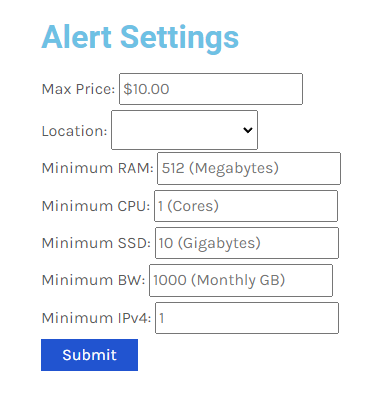
Sneak peak for alert settings:
Sneak peak for alert sound:
https://billing.virmach.com/modules/addons/blackfriday/alert.mp3
FrankZ drunk, reqouting messages without any content.

Oh top of that it's even edited!
Haven't bought a single service in VirMach Great Ryzen 2022 - 2023 Flash Sale.
I had to reedit the photo/meme as it came out to large.
It is re-posted now, just smaller.
Strongly recommend that you offer Alpine Linux in your standard installs. It uses about 64MB of RAM by itself. The min memory for installation is stated as 256MB though, for the full version, but there is a VPS version that is lighter. I try to install it all my machines but apparently ISO mount requests are strictly verboten for BF deals.
@nutjob you can get Alpine ISO in the billing panel.
I doubt the OOM killer was involved in that crash. I had almost nothing running on the VM when I did the upgrade. Plus, I just did the same upgrade on a similarly configured 384MB VM and it didn't crash. Something seems weird about the 768MB VM or its host node or location or something.
Thanks! Is that new? Or did I just miss it?
Why can't it be both?
The Yeti has left the building.
ISOs have been on the billing panel since July IIRC. I did not check specifically for Alpine Linux until you mentioned it so I could not tell you how long that ISO has been there.
Actually was looking for the Alpine Virtual version which has a slimmed down kernel and is virtio only, but I'm sure I can upgrade to that from the full version. I think the virtual version would still be a useful addition to that list.
Is it on netboot.xyz ISO ? If so, than that is there as well.
No it's not on there but you can select the linux-virt kernel during setup: https://wiki.alpinelinux.org/wiki/Kernels
So that ISO will do the job. Now I have no excuse to replace the remainder of my debian installs.
is the ram oversold ? although i doubt it
I bench YABS 24/7/365 unless it's a leap year.
I've only seen this happen on the one specific operation of apt-get upgrade.
Yo, can we add some graphic effects like the buffalo or whatever big explosion?
Ontario Dildo Inspector
That is new!
Haven't bought a single service in VirMach Great Ryzen 2022 - 2023 Flash Sale.
I think its way too advanced for me atleast. My VPS on FFME006 doesn't have IPv6 address listed in clientpanel or solus so its pretty hard to figure out that thing by yourself
@FrankZ wanna borrow ipv6 /64 subnet?
I'll add in these two with no option to disable:
https://jsfiddle.net/dtrooper/AceJJ/
https://jsfiddle.net/michelepisani/mdsw0wto/
Maybe also get ChatGPT to do some pure JS/CSS insane morphing tesseract effect to lag out your browser.
It doesn't work very well. I have like several versions of it and it's also synced randomly based on the node you're on. Making version... 17 or so soon and hopefully going to have it actually work as intended.
Alpine is on netboot, I use it all the time.
As the page you linked says, you can switch to the kernel before running the setup as one method.
You could even go as far as writing your own script for the Alpine setup, which I did and specify the virt kernel with one of the flags. Makes it very simple if you have the same basic setup. https://wiki.alpinelinux.org/wiki/Alpine_setup_scripts
sale
sale
sale
sale
MOARRRRRRRRR
I bench YABS 24/7/365 unless it's a leap year.
@FrankZ IPv6 request button added. We'll collect all the requests and label them by nodes and do them in batches since original idea of doing it for all unfortunately didn't play out how we wanted.
More manual work? This is exactly what you guys need...
Haven't bought a single service in VirMach Great Ryzen 2022 - 2023 Flash Sale.
I expect that I/we should not request IPv6 for the HiVelocity locations in Chicago, Los Angeles, or Miami based on what you said earlier about how much they were going to charge you per IPv6 /64 subnet.
I think the peering did change a bit on phoenix node:
comparing to:
but of course someone might have changed the config to not show exact hops as before.
That's a good idea, thanks.
One ticket per IPv6 request?
I wish you luck robust, script.