@Daevien said: Comcrap just flat out blocks the ip entirely? Thats pretty bad even for them.
It redirects port 80 to a safebrowse.io page that says warning, high risk content. Trying to visit anyway loops to the same page. 443 fails SSL handshake because of comcast messing with the connection somehow. Other ports like ssh work fine.
47.87.. Am I supposed to put the third octet here? This also affected the old vpsshared site.
Re resource change, it is fine if both existing vps are destroyed and a new one is created. It's ok if it's a new IP or whatever, and I can reinstall the system, don't need the old data. If it has to move to LAX, I can live with that, though still prefer SJC. Thanks!
@Daevien said: Comcrap just flat out blocks the ip entirely? Thats pretty bad even for them.
It redirects port 80 to a safebrowse.io page that says warning, high risk content. Trying to visit anyway loops to the same page. 443 fails SSL handshake because of comcast messing with the connection somehow. Other ports like ssh work fine.
47.87.. Am I supposed to put the third octet here? This also affected the old vpsshared site.
Re resource change, it is fine if both existing vps are destroyed and a new one is created. It's ok if it's a new IP or whatever, and I can reinstall the system, don't need the old data. If it has to move to LAX, I can live with that, though still prefer SJC. Thanks!
Are you using their DNS? Definitely nothing like that for me using them but I also specifically changed my DNS to Google's a long time ago. I do remember it was initially on their DNS and something like that happened once a while ago.
@Daevien said: Comcrap just flat out blocks the ip entirely? Thats pretty bad even for them.
It redirects port 80 to a safebrowse.io page that says warning, high risk content. Trying to visit anyway loops to the same page. 443 fails SSL handshake because of comcast messing with the connection somehow. Other ports like ssh work fine.
47.87.. Am I supposed to put the third octet here? This also affected the old vpsshared site.
Re resource change, it is fine if both existing vps are destroyed and a new one is created. It's ok if it's a new IP or whatever, and I can reinstall the system, don't need the old data. If it has to move to LAX, I can live with that, though still prefer SJC. Thanks!
Are you using their DNS? Definitely nothing like that for me using them but I also specifically changed my DNS to Google's a long time ago. I do remember it was initially on their DNS and something like that happened once a while ago.
Verizon also do something similar if you use their DNS. In the management page of the router they provide, there was an option to turn it off.
Hmm, I hadn't thought of the DNS. I figured they were intercepting the TCP stream since they do resolve to the right address for ports other than 80 and 443. Or anyway, ssh and ping go to the right place. I haven't tried putting an httpd on another port on the remote side.
I just tried setting nameserver to 1.1.1.1 in my local resolv.conf and nothing changed, but I didn't reboot and idk if that's needed.
@willie said:
Hmm, I hadn't thought of the DNS. I figured they were intercepting the TCP stream since they do resolve to the right address for ports other than 80 and 443. Or anyway, ssh and ping go to the right place. I haven't tried putting an httpd on another port on the remote side.
Some providers do inject stuff but it's usually a lot of overhead for a bigger provider to do it which has sort of made it not worth the time on a lot of providers. Plus the angry response from customers. But being Comcrap, they don't really care so I guess it's possible. If my isp was that terrible, I'd prob be trying to setup a wireguard instance somewhere and route everything through it so I didn't have to deal with whatever other idiotic policies / things they did.
I just tried setting nameserver to 1.1.1.1 in my local resolv.conf and nothing changed, but I didn't reboot and idk if that's needed.
If it's a systemd based resolve, there is
sudo systemd-resolve --flush-caches
There is another diff one for like centos/fedora or systems using dnsmasq (pretty much restart dnsmasq i think) or windows or whatever will all have their own way so hard to tell without knowing what you run.
@willie said:
Hmm, I hadn't thought of the DNS. I figured they were intercepting the TCP stream since they do resolve to the right address for ports other than 80 and 443. Or anyway, ssh and ping go to the right place. I haven't tried putting an httpd on another port on the remote side.
I just tried setting nameserver to 1.1.1.1 in my local resolv.conf and nothing changed, but I didn't reboot and idk if that's needed.
Reboot required I think if you edit it directly into resolv.conf but you can put it in the network configuration file and restart networking service instead. I could be wrong because I usually do it the latter way and then I think on reboot it auto enters it into resolv.conf but all of this probably depends on what setup you have on what distro.
@VirMach said:
Old LAX nodes that had catastrophic failure are getting their new IPs now. You can manually change the main IP to get it working sooner. I may be able to get the script working to do the main IP swaps for them but if something goes wrong that'll get done tomorrow.
(And the credits/extensions will be done tomorrow, it requires a lot of DB queries that I don't want to try to remember right now while I'm doing a lot of other things, sorry.)
This part's getting done:
I may be able to get the script working to do the main IP swaps for them but if something goes wrong that'll get done tomorrow.
@VirMach said:
Yeah I had a lot more written but realized I was going off on a weird upset tangent so I cut it out. There's a reason I'm unsurprised that such a thing would happen in Atlanta, let's just leave it there.
Yeah, I remember the locations with the public issues at least and overlap on who it was with being the worst braindead ones. My Atlanta one has worked pretty well so far though. I've got 3 vps that do most of my more important stuff and having all of them in NY just wouldn't be great and two are already there now due to an auto migrated one with ryzen changes.
I had a TLDR written for this but lost it. Basically I have an idea to let existing customers burn in new nodes we deploy so we find any issues we missed that may appear from "natural" usage. It's essentially a 14 day trial service of NVMe1G and it may otherwise go down or have issues, no support, guaranteed data loss. You can abuse it all you want though as long as you're not committing a crime (as in, high CPU or I/O is fine. But we can still suspend it if we want to, not that it matters.)
@WeiHo said:
Do you ready for TYOC035?
in ★ VirMach ★ RYZEN ★ NVMe ★★ $30/2YR- 768MB ★ $40/2YR - 1.5GB ★ $50/2YR - 2.5GB ★ $70/2YR - 4GB ★ LES Comment by WeiHo 5:23AM
(Quote) Time for 035
in ★ VirMach ★ RYZEN ★ NVMe ★★ $30/2YR- 768MB ★ $40/2YR - 1.5GB ★ $50/2YR - 2.5GB ★ $70/2YR - 4GB ★ LES Comment by WeiHo October 1
(Quote) Take care.TYOC035 is the same.
in ★ VirMach ★ RYZEN ★ NVMe ★★ $30/2YR- 768MB ★ $40/2YR - 1.5GB ★ $50/2YR - 2.5GB ★ $70/2YR - 4GB ★ LES Comment by WeiHo September 25
(Quote) TYOC035 : Last Updated 09/13/2022 16:39 TYOC040 : Last Updated 09/21/2022 07:03 Actually.035 offline more earlier than that.Do you believe that without ignored? You said that i m unhappy/angry/upset.But it is not my feeling because it is us…
in ★ VirMach ★ RYZEN ★ NVMe ★★ $30/2YR- 768MB ★ $40/2YR - 1.5GB ★ $50/2YR - 2.5GB ★ $70/2YR - 4GB ★ LES Comment by WeiHo September 23
(Quote) Do u have any service in TYOC035?
in ★ VirMach ★ RYZEN ★ NVMe ★★ $30/2YR- 768MB ★ $40/2YR - 1.5GB ★ $50/2YR - 2.5GB ★ $70/2YR - 4GB ★ LES Comment by WeiHo September 22
(Quote) Yes.TYOC035 has been abandoned
in ★ VirMach ★ RYZEN ★ NVMe ★★ $30/2YR- 768MB ★ $40/2YR - 1.5GB ★ $50/2YR - 2.5GB ★ $70/2YR - 4GB ★ LES Comment by WeiHo September 21
(Quote) But TYOC40 is In Progress now.TYOC035 still Outage.
in ★ VirMach ★ RYZEN ★ NVMe ★★ $30/2YR- 768MB ★ $40/2YR - 1.5GB ★ $50/2YR - 2.5GB ★ $70/2YR - 4GB ★ LES Comment by WeiHo September 16
(Quote) Poor TYOC035.He was ignored.
in ★ VirMach ★ RYZEN ★ NVMe ★★ $30/2YR- 768MB ★ $40/2YR - 1.5GB ★ $50/2YR - 2.5GB ★ $70/2YR - 4GB ★ LES Comment by WeiHo September 15
(Quote) TYOC035 has been offline about half month
in ★ VirMach ★ RYZEN ★ NVMe ★★ $30/2YR- 768MB ★ $40/2YR - 1.5GB ★ $50/2YR - 2.5GB ★ $70/2YR - 4GB ★ LES Comment by WeiHo September 11
(Quote) TYOC035 offline. A few days(>10)
in ★ VirMach ★ RYZEN ★ NVMe ★★ $30/2YR- 768MB ★ $40/2YR - 1.5GB ★ $50/2YR - 2.5GB ★ $70/2YR - 4GB ★ LES Comment by WeiHo September 10
@VirMach How about the TYOC035?
in ★ VirMach ★ RYZEN ★ NVMe ★★ $30/2YR- 768MB ★ $40/2YR - 1.5GB ★ $50/2YR - 2.5GB ★ $70/2YR - 4GB ★ LES Comment by WeiHo September 1
All the service in TYOC035 is still offline now?
in ★ VirMach ★ RYZEN ★ NVMe ★★ $30/2YR- 768MB ★ $40/2YR - 1.5GB ★ $50/2YR - 2.5GB ★ $70/2YR - 4GB ★ LES Comment by WeiHo August 31
@VirMach said:
I had a TLDR written for this but lost it. Basically I have an idea to let existing customers burn in new nodes we deploy so we find any issues we missed that may appear from "natural" usage. It's essentially a 14 day trial service of NVMe1G and it may otherwise go down or have issues, no support, guaranteed data loss.
not sure how you would like to get issues raported but it doesnt seem to fire up my new debian 11 server and bandwidth is set to 1GB
Servers facing partial disk issue.
These servers have a disk that is not being detected. Most customers are unaffected but they have an upcoming maintenance window.
@VirMach said:
I had a TLDR written for this but lost it. Basically I have an idea to let existing customers burn in new nodes we deploy so we find any issues we missed that may appear from "natural" usage. It's essentially a 14 day trial service of NVMe1G and it may otherwise go down or have issues, no support, guaranteed data loss.
not sure how you would like to get issues raported but it doesnt seem to fire up my new debian 11 server and bandwidth is set to 1GB
Servers facing partial disk issue.
These servers have a disk that is not being detected. Most customers are unaffected but they have an upcoming maintenance window.
My boot disk on TYOC026 is missing. What should I do? Should I open a ticket or wait or reinstall?
Answer's here:
they have an upcoming maintenance window.
Was supposed to be earlier but I only got to TYOC040 since I had to also recreate everyone's and do a bunch of other stuff. Should hopefully get to all of them by today.
Actually it means it got way better in the way we intended/discussed. Remember, there was just a weekend. Last weekend it froze for a few hours. This weekend I only see a 1 hour period where this may have happened instead of a few hour on Saturday and only 3 minutes on Sunday.
Taking a look at who caused that hour and then next weekend we should get it under control.
(But the other issue will be there indefinitely as we also discussed.)
Someone can test ping 8.8.8.8 vs ping 1.1.1.1 ? Pool blacklisted by Google?... SolusVM reconfig use 8.8.8.8 default, Im testing because my LNMS monitor is having some weird network graphs.
Oh, btw this is DALZ003 with new IP
From NYCB041 i dont have this problem ( new IP too )
Yahoo it's AMSD030X ! Can I keep it? Pretty please.
Speaking of which, I'm looking forward to when Ryzen Migrate return to NL.
In stasis until the shitposting stops/abates.
Than=compare;then=sequence:brought=bring;bought=buy:staffs=pile of sticks:informations/infos=no plural. It wisnae me! A big boy done it and ran away. || NVMe2G for life! until death (the end is nigh).
@AlwaysSkint said:
Yahoo it's AMSD030X ! Can I keep it? Pretty please.
Speaking of which, I'm looking forward to when Ryzen Migrate return to NL.
Hmm, so it worked for you? I had thought it was extra picky but now I'm concerned as to why I failed the security check for any future services I want to buy lol
I did change providers recently but everything else is same and even using 2factor lol
@risturiz said:
Someone can test ping 8.8.8.8 vs ping 1.1.1.1 ? Pool blacklisted by Google?... SolusVM reconfig use 8.8.8.8 default, Im testing because my LNMS monitor is having some weird network graphs.
Oh, btw this is DALZ003 with new IP
From NYCB041 i dont have this problem ( new IP too )
Same
dfw-vrm2:~$ ping -c 3 8.8.8.8
PING 8.8.8.8 (8.8.8.8): 56 data bytes

--- 8.8.8.8 ping statistics ---
3 packets transmitted, 0 packets received, 100% packet loss
dfw-vrm2:~$ ping -c 3 1.1.1.1
PING 1.1.1.1 (1.1.1.1): 56 data bytes
64 bytes from 1.1.1.1: seq=0 ttl=42 time=3.185 ms
64 bytes from 1.1.1.1: seq=1 ttl=42 time=3.153 ms
64 bytes from 1.1.1.1: seq=2 ttl=42 time=3.296 ms

--- 1.1.1.1 ping statistics ---
3 packets transmitted, 3 packets received, 0% packet loss
round-trip min/avg/max = 3.153/3.211/3.296 ms
@gritty said: Does anyone know how to solve this problem?
.. and you have provided absolutely sod all information that will help us try to figure it out/help.
In stasis until the shitposting stops/abates.
Than=compare;then=sequence:brought=bring;bought=buy:staffs=pile of sticks:informations/infos=no plural. It wisnae me! A big boy done it and ran away. || NVMe2G for life! until death (the end is nigh).
In stasis until the shitposting stops/abates.
Than=compare;then=sequence:brought=bring;bought=buy:staffs=pile of sticks:informations/infos=no plural. It wisnae me! A big boy done it and ran away. || NVMe2G for life! until death (the end is nigh).
@Daevien said: I was already logged in from doing some stuff before.
Maybe you're just naughty!
In stasis until the shitposting stops/abates.
Than=compare;then=sequence:brought=bring;bought=buy:staffs=pile of sticks:informations/infos=no plural. It wisnae me! A big boy done it and ran away. || NVMe2G for life! until death (the end is nigh).
@atomi said: .. let existing customers burn in new nodes..
Gateway is pingable but Solus HTML5 VNC doesn't attach to node and VMS doesn't boot up (to netboot.xyz ISO).
In stasis until the shitposting stops/abates.
Than=compare;then=sequence:brought=bring;bought=buy:staffs=pile of sticks:informations/infos=no plural. It wisnae me! A big boy done it and ran away. || NVMe2G for life! until death (the end is nigh).
@AlwaysSkint said:
Gateway is pingable but Solus HTML5 VNC doesn't attach to node and VMS doesn't boot up (to netboot.xyz ISO).
Same problem, I also noticed that client panel says AMSD030X but its RYZE.AMS-D001.VMS in Solus. I'm not sure if numbers should match but they usually do
@risturiz said:
Someone can test ping 8.8.8.8 vs ping 1.1.1.1 ? Pool blacklisted by Google?... SolusVM reconfig use 8.8.8.8 default, Im testing because my LNMS monitor is having some weird network graphs.
Oh, btw this is DALZ003 with new IP
Dallas definitely has some weird routing issue and it definitely is tied to Google DNS. DALZ008 affected the most in other ways. Already have a ticket to try to figure it all out and see what can be done. Looks like with the new IPs there's an added layer of issues now but I think that's just temporary sub-optimal routing due to announcement combined with whatever else.
@AlwaysSkint said:
Yahoo it's AMSD030X ! Can I keep it? Pretty please.
Speaking of which, I'm looking forward to when Ryzen Migrate return to NL.
Hmm, so it worked for you? I had thought it was extra picky but now I'm concerned as to why I failed the security check for any future services I want to buy lol
I did change providers recently but everything else is same and even using 2factor lol
Anti-fraud is pretty terrible at actually doing much. Lots of false positives and false negatives. No solution. One of my passion projects was just to come up with a better antifraud system but I obviously don't have any time to do anything like that. I'm interested to see why you got flagged specifically, can I have the order ID?
@atomi said: .. let existing customers burn in new nodes..
Gateway is pingable but Solus HTML5 VNC doesn't attach to node and VMS doesn't boot up (to netboot.xyz ISO).
I just added it a few minutes before posting that so templates are still syncing and ... let me see what's up with VNC.
(edit) Fixing VNC, I swear I thought I fixed that already. It's the SolusVM bug I keep forgetting to patch every time I set up a new node. Looks like I forgot to hit enter on the last bit.
@VirMach said:
I had a TLDR written for this but lost it. Basically I have an idea to let existing customers burn in new nodes we deploy so we find any issues we missed that may appear from "natural" usage.
Ordered with Debian 11. The order process was fine. Was provisioned an 1CPU, 1GB RAM, 25GB disk, 1GB traffic on a AMS node. Was marked as offline. Went into the control panel and tried to boot it. Nothing. Re-installed with Debian 11. Still not coming up. Tried Debian 10. Not still offline. Tried VNC, unreachable. Tried remote echo request (PING) to make sure it wasn't being misreported by control panel, no response. Tried CentOS 8, still not up. Tried a couple power offs, boots, and what not.
@AlwaysSkint said:
Gateway is pingable but Solus HTML5 VNC doesn't attach to node and VMS doesn't boot up (to netboot.xyz ISO).
Same problem, I also noticed that client panel says AMSD030X but its RYZE.AMS-D001.VMS in Solus. I'm not sure if numbers should match but they usually do
@VirMach said:
I had a TLDR written for this but lost it. Basically I have an idea to let existing customers burn in new nodes we deploy so we find any issues we missed that may appear from "natural" usage. It's essentially a 14 day trial service of NVMe1G and it may otherwise go down or have issues, no support, guaranteed data loss. You can abuse it all you want though as long as you're not committing a crime (as in, high CPU or I/O is fine. But we can still suspend it if we want to, not that it matters.)
I got "You must have an active product/service to use this code" error when I applied the Promo code so it did not remove the setup fee. Was logged in to my account and I do have an active service
@AlwaysSkint said:
Gateway is pingable but Solus HTML5 VNC doesn't attach to node and VMS doesn't boot up (to netboot.xyz ISO).
Same problem, I also noticed that client panel says AMSD030X but its RYZE.AMS-D001.VMS in Solus. I'm not sure if numbers should match but they usually do
It just means I can't type. (edit) or think.
I think it must the first one since that package has only 1GB of bandwidth. You cannot think anyone could proceed a normal testing with such a abnormal amount of data transfer
This virtual server has been suspended by the administrator. Please contact your service provider for details
At least this part works, even got a nice e-mail with all the details.
Product/Service: TEMPORARY TEST SERVER RISK OF DATA LOSS
Domain: KaleidoscopicBurlywood-VM
Amount: $0.00 USD
Due Date: 11/03/2022
Suspension Reason: Bandwidth Overusage
Your service was suspended due to using up the bandwidth for this month. You can contact our support to purchase more bandwidth or wait until the bandwidth resets on the 1st of the month.
Haven't bought a single service in VirMach Great Ryzen 2022 - 2023 Flash Sale.
@VirMach said:
Anti-fraud is pretty terrible at actually doing much. Lots of false positives and false negatives. No solution. One of my passion projects was just to come up with a better antifraud system but I obviously don't have any time to do anything like that. I'm interested to see why you got flagged specifically, can I have the order ID?
Yeah, I've worked with hosting and registrars before, so I realize how terrible it can be. 674914 is the first one, tried a couple others so it failed cc, paypal & virmach credit even, just no payment method at all from me that it likes right now lol
Ordered with Debian 11. The order process was fine. Was provisioned an 1CPU, 1GB RAM, 25GB disk, 1GB traffic on a AMS node. Was marked as offline. Went into the control panel and tried to boot it. Nothing. Re-installed with Debian 11. Still not coming up. Tried Debian 10. Not still offline. Tried VNC, unreachable. Tried remote echo request (PING) to make sure it wasn't being misreported by control panel, no response. Tried CentOS 8, still not up. Tried a couple power offs, boots, and what not.
Whatever changed shortly after fixed it, re-installed with Debian11. System, config, and connectivity appears good now.
@Jab said: So I've run the usual thing I would run on VPS.
@Virmach Note that AES-NI is disabled - big performance deficit.
In stasis until the shitposting stops/abates.
Than=compare;then=sequence:brought=bring;bought=buy:staffs=pile of sticks:informations/infos=no plural. It wisnae me! A big boy done it and ran away. || NVMe2G for life! until death (the end is nigh).
SolusVM template that says "Passthrough" isn't. [Ryzen Compatible] Debian 11 (64-Bit) Debian 11 (Bullseye.) Generation 2 w/ ext4 filesystem. VirtIO disk driver. Host Passthrough CPU. This is a default SolusVM template collected from the Template Distribution Network, and is not modified in any way. It may require immediate basic security hardening and will be minimal in nature. SSH Port: 22
Template doesn't pass through, and so lacks AES-NI
I have a tiny VPS on PHXZ004 idling all the time just triggered an email imforming me it was suspended due to bandwidth overuse. It was a BF flash deal plan and the bandwidth actually is as low as 125GB if I remember correctly so it could have fallen victim to some sort of attack and got it all burnt up ( or maybe the configuration messed up during migration or IP switching and I didn't pay attention ).
I don't think I'm gonna appeal for it. It's just kinda infuriating not be able to inspect how or when it ran out of bandwidth as either whcms or solusvm won't allow me to see stats and graph at all when service isn't active.
SolusVM template that says "Passthrough" isn't. [Ryzen Compatible] Debian 11 (64-Bit) Debian 11 (Bullseye.) Generation 2 w/ ext4 filesystem. VirtIO disk driver. Host Passthrough CPU. This is a default SolusVM template collected from the Template Distribution Network, and is not modified in any way. It may require immediate basic security hardening and will be minimal in nature. SSH Port: 22
Template doesn't pass through, and so lacks AES-NI
I noticed this too, you have to install alma first, then Debian.
SolusVM template that says "Passthrough" isn't. [Ryzen Compatible] Debian 11 (64-Bit) Debian 11 (Bullseye.) Generation 2 w/ ext4 filesystem. VirtIO disk driver. Host Passthrough CPU. This is a default SolusVM template collected from the Template Distribution Network, and is not modified in any way. It may require immediate basic security hardening and will be minimal in nature. SSH Port: 22
Template doesn't pass through, and so lacks AES-NI
I noticed this too, you have to install alma first, then Debian.
You are correct. Installed Alma8 template and I show
^Yup, I concur. I couldn't get netboot.xyz to play nicely, so booted Alama and flags are set.
Awesomeness..
fio Disk Speed Tests (Mixed R/W 50/50):
Block Size
4k (IOPS)
64k (IOPS)
Read
421.66 MB/s (105.4k)
675.59 MB/s (10.5k)
Write
422.77 MB/s (105.6k)
679.15 MB/s (10.6k)
Total
844.43 MB/s (211.1k)
1.35 GB/s (21.1k)
Block Size
512k (IOPS)
1m (IOPS)
------
--- ----
---- ----
Read
971.87 MB/s (1.8k)
2.50 GB/s (2.4k)
Write
1.02 GB/s (1.9k)
2.67 GB/s (2.6k)
Total
1.99 GB/s (3.8k)
5.18 GB/s (5.0k)
iperf3 Network Speed Tests (IPv4):
Provider | Location (Link) | Send Speed | Recv Speed
| | |
Clouvider | London, UK (10G) | 940 Mbits/sec | 940 Mbits/sec
Online.net | Paris, FR (10G) | 937 Mbits/sec | 932 Mbits/sec
Hybula | The Netherlands (40G) | 941 Mbits/sec | 941 Mbits/sec
Uztelecom | Tashkent, UZ (10G) | 809 Mbits/sec | 426 Mbits/sec
Clouvider | NYC, NY, US (10G) | 873 Mbits/sec | 252 Mbits/sec
Performing IPv4 iperf3 send test to Clouvider (Attempt #2 of 3)...Connection to 47.87.xxx.xxx closed by remote host.
Followed by sadness..
Suspension Reason: Bandwidth Overusage
In stasis until the shitposting stops/abates.
Than=compare;then=sequence:brought=bring;bought=buy:staffs=pile of sticks:informations/infos=no plural. It wisnae me! A big boy done it and ran away. || NVMe2G for life! until death (the end is nigh).


Comments
It redirects port 80 to a safebrowse.io page that says warning, high risk content. Trying to visit anyway loops to the same page. 443 fails SSL handshake because of comcast messing with the connection somehow. Other ports like ssh work fine.
47.87.. Am I supposed to put the third octet here? This also affected the old vpsshared site.
Re resource change, it is fine if both existing vps are destroyed and a new one is created. It's ok if it's a new IP or whatever, and I can reinstall the system, don't need the old data. If it has to move to LAX, I can live with that, though still prefer SJC. Thanks!
Are you using their DNS? Definitely nothing like that for me using them but I also specifically changed my DNS to Google's a long time ago. I do remember it was initially on their DNS and something like that happened once a while ago.
Verizon also do something similar if you use their DNS. In the management page of the router they provide, there was an option to turn it off.
Hmm, I hadn't thought of the DNS. I figured they were intercepting the TCP stream since they do resolve to the right address for ports other than 80 and 443. Or anyway, ssh and ping go to the right place. I haven't tried putting an httpd on another port on the remote side.
I just tried setting nameserver to 1.1.1.1 in my local resolv.conf and nothing changed, but I didn't reboot and idk if that's needed.
Some providers do inject stuff but it's usually a lot of overhead for a bigger provider to do it which has sort of made it not worth the time on a lot of providers. Plus the angry response from customers. But being Comcrap, they don't really care so I guess it's possible. If my isp was that terrible, I'd prob be trying to setup a wireguard instance somewhere and route everything through it so I didn't have to deal with whatever other idiotic policies / things they did.
If it's a systemd based resolve, there is
sudo systemd-resolve --flush-caches
There is another diff one for like centos/fedora or systems using dnsmasq (pretty much restart dnsmasq i think) or windows or whatever will all have their own way so hard to tell without knowing what you run.
Reboot required I think if you edit it directly into resolv.conf but you can put it in the network configuration file and restart networking service instead. I could be wrong because I usually do it the latter way and then I think on reboot it auto enters it into resolv.conf but all of this probably depends on what setup you have on what distro.
This part's getting done:
Yeah, I remember the locations with the public issues at least and overlap on who it was with being the worst braindead ones. My Atlanta one has worked pretty well so far though. I've got 3 vps that do most of my more important stuff and having all of them in NY just wouldn't be great and two are already there now due to an auto migrated one with ryzen changes.
I had a TLDR written for this but lost it. Basically I have an idea to let existing customers burn in new nodes we deploy so we find any issues we missed that may appear from "natural" usage. It's essentially a 14 day trial service of NVMe1G and it may otherwise go down or have issues, no support, guaranteed data loss. You can abuse it all you want though as long as you're not committing a crime (as in, high CPU or I/O is fine. But we can still suspend it if we want to, not that it matters.)
https://billing.virmach.com/cart.php?a=add&pid=217
Coupon code IUNDERSTANDWHATIMORDERING
Can we name the system after our favourite unstable company / person / site on the internet? :P
Also, I failed the automated security measures with my saved CC or paypal btw lol
Do you ready for TYOC035?
This broken record isn't really helping anyone.
@VirMach can you please refund him or something?
not sure how you would like to get issues raported but it doesnt seem to fire up my new debian 11 server and bandwidth is set to 1GB
TYOC002S
https://status.virm.ac/?s=629a0367778ad13c93445150
getting worse and worse day by day
@VirMach
My boot disk on TYOC026 is missing. What should I do? Should I open a ticket or wait or reinstall?
Mine also having the same issue.
MY/SG & Worldwide Latency Test V3 : http://www.mywebping.com (27 February 2021 Updated)
MY-Unifi Home SmokePing: http://smokeping.mywebping.com/smokeping/
Answer's here:
Was supposed to be earlier but I only got to TYOC040 since I had to also recreate everyone's and do a bunch of other stuff. Should hopefully get to all of them by today.
Actually it means it got way better in the way we intended/discussed. Remember, there was just a weekend. Last weekend it froze for a few hours. This weekend I only see a 1 hour period where this may have happened instead of a few hour on Saturday and only 3 minutes on Sunday.
Taking a look at who caused that hour and then next weekend we should get it under control.
(But the other issue will be there indefinitely as we also discussed.)
Someone can test ping 8.8.8.8 vs ping 1.1.1.1 ? Pool blacklisted by Google?... SolusVM reconfig use 8.8.8.8 default, Im testing because my LNMS monitor is having some weird network graphs.
Oh, btw this is DALZ003 with new IP
From NYCB041 i dont have this problem ( new IP too )
Yahoo it's AMSD030X ! Can I keep it? Pretty please.

Speaking of which, I'm looking forward to when Ryzen Migrate return to NL.
In stasis until the shitposting stops/abates.
Than=compare;then=sequence:brought=bring;bought=buy:staffs=pile of sticks:informations/infos=no plural.
It wisnae me! A big boy done it and ran away. || NVMe2G for life! until death (the end is nigh).
Hmm, so it worked for you? I had thought it was extra picky but now I'm concerned as to why I failed the security check for any future services I want to buy lol
I did change providers recently but everything else is same and even using 2factor lol
Same
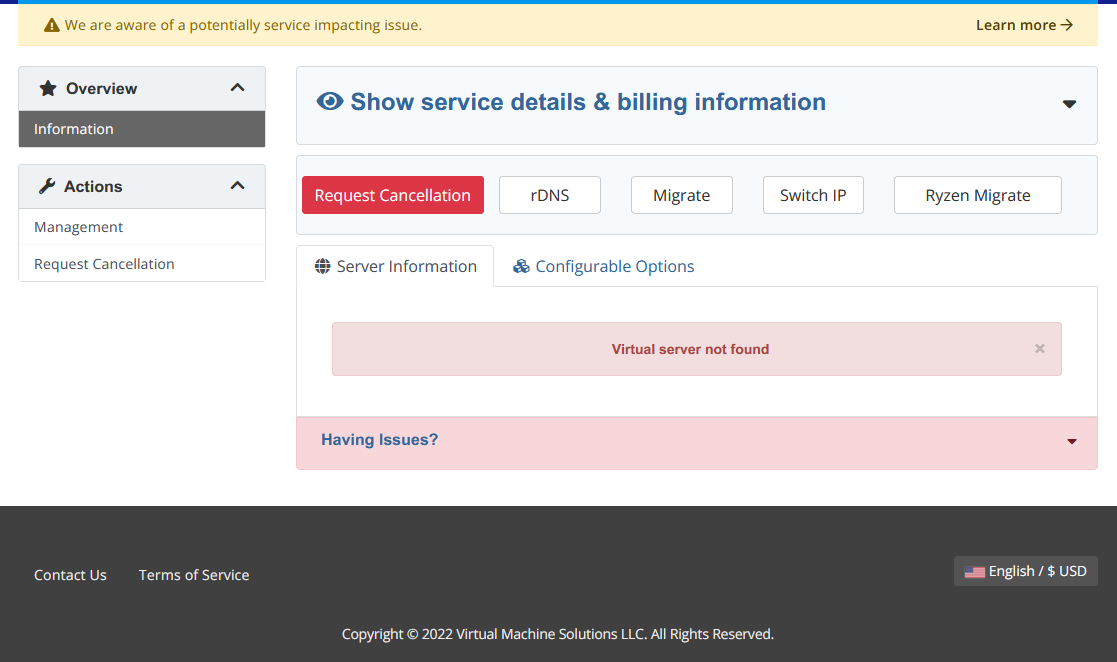
Does anyone know how to solve this problem? This Virmach's vps cann't be connectd now
.. and you have provided absolutely sod all information that will help us try to figure it out/help.
In stasis until the shitposting stops/abates.
Than=compare;then=sequence:brought=bring;bought=buy:staffs=pile of sticks:informations/infos=no plural.
It wisnae me! A big boy done it and ran away. || NVMe2G for life! until death (the end is nigh).
I logged in, before adding to Cart/Basket.
In stasis until the shitposting stops/abates.
Than=compare;then=sequence:brought=bring;bought=buy:staffs=pile of sticks:informations/infos=no plural.
It wisnae me! A big boy done it and ran away. || NVMe2G for life! until death (the end is nigh).
I was already logged in from doing some stuff before. Weird. Somethign else to add to my list of stuff not working right this summer I guess lol
Maybe you're just naughty!
In stasis until the shitposting stops/abates.
Than=compare;then=sequence:brought=bring;bought=buy:staffs=pile of sticks:informations/infos=no plural.
It wisnae me! A big boy done it and ran away. || NVMe2G for life! until death (the end is nigh).
Gateway is pingable but Solus HTML5 VNC doesn't attach to node and VMS doesn't boot up (to netboot.xyz ISO).
In stasis until the shitposting stops/abates.
Than=compare;then=sequence:brought=bring;bought=buy:staffs=pile of sticks:informations/infos=no plural.
It wisnae me! A big boy done it and ran away. || NVMe2G for life! until death (the end is nigh).
Same problem, I also noticed that client panel says AMSD030X but its RYZE.AMS-D001.VMS in Solus. I'm not sure if numbers should match but they usually do
Dallas definitely has some weird routing issue and it definitely is tied to Google DNS. DALZ008 affected the most in other ways. Already have a ticket to try to figure it all out and see what can be done. Looks like with the new IPs there's an added layer of issues now but I think that's just temporary sub-optimal routing due to announcement combined with whatever else.
Anti-fraud is pretty terrible at actually doing much. Lots of false positives and false negatives. No solution. One of my passion projects was just to come up with a better antifraud system but I obviously don't have any time to do anything like that. I'm interested to see why you got flagged specifically, can I have the order ID?
Was this after Ryzen migrate button press?
Hey, he provided more than a lot of customers normally would. I've seen all of the following as actual descriptions for the issue:
I just added it a few minutes before posting that so templates are still syncing and ... let me see what's up with VNC.
(edit) Fixing VNC, I swear I thought I fixed that already. It's the SolusVM bug I keep forgetting to patch every time I set up a new node. Looks like I forgot to hit enter on the last bit.
Ordered with Debian 11. The order process was fine. Was provisioned an 1CPU, 1GB RAM, 25GB disk, 1GB traffic on a AMS node. Was marked as offline. Went into the control panel and tried to boot it. Nothing. Re-installed with Debian 11. Still not coming up. Tried Debian 10. Not still offline. Tried VNC, unreachable. Tried remote echo request (PING) to make sure it wasn't being misreported by control panel, no response. Tried CentOS 8, still not up. Tried a couple power offs, boots, and what not.
Dataplane.org's current server hosting provider list
It just means I can't type. (edit) or think.
I got "You must have an active product/service to use this code" error when I applied the Promo code so it did not remove the setup fee. Was logged in to my account and I do have an active service
So I've run the usual thing I would run on VPS.
Haven't bought a single service in VirMach Great Ryzen 2022 - 2023 Flash Sale.
I think it must the first one since that package has only 1GB of bandwidth. You cannot think anyone could proceed a normal testing with such a abnormal amount of data transfer
^ also can confirm 1GB bandwidth...
This virtual server has been suspended by the administrator. Please contact your service provider for detailsAt least this part works, even got a nice e-mail with all the details.
Product/Service: TEMPORARY TEST SERVER RISK OF DATA LOSS
Domain: KaleidoscopicBurlywood-VM
Amount: $0.00 USD
Due Date: 11/03/2022
Suspension Reason: Bandwidth Overusage
Your service was suspended due to using up the bandwidth for this month. You can contact our support to purchase more bandwidth or wait until the bandwidth resets on the 1st of the month.
Haven't bought a single service in VirMach Great Ryzen 2022 - 2023 Flash Sale.
Yeah, I've worked with hosting and registrars before, so I realize how terrible it can be. 674914 is the first one, tried a couple others so it failed cc, paypal & virmach credit even, just no payment method at all from me that it likes right now lol
Whatever changed shortly after fixed it, re-installed with Debian11. System, config, and connectivity appears good now.
Dataplane.org's current server hosting provider list
it's free! Thank you! Trying out some disk/cpu actiivty should be fun!
However, and not to be greedy, but would you consider making the limit 100GB, or maybe exclude in-network traffic ?
@Virmach Note that AES-NI is disabled - big performance deficit.
In stasis until the shitposting stops/abates.
Than=compare;then=sequence:brought=bring;bought=buy:staffs=pile of sticks:informations/infos=no plural.
It wisnae me! A big boy done it and ran away. || NVMe2G for life! until death (the end is nigh).
SolusVM template that says "Passthrough" isn't.
[Ryzen Compatible] Debian 11 (64-Bit) Debian 11 (Bullseye.) Generation 2 w/ ext4 filesystem. VirtIO disk driver. Host Passthrough CPU. This is a default SolusVM template collected from the Template Distribution Network, and is not modified in any way. It may require immediate basic security hardening and will be minimal in nature. SSH Port: 22Template doesn't pass through, and so lacks AES-NI
I have a tiny VPS on PHXZ004 idling all the time just triggered an email imforming me it was suspended due to bandwidth overuse. It was a BF flash deal plan and the bandwidth actually is as low as 125GB if I remember correctly so it could have fallen victim to some sort of attack and got it all burnt up ( or maybe the configuration messed up during migration or IP switching and I didn't pay attention ).
I don't think I'm gonna appeal for it. It's just kinda infuriating not be able to inspect how or when it ran out of bandwidth as either whcms or solusvm won't allow me to see stats and graph at all when service isn't active.
I noticed this too, you have to install alma first, then Debian.
after click migrate button, it shows migrate fail. but the page changed to "Virtual server not found"
i create a ticket #460492, can you help me solve this problem and active this sever? thanks a lot
You are correct. Installed Alma8 template and I show
EDIT: Why do I find myself saving the order number for everything I order these days?
^Yup, I concur. I couldn't get netboot.xyz to play nicely, so booted Alama and flags are set.
Awesomeness..
fio Disk Speed Tests (Mixed R/W 50/50):
iperf3 Network Speed Tests (IPv4):
Provider | Location (Link) | Send Speed | Recv Speed
| | |
Clouvider | London, UK (10G) | 940 Mbits/sec | 940 Mbits/sec
Online.net | Paris, FR (10G) | 937 Mbits/sec | 932 Mbits/sec
Hybula | The Netherlands (40G) | 941 Mbits/sec | 941 Mbits/sec
Uztelecom | Tashkent, UZ (10G) | 809 Mbits/sec | 426 Mbits/sec
Clouvider | NYC, NY, US (10G) | 873 Mbits/sec | 252 Mbits/sec
Performing IPv4 iperf3 send test to Clouvider (Attempt #2 of 3)...Connection to 47.87.xxx.xxx closed by remote host.
Followed by sadness..
In stasis until the shitposting stops/abates.
Than=compare;then=sequence:brought=bring;bought=buy:staffs=pile of sticks:informations/infos=no plural.
It wisnae me! A big boy done it and ran away. || NVMe2G for life! until death (the end is nigh).