VNC has been fixed, I forgot it doesn't get set up out the box and has it's own manual setup. I basically re-installed SolusVM and moved everything over because that was somehow easier than trying to revert whatever it did to break it.
I figured since they haven't fixed it yet, it must be "working" when they test it which I assume they do with a fresh setup instead of piling onto an older installation, and for whatever reason this update broke for our specific X to Y updates over the years. Luckily it did work, it just means I probably have to clean up a few things like that. I'll still check back to see what you guys say about the error you're seeing, but I can confirm that others are successfully sending commands and logging in and having it all processed, so again I'm leaning toward some weird caching issue.
@BNNY said:
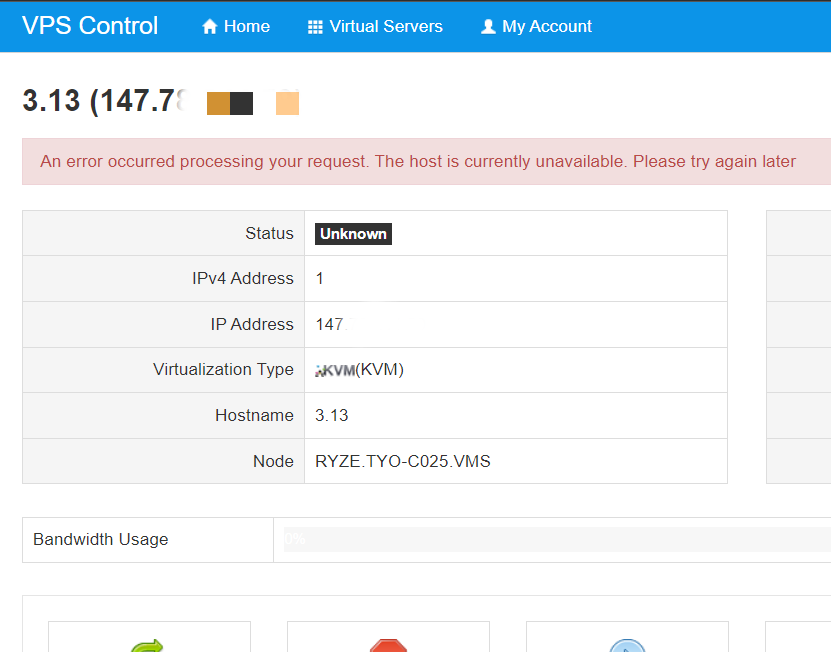
My VPS is on NYCB046 and the VPS control panel also shows Status Unkown in addition to the error message: An error occurred processing your request. The host is currently unavailable. Please try again later. @VirMach Ticket #680003 created with screenshot.
Can't reproduce. Logged in as you in client area shows online. Perhaps this may be a browser cache issue?
Tried the latest Chrome, Edge, and Firefox with&without Incognito Mode after clearing the cache and cookies. All show the same Unknown status and the same Red bar error message. Please look into this when possible.
The status in Client Area under Server Details shows Online but the VPS Control Panel shows the status unknown.
All of the machines I've tested so far show status Unknown in SolusVM.
Interestingly, some show as Online ( RYZE.AMS-D028.VMS / STOR.NYC-B004S.VMS ) in the WebUI where the others ( CHIZ001, NYCB014, SEAZ005 ) show as offline in the stock WebUI.
Edit: ATLZ005 Unknown/Offline. I think this is fairly widespread. And I clear my Firefox cache Everything.
Confirmed -- VNC is working . Thanks very much, I appreciate the prompt service. Now on to fiddling around with Netboot ISO.
@VirMach said:
VNC has been fixed, I forgot it doesn't get set up out the box and has it's own manual setup. I basically re-installed SolusVM and moved everything over because that was somehow easier than trying to revert whatever it did to break it.
RYZE.PHX-Z001.VMS, Solus said;
An error occurred processing your request. The host is currently unavailable. Please try again later
better yet, all of my 9 services shows same error message.
Posting in case this info may be helpful in diagnosing SolusVM issues:
Logging into VirMach client area shows my CHIZ003 VPS as "Offline"- it's definitely not offline. Clicking on my Dallas VPS in client area gives the "Node Locked" and "Operation timed out" errors. However both my VirMach VPS are up and running well. CHIZ003 and Dallas (think it's now on DALZ001) are good, websites on them fully accessible. No complaints.
I'm with the person who posted here recommending an alternative to SolusVM as it seems to be at the root of most of the issues that have occured over the years
NYCB048, NYCB009, NYCB006 should be up today. NYCB042 high likelihood as well, just fixing one last thing with the IPMI and network configuration, I possibly made a mistake on this one when setting up the IPMI and network configuration or maybe it's having some other problem, we'll see.
Also looking into the information provided above for SolusVM. I may need to mess with some other hidden configuration file or refresh something.
@skorous said:
All of the machines I've tested so far show status Unknown in SolusVM.
Interestingly, some show as Online ( RYZE.AMS-D028.VMS / STOR.NYC-B004S.VMS ) in the WebUI where the others ( CHIZ001, NYCB014, SEAZ005 ) show as offline in the stock WebUI.
Edit: ATLZ005 Unknown/Offline. I think this is fairly widespread. And I clear my Firefox cache Everything.
Let's call this issue #1. I'm working on it now. Of course i's not the same issue as the others, why would it be? That'd be too simple.
(edit) Even issue #1 is actually separate issues. I'm just going to not bother providing updates on this looks like it's going to be all day whack a mole.
@skorous said:
All of the machines I've tested so far show status Unknown in SolusVM.
Interestingly, some show as Online ( RYZE.AMS-D028.VMS / STOR.NYC-B004S.VMS ) in the WebUI where the others ( CHIZ001, NYCB014, SEAZ005 ) show as offline in the stock WebUI.
Edit: ATLZ005 Unknown/Offline. I think this is fairly widespread. And I clear my Firefox cache Everything.
Let's call this issue #1. I'm working on it now. Of course i's not the same issue as the others, why would it be? That'd be too simple.
(edit) Even issue #1 is actually separate issues. I'm just going to not bother providing updates on this looks like it's going to be all day whack a mole.
The hope was providing weird conflicting behaviors would make it easier to diagnose. The reality unfortunately is often that there's more than one problem. :-/
@skorous said: The hope was providing weird conflicting behaviors would make it easier to diagnose. The reality unfortunately is often that there's more than one problem. :-/
Nope basically the information you provided in a logical world would have been very helpful but it wasn't because the one working versus one not working are on the exact same SolusVM and PHP version, issue #1A let's called it was one where my update for whatever reason didn't work and the same exact thing had to be run a second time and works. Issue #2A would be the one where for some reason PHP8 update on it didn't work and for some other reason, even though the master is on PHP7 when you install SolusVM from scratch (which it doesn't work by the way, it updates it to PHP8 when you run the update otherwise if you don't then you get locked out because they used PHP8 ioncube on one of the files.) So actually what ends up working for whatever reason is PHP8 on the slaves and PHP7 on the master but I'm assuming I'll have to bring the master up to PHP8 again to fix issue #3 and issue #4 in which case all of it may fully break again, so there's that. Then there's issue #1C where #1B and #1A don't work for some reason. Oh and this is all for just fixing only a set of problems, I haven't even got to the weird problem I thought was caching yet.
(edit) I didn't really mention this specifically I don't think but fun fact, the way SolusVM is built when you change IP on the master you have to manually go into all slaves and delete a file. That's the official way of doing it. And it doesn't always work.
(edit2) And over time when the master updates, some slaves will naturally just go out of sync from an error so they won't even be on the same version and there's no system on SolusVM that actually checks for that, none of this is even our current problem just thought I'd add that in.
We apologize for the extreme outage that recently occurred. We've received the physical server back, returned it to a functional state, and re-deployed it in our LAX2 datacenter. We will be going through in the next few days and either crediting everyone or extending services to match the downtime.
Services should now be accessible, where you can also retrieve your data. If you have any problems, please open a priority ticket mentioning "Shared Hosting" and we'll assist you, but please understand that ticket volumes may be extremely high.
Please note, if your service is utilizing a dedicated IP, you must log in to grab the new IP address and set an A record to the new IP address with your domain provider.
Below are the new nameservers, if you set them using the IP address, it must also be updated (but usually this isn't required.)
Please note it may take some time for changes to propagate, up to 48 hours.
Finally, please note that the server may still be facing some potential problems which we will resolve, if they appear, and looking into them further proactively. Now that the server is much closer to our offices in Los Angeles, should these errors occur we should avoid another long outage. We also have a second copy of data at our office as of today, so if any catastrophic failure occurs in the coming weeks, although extremely rare, we'd be able to more quickly share this data with you. We will also continue to take backups, but also store them more frequently on an external server.
Thank you.
Haven't bought a single service in VirMach Great Ryzen 2022 - 2023 Flash Sale.
@VirMach Will, the network performance of LAX2Z017, improve over time? Most of the time, the pings are 69-70 ms. However, ping time can go up to >200 ms sometimes.
@BNNY said: @VirMach Will, the network performance of LAX2Z017, improve over time? Most of the time, the pings are 69-70 ms. However, ping time can go up to >200 ms sometimes.
Without showing a couple of trace routes or mtr how do we know where the actual problem is ?
@imok said:
Hello people. Is everything going well?
Hello, hello, hello. Long time no see here in the VirMach thread. How are thing going with you ?
Hi! Not much servers to manage. Only a couple from Virmach that never go offline. And a couple of dedis with other providers that have been performing without any single problem for months 😁 So nothing to worry about on my side.
I've been busy looking for a job in the last couple of months. Time flies extremely fast lately.
Patch likely going out tomorrow or in next few days to fix the more recent issue that's been happening where some servers still overload, in an effort to clean up the few leftover servers still experiencing them. Fingers crossed that it's the final one. This one was particularly difficult to track down but if it's what I think it is then I believe it'll be a fairly significant improvement. We'll see.
@kidoh said:
TPAZ003: The node is currently locked
MIAZ014: Operation Timed Out After 90000 Milliseconds With 0 Bytes Received
I would like my VPS in the node TPAZ003 to be migrated to one in Miami , plz.
MIAZ014 should be getting maybe two more servers, whenever that happens, I won't dare say soon. MIAZ014 will likely require a reboot to fix controls, I've been trying to decide over the last 24 hours if I should do an emergency reboot without notice or to send 24 hour notice, I guess in hindsight I should've just sent out the notice yesterday.
TPAZ003 will stay locked off at least another day, hoping it stabilizes.
Then the other one left for fixing controls is TYOC035, that one may need several reboots and a lot of guesswork right now, I'm trying to look into it much further before just annoying everyone but it's being super weird.
I'm very very happy to see you again online. I couldn't find any provider like you .
Is IPv6 request automatically processed? AMS vps haven't come with IPv6 and would like to get a IPv6 but tickets aren't answering. I think it's because of the intensity.
@VirMach, when will Solus work? Still it says;
An error occurred processing your request. The host is currently unavailable. Please try again later Status Unknown
@tenpera said: @VirMach, when will Solus work? Still it says;
An error occurred processing your request. The host is currently unavailable. Please try again later Status Unknown
Which host? Random checks of a few of mine all look like they're working fine now.
@tenpera said: @VirMach, when will Solus work? Still it says;
An error occurred processing your request. The host is currently unavailable. Please try again later Status Unknown
@tenpera said: @VirMach, when will Solus work? Still it says;
An error occurred processing your request. The host is currently unavailable. Please try again later Status Unknown
Need more information.
also the reinstall page images are older now, debian 10 instead of 11, ubuntu 20 without 22.
@VirMach My service is showing normal though. But it can't connect to SSH nor PING, I have tried reinstalling the system, with network troubleshooting, but to no avail.
@tenpera said: @VirMach, when will Solus work? Still it says;
An error occurred processing your request. The host is currently unavailable. Please try again later Status Unknown
Need more information.
also the reinstall page images are older now, debian 10 instead of 11, ubuntu 20 without 22.
while we are on this, might as well add on:
there are latest ISO images that can be mounted in solusVM and boots up fine, but after installation it fails to boot up. gets stuck at grub bootloader error or some sort.
had similar issues before where only ext4 works and xfs doesnt, but in this case both dont.
Sent out emails for TPAZ005 (at some point it was also called TPAZ002) data recovery. We have the data available now and can load it on an existing VPS or we can SCP it over. Everyone who was previously on that node will receive an email, but short version is just make a priority ticket titled:
TPAZ005 Data Recovery - VPS/SCP
Where it's VPS if you want it loaded to a VPS, and SCP if you want it transferred over to you.
hello @VirMach
kindly request to immediately process my ticket Ticket #550403
I have closed tickets several times regarding the same problem, ticket #550403 is the last ticket I made 12 days ago , please respond.
because I have to be able to enter the member panel to follow up on payment of invoice #1565324
kindly please, please
@vgood said:
hello @VirMach
kindly request to immediately process my ticket Ticket #550403
I have closed tickets several times regarding the same problem, ticket #550403 is the last ticket I made 12 days ago , please respond.
because I have to be able to enter the member panel to follow up on payment of invoice #1565324
kindly please, please
@vgood said:
hello @VirMach
kindly request to immediately process my ticket Ticket #550403
I have closed tickets several times regarding the same problem, ticket #550403 is the last ticket I made 12 days ago , please respond.
because I have to be able to enter the member panel to follow up on payment of invoice #1565324
kindly please, please
Sadly I'm actually a little invested in this saga. When does the machine renew? Have you created the Guest ticket a la section D or just pinning everything on getting your account back first?
Sadly I'm actually a little invested in this saga. When does the machine renew? Have you created the Guest ticket a la section D or just pinning everything on getting your account back first?
My old cellphone is gone, it has been reset and wiped, all data is lost including the backup code to the @VirMach member panel.
and since 23-02-2023 I have never entered the member panel again, I automatically don't use the VPS because to use it again I have to reinstall the OS from solusvm.
if you look at this tread a few months ago, several times complaining about this problem can not enter the member area. but until now it has not been resolved
it's a little complicated, it's different from other VPS services, it only takes about 3-7 days to solve the same problem.
since then maybe more than 10 times i submitted a ticket to ask virmach to delete delete google authenticator but the ending is closed, after the comments 12 days ago and requests on this forum to reset 2FA finally they confirmed the request today after i posted the above comment, but still they said it would take 14 days for the process.
indeed I can login to member login with google but still blocked because I have to enter the code and I have no other way to get the code.
My 1 VPS payment is due on July 7, 2023. Maybe if I can't log into the member area, I'll let it go. The VPS is gone.
Sadly I'm actually a little invested in this saga. When does the machine renew? Have you created the Guest ticket a la section D or just pinning everything on getting your account back first?
My old cellphone is gone, it has been reset and wiped, all data is lost including the backup code to the @VirMach member panel.
and since 23-02-2023 I have never entered the member panel again, I automatically don't use the VPS because to use it again I have to reinstall the OS from solusvm.
if you look at this tread a few months ago, several times complaining about this problem can not enter the member area. but until now it has not been resolved
it's a little complicated, it's different from other VPS services, it only takes about 3-7 days to solve the same problem.
since then maybe more than 10 times i submitted a ticket to ask virmach to delete delete google authenticator but the ending is closed, after the comments 12 days ago and requests on this forum to reset 2FA finally they confirmed the request today after i posted the above comment, but still they said it would take 14 days for the process.
indeed I can login to member login with google but still blocked because I have to enter the code and I have no other way to get the code.
My 1 VPS payment is due on July 7, 2023. Maybe if I can't log into the member area, I'll let it go. The VPS is gone.
SSssssooooooo ... I'm guessing no on the guest ticket and yes on the 'pin my hopes on getting 2FA removed'... ? Personally, I agree with you that you should just let it go.
I offered to help out on making sure payment goes through or it gets extended but you didn't confirm, instead in private messages you tacked on how you also needed VPS controls access and so on. I'm just trying to do the critical time sensitive portion for you sooner, so if you change your mind reply with the confirmation so we can make sure we avoid any termination.
The 2FA removal portion will take longer, there's a wait period and we've had ticket backlog. Later on the process should be smoother but developer fell behind on implementing the semi-automation. It's going to end up happening after potential termination hence why I offered to help out on that portion since it's our fault it got pushed into the due date.
@VirMach, again, why PHXZ001 Solus panel shows; An error occurred processing your request. The host is currently unavailable. Please try again later
Status Unknown
also, where did Debian 11 go?
@tenpera said: @VirMach, again, why PHXZ001 Solus panel shows; An error occurred processing your request. The host is currently unavailable. Please try again later
Status Unknown
Any improvement or change? I'm going to ask this about 5 times if you're up for it. It's not affecting everyone and I still can't reproduce it on my end right now. Maybe I'm missing something mentally but it's strange it'd do that for both directly on SVM and through WHMCS since it should be connected differently and there's nothing in between that server and the panel that's having problems or between WHMCS and SVM. On my end it's completely fine as well.
MIAZ014 and TYOC035 should be the only ones with problems left, but I'm pushing through the update I talked about a couple days ago now and trying different variations, just need someone facing the issue to confirm on their end.


Comments
VNC has been fixed, I forgot it doesn't get set up out the box and has it's own manual setup. I basically re-installed SolusVM and moved everything over because that was somehow easier than trying to revert whatever it did to break it.
I figured since they haven't fixed it yet, it must be "working" when they test it which I assume they do with a fresh setup instead of piling onto an older installation, and for whatever reason this update broke for our specific X to Y updates over the years. Luckily it did work, it just means I probably have to clean up a few things like that. I'll still check back to see what you guys say about the error you're seeing, but I can confirm that others are successfully sending commands and logging in and having it all processed, so again I'm leaning toward some weird caching issue.
I'll log out and clear my cache in a moment. So far I've had one machine Online and five Offline ( logged in to three of the 'offline' ones).
Tried the latest Chrome, Edge, and Firefox with&without Incognito Mode after clearing the cache and cookies. All show the same Unknown status and the same Red bar error message. Please look into this when possible.
The status in Client Area under Server Details shows Online but the VPS Control Panel shows the status unknown.
All of the machines I've tested so far show status Unknown in SolusVM.
Interestingly, some show as Online ( RYZE.AMS-D028.VMS / STOR.NYC-B004S.VMS ) in the WebUI where the others ( CHIZ001, NYCB014, SEAZ005 ) show as offline in the stock WebUI.
Edit: ATLZ005 Unknown/Offline. I think this is fairly widespread. And I clear my Firefox cache Everything.
Confirmed -- VNC is working . Thanks very much, I appreciate the prompt service. Now on to fiddling around with Netboot ISO.
RYZE.PHX-Z001.VMS, Solus said;
An error occurred processing your request. The host is currently unavailable. Please try again later
better yet, all of my 9 services shows same error message.
Posting in case this info may be helpful in diagnosing SolusVM issues:
Logging into VirMach client area shows my CHIZ003 VPS as "Offline"- it's definitely not offline. Clicking on my Dallas VPS in client area gives the "Node Locked" and "Operation timed out" errors. However both my VirMach VPS are up and running well. CHIZ003 and Dallas (think it's now on DALZ001) are good, websites on them fully accessible. No complaints.
I'm with the person who posted here recommending an alternative to SolusVM as it seems to be at the root of most of the issues that have occured over the years
high time for Virtfusion
I bench YABS 24/7/365 unless it's a leap year.
NYCB048, NYCB009, NYCB006 should be up today. NYCB042 high likelihood as well, just fixing one last thing with the IPMI and network configuration, I possibly made a mistake on this one when setting up the IPMI and network configuration or maybe it's having some other problem, we'll see.
Also looking into the information provided above for SolusVM. I may need to mess with some other hidden configuration file or refresh something.
Let's call this issue #1. I'm working on it now. Of course i's not the same issue as the others, why would it be? That'd be too simple.
(edit) Even issue #1 is actually separate issues. I'm just going to not bother providing updates on this looks like it's going to be all day whack a mole.
The hope was providing weird conflicting behaviors would make it easier to diagnose. The reality unfortunately is often that there's more than one problem. :-/
Nope basically the information you provided in a logical world would have been very helpful but it wasn't because the one working versus one not working are on the exact same SolusVM and PHP version, issue #1A let's called it was one where my update for whatever reason didn't work and the same exact thing had to be run a second time and works. Issue #2A would be the one where for some reason PHP8 update on it didn't work and for some other reason, even though the master is on PHP7 when you install SolusVM from scratch (which it doesn't work by the way, it updates it to PHP8 when you run the update otherwise if you don't then you get locked out because they used PHP8 ioncube on one of the files.) So actually what ends up working for whatever reason is PHP8 on the slaves and PHP7 on the master but I'm assuming I'll have to bring the master up to PHP8 again to fix issue #3 and issue #4 in which case all of it may fully break again, so there's that. Then there's issue #1C where #1B and #1A don't work for some reason. Oh and this is all for just fixing only a set of problems, I haven't even got to the weird problem I thought was caching yet.
(edit) I didn't really mention this specifically I don't think but fun fact, the way SolusVM is built when you change IP on the master you have to manually go into all slaves and delete a file. That's the official way of doing it. And it doesn't always work.
(edit2) And over time when the master updates, some slaves will naturally just go out of sync from an error so they won't even be on the same version and there's no system on SolusVM that actually checks for that, none of this is even our current problem just thought I'd add that in.
Holy cow. Shared hosting is UP.
SJCZ002 Timed out
Haven't bought a single service in VirMach Great Ryzen 2022 - 2023 Flash Sale.
Hello people. Is everything going well?
@VirMach
Thanks so much NYCB048 has been fully restored and its now functional!
@VirMach Will, the network performance of LAX2Z017, improve over time? Most of the time, the pings are 69-70 ms. However, ping time can go up to >200 ms sometimes.
Without showing a couple of trace routes or mtr how do we know where the actual problem is ?
Hello, hello, hello. Long time no see here in the VirMach thread. How are thing going with you ?
Issue on NY node so got moved to LA makes sense
Hi! Not much servers to manage. Only a couple from Virmach that never go offline. And a couple of dedis with other providers that have been performing without any single problem for months 😁 So nothing to worry about on my side.
I've been busy looking for a job in the last couple of months. Time flies extremely fast lately.
After 8 hours down SJCZ002 up again
Impatiently tackle my balls while waiting for the server goes dung.

Very relatable.
TPAZ003: The node is currently locked
MIAZ014: Operation Timed Out After 90000 Milliseconds With 0 Bytes Received
I would like my VPS in the node TPAZ003 to be migrated to one in Miami , plz.
Patch likely going out tomorrow or in next few days to fix the more recent issue that's been happening where some servers still overload, in an effort to clean up the few leftover servers still experiencing them. Fingers crossed that it's the final one. This one was particularly difficult to track down but if it's what I think it is then I believe it'll be a fairly significant improvement. We'll see.
MIAZ014 should be getting maybe two more servers, whenever that happens, I won't dare say soon. MIAZ014 will likely require a reboot to fix controls, I've been trying to decide over the last 24 hours if I should do an emergency reboot without notice or to send 24 hour notice, I guess in hindsight I should've just sent out the notice yesterday.
TPAZ003 will stay locked off at least another day, hoping it stabilizes.
Then the other one left for fixing controls is TYOC035, that one may need several reboots and a lot of guesswork right now, I'm trying to look into it much further before just annoying everyone but it's being super weird.
Yo @VirMach
Will we get dirty cheap Tokyo storage any time soon?
I'm very very happy to see you again online. I couldn't find any provider like you .
.
Is IPv6 request automatically processed? AMS vps haven't come with IPv6 and would like to get a IPv6 but tickets aren't answering. I think it's because of the intensity.
The repair of node NYCBO27 seems to be progressing slowly, and the backend is still in a locked state.
R I P FFME002
Haven't bought a single service in VirMach Great Ryzen 2022 - 2023 Flash Sale.
Welcome back FFME002.
Downtime: 1 hr 26 minHaven't bought a single service in VirMach Great Ryzen 2022 - 2023 Flash Sale.
@VirMach, when will Solus work? Still it says;
An error occurred processing your request. The host is currently unavailable. Please try again later
Status Unknown
Which host? Random checks of a few of mine all look like they're working fine now.
Need more information.
@VirMach, PHXZ001
also the reinstall page images are older now, debian 10 instead of 11, ubuntu 20 without 22.
I bench YABS 24/7/365 unless it's a leap year.
@VirMach My service is showing normal though. But it can't connect to SSH nor PING, I have tried reinstalling the system, with network troubleshooting, but to no avail.
while we are on this, might as well add on:
there are latest ISO images that can be mounted in solusVM and boots up fine, but after installation it fails to boot up. gets stuck at grub bootloader error or some sort.
had similar issues before where only ext4 works and xfs doesnt, but in this case both dont.
Debian 11.ISO
I bench YABS 24/7/365 unless it's a leap year.
LAXA032 "Operation Timed Out After 90001 Milliseconds With 0 Bytes Received"
It's normal now
Sent out emails for TPAZ005 (at some point it was also called TPAZ002) data recovery. We have the data available now and can load it on an existing VPS or we can SCP it over. Everyone who was previously on that node will receive an email, but short version is just make a priority ticket titled:
TPAZ005 Data Recovery - VPS/SCP
Where it's VPS if you want it loaded to a VPS, and SCP if you want it transferred over to you.
hello @VirMach
kindly request to immediately process my ticket Ticket #550403
I have closed tickets several times regarding the same problem, ticket #550403 is the last ticket I made 12 days ago , please respond.
because I have to be able to enter the member panel to follow up on payment of invoice #1565324
kindly please, please
Sadly I'm actually a little invested in this saga. When does the machine renew? Have you created the Guest ticket a la section D or just pinning everything on getting your account back first?
My old cellphone is gone, it has been reset and wiped, all data is lost including the backup code to the @VirMach member panel.
and since 23-02-2023 I have never entered the member panel again, I automatically don't use the VPS because to use it again I have to reinstall the OS from solusvm.
if you look at this tread a few months ago, several times complaining about this problem can not enter the member area. but until now it has not been resolved
it's a little complicated, it's different from other VPS services, it only takes about 3-7 days to solve the same problem.
since then maybe more than 10 times i submitted a ticket to ask virmach to delete delete google authenticator but the ending is closed, after the comments 12 days ago and requests on this forum to reset 2FA finally they confirmed the request today after i posted the above comment, but still they said it would take 14 days for the process.
indeed I can login to member login with google but still blocked because I have to enter the code and I have no other way to get the code.
My 1 VPS payment is due on July 7, 2023. Maybe if I can't log into the member area, I'll let it go. The VPS is gone.
SSssssooooooo ... I'm guessing no on the guest ticket and yes on the 'pin my hopes on getting 2FA removed'... ? Personally, I agree with you that you should just let it go.
I offered to help out on making sure payment goes through or it gets extended but you didn't confirm, instead in private messages you tacked on how you also needed VPS controls access and so on. I'm just trying to do the critical time sensitive portion for you sooner, so if you change your mind reply with the confirmation so we can make sure we avoid any termination.
The 2FA removal portion will take longer, there's a wait period and we've had ticket backlog. Later on the process should be smoother but developer fell behind on implementing the semi-automation. It's going to end up happening after potential termination hence why I offered to help out on that portion since it's our fault it got pushed into the due date.
@VirMach, again, why PHXZ001 Solus panel shows;
An error occurred processing your request. The host is currently unavailable. Please try again later
Status Unknown
also, where did Debian 11 go?
Any improvement or change? I'm going to ask this about 5 times if you're up for it. It's not affecting everyone and I still can't reproduce it on my end right now. Maybe I'm missing something mentally but it's strange it'd do that for both directly on SVM and through WHMCS since it should be connected differently and there's nothing in between that server and the panel that's having problems or between WHMCS and SVM. On my end it's completely fine as well.
MIAZ014 and TYOC035 should be the only ones with problems left, but I'm pushing through the update I talked about a couple days ago now and trying different variations, just need someone facing the issue to confirm on their end.