Hooray !!!
I got IPv6 working on node FFME006 as well now. So cool that IPv6 works on both Frankfurt nodes.
FYI the template setup for IPv6 on Alma8 does not work out of the box. There is one IPv6 from a /40 and a /48 subnet assigned to my VPS.
Originally a random IPv6 from the /48 was assigned as the main IPv6 and the default route was set as [the /48]::0001.
This did not work and I could not even ping the gateway. By setting the single IPv6 from the /40 as the main IPv6, and some IPv6 from the /48 as secondaries, and setting the IPv6 gateway IPv6 to [the /40]::0001, it works for not only the main IPv6 but also the secondaries in the /48.
@FrankZ said:
Hooray !!!
I got IPv6 working on node FFME006 as well now. So cool that IPv6 works on both Frankfurt nodes.
FYI the template setup for IPv6 on Alma8 does not work out of the box. There is one IPv6 from a /40 and a /48 subnet assigned to my VPS.
Originally a random IPv6 from the /48 was assigned as the main IPv6 and the default route was set as [the /48]::0001.
This did not work and I could not even ping the gateway. By setting the single IPv6 from the /40 as the main IPv6, and some IPv6 from the /48 as secondaries, and setting the IPv6 gateway IPv6 to [the /40]::0001, it works for not only the main IPv6 but also the secondaries in the /48.
I think that's basically going to be how it ends up working,. It's very much going to be "you're on your own to figure it out, advanced users only" at least until we make guides and start mass advertising it as included.
@VirMach said: I think that's basically going to be how it ends up working,. It's very much going to be "you're on your own to figure it out, advanced users only" at least until we make guides and start mass advertising it as included.
Will we maybe see a "Add IPv6" button in the future ?
I have working IPv6 on the two Frankfurt nodes and the Tokyo storage VPS.
I would have no objections to trying to figure out how to make some other locations work and post my findings here.
Not trying to pressure you about IPv6, just saying I'm still a glutton for punishment .
@VirMach
hi , my vps in Node CHIZ002, is down More than 3 month.
I have sent support tickets, but No answer and close.
I boot ,reboot,reinstall, can't fix this and I can't send a support ticket
my vps id=634698
Please take time to fix it.
thank you .
We're going to have a flash sale test soon, I'll post it here and it'll only run for a couple hours. The plans will be real (as in you can purchase and use them normally) and we're going to basically measure what goes wrong and how many tickets created from it and multiply it out to estimate it for the whole sale.
@VirMach said:
We're going to have a flash sale test soon, I'll post it here and it'll only run for a couple hours. The plans will be real (as in you can purchase and use them normally) and we're going to basically measure what goes wrong and how many tickets created from it and multiply it out to estimate it for the whole sale.
It gotta be more difficult.
Generate two five-digit PIDs, X and Y.
Publish X+Y and X*Y.
The solution would be unique, but only smart people can figure out.
It gotta be more difficult.
Generate two five-digit PIDs, X and Y.
Publish X+Y and X*Y.
The solution would be unique, but only smart people can figure out.
Can't, it would skew the results.
measure what goes wrong and how many tickets created from it
Had another incident of apt-get upgrade wedging my VPS. (Edited) I was able to succesfully reboot from client area, but this happening repeatedly makes me think something is busted at the other end.
I don't think this can be the VM running out of memory. The VM has 768MB of ram and it is a fairly stock Debian install. I've run Debian just fine on much smaller VM's.
In stasis until the shitposting stops/abates.
Than=compare;then=sequence:brought=bring;bought=buy:staffs=pile of sticks:informations/infos=no plural. It wisnae me! A big boy done it and ran away. || NVMe2G for life! until death (the end is nigh).
@VirMach said:
We're going to have a flash sale test soon, I'll post it here and it'll only run for a couple hours. The plans will be real (as in you can purchase and use them normally) and we're going to basically measure what goes wrong and how many tickets created from it and multiply it out to estimate it for the whole sale.
FFFFFFFFFFFFFFFFFFFFFFFFFFFFFFFFFFFFFFFFFFFFFFFLASH what
I see 255MB of swap, but don't understand why any at all should be needed. In the great early LES days, I had Debian boxes as small as 32MB, though they were OpenVZ. I had a 256MB KVM for a while though, and have a 384MB now.
@willie said:
I see 255MB of swap, but don't understand why any at all should be needed. In the great early LES days, I had Debian boxes as small as 32MB, though they were OpenVZ. I had a 256MB KVM for a while though, and have a 384MB now.
@willie said:
Had another incident of apt-get upgrade wedging my VPS. (Edited) I was able to succesfully reboot from client area, but this happening repeatedly makes me think something is busted at the other end.
I don't think this can be the VM running out of memory. The VM has 768MB of ram and it is a fairly stock Debian install. I've run Debian just fine on much smaller VM's.
I've seen issues pop up with 1GB RAM as early as like 3 years ago where it previously was completely fine, and this was on the same servers with same RAM amount for previous few years. It needed maybe 1.5GB RAM IIRC in that particular instance for it not to get killed.
We have older versions of the same operating system that do fine but past maybe Debian 7 or CentOS 5-6 everything basically went from needing 64MB-128MB memory to function properly for some light use cases to having constant kernel panic with 384MB and other issues with 512MB to 1GB. Of course it could be something on our end but in the end it'd be some super complicated kernel function that we can't do much about. Like I'm sure we could modify OOM killer but at the same time it could open up a world of other issues if we don't leave it alone in relation to memory management.
ChatGPT wrote the frontend for the sale a little bit weird so I was working on that and then had to focus on something else. I'll get him to recode it later tonight.
@willie said:
I see 255MB of swap, but don't understand why any at all should be needed. In the great early LES days, I had Debian boxes as small as 32MB, though they were OpenVZ. I had a 256MB KVM for a while though, and have a 384MB now.
@willie said:
Had another incident of apt-get upgrade wedging my VPS. (Edited) I was able to succesfully reboot from client area, but this happening repeatedly makes me think something is busted at the other end.
I don't think this can be the VM running out of memory. The VM has 768MB of ram and it is a fairly stock Debian install. I've run Debian just fine on much smaller VM's.
I've seen issues pop up with 1GB RAM as early as like 3 years ago where it previously was completely fine, and this was on the same servers with same RAM amount for previous few years. It needed maybe 1.5GB RAM IIRC in that particular instance for it not to get killed.
We have older versions of the same operating system that do fine but past maybe Debian 7 or CentOS 5-6 everything basically went from needing 64MB-128MB memory to function properly for some light use cases to having constant kernel panic with 384MB and other issues with 512MB to 1GB. Of course it could be something on our end but in the end it'd be some super complicated kernel function that we can't do much about. Like I'm sure we could modify OOM killer but at the same time it could open up a world of other issues if we don't leave it alone in relation to memory management.
Strongly recommend that you offer Alpine Linux in your standard installs. It uses about 64MB of RAM by itself. The min memory for installation is stated as 256MB though, for the full version, but there is a VPS version that is lighter. I try to install it all my machines but apparently ISO mount requests are strictly verboten for BF deals.
I doubt the OOM killer was involved in that crash. I had almost nothing running on the VM when I did the upgrade. Plus, I just did the same upgrade on a similarly configured 384MB VM and it didn't crash. Something seems weird about the 768MB VM or its host node or location or something.


Comments
We back bois!
Downtime: 9 hr 24 min
Haven't bought a single service in VirMach Great Ryzen 2022 - 2023 Flash Sale.
https://lowendspirit.com/uploads/editor/gi/ippw0lcmqowk.png
Hooray !!!
I got IPv6 working on node FFME006 as well now. So cool that IPv6 works on both Frankfurt nodes.
FYI the template setup for IPv6 on Alma8 does not work out of the box. There is one IPv6 from a /40 and a /48 subnet assigned to my VPS.
Originally a random IPv6 from the /48 was assigned as the main IPv6 and the default route was set as [the /48]::0001.
This did not work and I could not even ping the gateway. By setting the single IPv6 from the /40 as the main IPv6, and some IPv6 from the /48 as secondaries, and setting the IPv6 gateway IPv6 to [the /40]::0001, it works for not only the main IPv6 but also the secondaries in the /48.
I think that's basically going to be how it ends up working,. It's very much going to be "you're on your own to figure it out, advanced users only" at least until we make guides and start mass advertising it as included.
Will we maybe see a "Add IPv6" button in the future ?
I have working IPv6 on the two Frankfurt nodes and the Tokyo storage VPS.
I would have no objections to trying to figure out how to make some other locations work and post my findings here.
Not trying to pressure you about IPv6, just saying I'm still a glutton for punishment .
@VirMach
hi , my vps in Node CHIZ002, is down More than 3 month.
I have sent support tickets, but No answer and close.
I boot ,reboot,reinstall, can't fix this and I can't send a support ticket
my vps id=634698
Please take time to fix it.
thank you .
@VirMach
PHX maintenance has been completed?
Can use now?
We're going to have a flash sale test soon, I'll post it here and it'll only run for a couple hours. The plans will be real (as in you can purchase and use them normally) and we're going to basically measure what goes wrong and how many tickets created from it and multiply it out to estimate it for the whole sale.
TOKYO
ATTACK
soon
Haven't bought a single service in VirMach Great Ryzen 2022 - 2023 Flash Sale.
https://lowendspirit.com/uploads/editor/gi/ippw0lcmqowk.png
You can do like this:
Test link is
https://billing.virmach.com/cart.php?a=add&pid=X
X = 100 * 8 + 10 * 4 + 3
It gotta be more difficult.
Generate two five-digit PIDs, X and Y.
Publish X+Y and X*Y.
The solution would be unique, but only smart people can figure out.
Daniel fan club 😎 affbrr
Can't, it would skew the results.
Had another incident of apt-get upgrade wedging my VPS. (Edited) I was able to succesfully reboot from client area, but this happening repeatedly makes me think something is busted at the other end.
I don't think this can be the VM running out of memory. The VM has 768MB of ram and it is a fairly stock Debian install. I've run Debian just fine on much smaller VM's.
At least 256MB swap, perhaps 512MB?
In stasis until the shitposting stops/abates.
Than=compare;then=sequence:brought=bring;bought=buy:staffs=pile of sticks:informations/infos=no plural.
It wisnae me! A big boy done it and ran away. || NVMe2G for life! until death (the end is nigh).
FFFFFFFFFFFFFFFFFFFFFFFFFFFFFFFFFFFFFFFFFFFFFFFLASH what

Even lad Franz won't expect that

Ontario Dildo Inspector
I see 255MB of swap, but don't understand why any at all should be needed. In the great early LES days, I had Debian boxes as small as 32MB, though they were OpenVZ. I had a 256MB KVM for a while though, and have a 384MB now.
where is the sale
where is the sale
where is the sale
I bench YABS 24/7/365 unless it's a leap year.
Did Virmach dude faint again?
Ontario Dildo Inspector
He said FOR a couple of hours, not IN a couple of hours.
VIIIRRRMAAAAAACCCHH
SOON™
waiting
The Ultimate Speedtest Script | Get Instant Alerts on new LES/LET deals | Cheap VPS Deals | VirMach Flash Sales Notifier
FREE KVM VPS - FreeVPS.org | FREE LXC VPS - MicroLXC
I've seen issues pop up with 1GB RAM as early as like 3 years ago where it previously was completely fine, and this was on the same servers with same RAM amount for previous few years. It needed maybe 1.5GB RAM IIRC in that particular instance for it not to get killed.
We have older versions of the same operating system that do fine but past maybe Debian 7 or CentOS 5-6 everything basically went from needing 64MB-128MB memory to function properly for some light use cases to having constant kernel panic with 384MB and other issues with 512MB to 1GB. Of course it could be something on our end but in the end it'd be some super complicated kernel function that we can't do much about. Like I'm sure we could modify OOM killer but at the same time it could open up a world of other issues if we don't leave it alone in relation to memory management.
ChatGPT wrote the frontend for the sale a little bit weird so I was working on that and then had to focus on something else. I'll get him to recode it later tonight.
Sneak peak for alert settings:
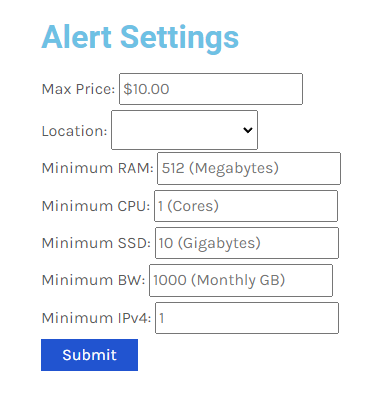
Sneak peak for alert sound:
https://billing.virmach.com/modules/addons/blackfriday/alert.mp3
FrankZ drunk, reqouting messages without any content.

Oh top of that it's even edited!
Haven't bought a single service in VirMach Great Ryzen 2022 - 2023 Flash Sale.
https://lowendspirit.com/uploads/editor/gi/ippw0lcmqowk.png
I had to reedit the photo/meme as it came out to large.
It is re-posted now, just smaller.
Strongly recommend that you offer Alpine Linux in your standard installs. It uses about 64MB of RAM by itself. The min memory for installation is stated as 256MB though, for the full version, but there is a VPS version that is lighter. I try to install it all my machines but apparently ISO mount requests are strictly verboten for BF deals.
@nutjob you can get Alpine ISO in the billing panel.
I doubt the OOM killer was involved in that crash. I had almost nothing running on the VM when I did the upgrade. Plus, I just did the same upgrade on a similarly configured 384MB VM and it didn't crash. Something seems weird about the 768MB VM or its host node or location or something.
Thanks! Is that new? Or did I just miss it?