@NotRealZeyad said:
Hi @Not_Oles so about the question "What the game I ran and how much people were playing" I was playing gta v the time you saw the graph was I installing it and it is true it takes a lot of CPU and ram to install once it finished I opened it only for 1 minute for testing purposes to see if it would handle it and it did work very smoothly but lags for me as my internet as for the how many people there was only me who was testing it other then my friend was connected to it at the same time using rdpwrapper and he was monitoring the test again am very sorry also if you saw me using a lot of resources it wont be for long here is my ssh key btw
@NotRealZeyad said:
Hi @Not_Oles so about the question "What the game I ran and how much people were playing" I was playing gta v the time you saw the graph was I installing it and it is true it takes a lot of CPU and ram to install once it finished I opened it only for 1 minute for testing purposes to see if it would handle it and it did work very smoothly but lags for me as my internet as for the how many people there was only me who was testing it other then my friend was connected to it at the same time using rdpwrapper and he was monitoring the test again am very sorry also if you saw me using a lot of resources it wont be for long here is my ssh key btw
Thanks for your message! I appreciate your kindly answering my question.
Does anyone want to speak up for @NotRealZeyad? Should his paused MetalVPS account be reinstated because of his contributions to our community?
Thanks!
Tom
I can help people to get rdpwrapper working
Is there anything else you would like to learn, have learned, or can help with on MetalVPS?
Maybe something that is not in a legal gray area like RDPWrap. (There are statements on the internet that it is legal, statements that it is illegal and statements that there is no definite answer for it).
@NotRealZeyad said:
Hi @Not_Oles so about the question "What the game I ran and how much people were playing" I was playing gta v the time you saw the graph was I installing it and it is true it takes a lot of CPU and ram to install once it finished I opened it only for 1 minute for testing purposes to see if it would handle it and it did work very smoothly but lags for me as my internet as for the how many people there was only me who was testing it other then my friend was connected to it at the same time using rdpwrapper and he was monitoring the test again am very sorry also if you saw me using a lot of resources it wont be for long here is my ssh key btw
@NotRealZeyad said:
Hi @Not_Oles so about the question "What the game I ran and how much people were playing" I was playing gta v the time you saw the graph was I installing it and it is true it takes a lot of CPU and ram to install once it finished I opened it only for 1 minute for testing purposes to see if it would handle it and it did work very smoothly but lags for me as my internet as for the how many people there was only me who was testing it other then my friend was connected to it at the same time using rdpwrapper and he was monitoring the test again am very sorry also if you saw me using a lot of resources it wont be for long here is my ssh key btw
Thanks for your message! I appreciate your kindly answering my question.
Does anyone want to speak up for @NotRealZeyad? Should his paused MetalVPS account be reinstated because of his contributions to our community?
Thanks!
Tom
I can help people to get rdpwrapper working
Is there anything else you would like to learn, have learned, or can help with on MetalVPS?
Maybe something that is not in a legal gray area like RDPWrap. (There are statements on the internet that it is legal, statements that it is illegal and statements that there is no definite answer for it).
I didn't know that rdpwrapper was illegal, but I did learn how to operate qemu using my friends and a bit and port forwarding
@NotRealZeyad said:
Hi @Not_Oles so about the question "What the game I ran and how much people were playing" I was playing gta v the time you saw the graph was I installing it and it is true it takes a lot of CPU and ram to install once it finished I opened it only for 1 minute for testing purposes to see if it would handle it and it did work very smoothly but lags for me as my internet as for the how many people there was only me who was testing it other then my friend was connected to it at the same time using rdpwrapper and he was monitoring the test again am very sorry also if you saw me using a lot of resources it wont be for long here is my ssh key btw
@NotRealZeyad said:
Hi @Not_Oles so about the question "What the game I ran and how much people were playing" I was playing gta v the time you saw the graph was I installing it and it is true it takes a lot of CPU and ram to install once it finished I opened it only for 1 minute for testing purposes to see if it would handle it and it did work very smoothly but lags for me as my internet as for the how many people there was only me who was testing it other then my friend was connected to it at the same time using rdpwrapper and he was monitoring the test again am very sorry also if you saw me using a lot of resources it wont be for long here is my ssh key btw
Thanks for your message! I appreciate your kindly answering my question.
Does anyone want to speak up for @NotRealZeyad? Should his paused MetalVPS account be reinstated because of his contributions to our community?
Thanks!
Tom
I can help people to get rdpwrapper working
Is there anything else you would like to learn, have learned, or can help with on MetalVPS?
Maybe something that is not in a legal gray area like RDPWrap. (There are statements on the internet that it is legal, statements that it is illegal and statements that there is no definite answer for it).
I didn't know that rdpwrapper was illegal, but I did learn how to operate qemu using my friends and a bit and port forwarding
@Not_Oles
ヾ(*゚▽゚)ノ Hello♪
I hope this letter finds you well. I wanted to take a moment to express my gratitude for your concern and support. Your encouragement has been invaluable to me.(◕‿◕)
I wanted to explain that in the first few days, I was researching how to connect to a Linux virtual machine on MetalVPS using RDP (I initially tried Ubuntu). Unfortunately, due to my slow internet speed, VNC services were too laggy for me. However, I was fortunate enough to come across tutorials by @cpsd and @itsmepaddi(salute to them( ̄^ ̄)ゞ), which helped me successfully connect my Win11 to Ubuntu using RDP(•̀ᴗ•́)و ̑̑. Compared to VNC, RDP was much smoother and more efficient.
As a result, I thought it would be helpful to organize my thoughts and share them with others who may have similar needs. I would also appreciate any guidance or feedback from the community.
However, I must admit that I tend to get easily distracted, and I've spent a pretty much time exploring LXC and Docker, so I'm just now starting to formally organize my thoughts and will be sharing them soon.
I do have a few questions that I hope you can help me with:
Is it necessary to use QEMU technology with KVM, or are there other ways to use it?
I would like to try configuring and using Docker, but it seems that I do not have the necessary permissions. If it is convenient for you, could you please add me to the Docker group?(๑•̀ㅂ•́)و✧
I also want to try LXC, but it seems that I do not have the necessary permissions. If it is convenient for you, could you please add me to the LXC group?(๑•̀ㅂ•́)و✧
Thank you again for your support and guidance. I look forward to hearing from you soon.
So you should be able to enter @fsn.metalvps.com:59 or 88.198.14.252:59 in VNC Viewer or TigerVNC Viewer, press Enter to connect to your Ubuntu, and then don't forget to complete the installation of the Ubuntu system according to the prompt. Remember the username and password you set
Because of my high network latency, the experience of VNC service is poor, so I want to seek RDP connection, which may improve the situation (it turns out that enabling RDP connection does improve a lot and reduces a lot of stuttering)
Enable xrdp service
It seems that Windows uses the RDP protocol to connect to Ubuntu, requiring the xrdp service to be installed and enabled in advance in Ubuntu:
Press Ctrl+Alt+T in the VNC-Ubuntu interface to enter the Ubuntu terminal
Run in sequence:
sudo apt update
This step updates the Ubuntu software package list to ensure you can install the latest version of the software package
sudo apt install xrdp
This step installs the xrdp package, which is an open source software that allows remote desktop connections.
sudo systemctl enable xrdp
This step enables the xrdp service so that it automatically starts when the system boots.
sudo ufw allow from any to any proto tcp
This step allows remote desktop connections on TCP port 3389 through Ubuntu's firewall.
This will allow other computers to remotely connect to your Ubuntu computer via Remote Desktop.
Then close the VNC window,
Enter quit in the VPS terminal to exit the virtual machine
Port forwarding
Run in the terminal in the VPS home directory (thanks to @itsmepaddi for providing the code):
You can understand these parameters to customize them in the future:
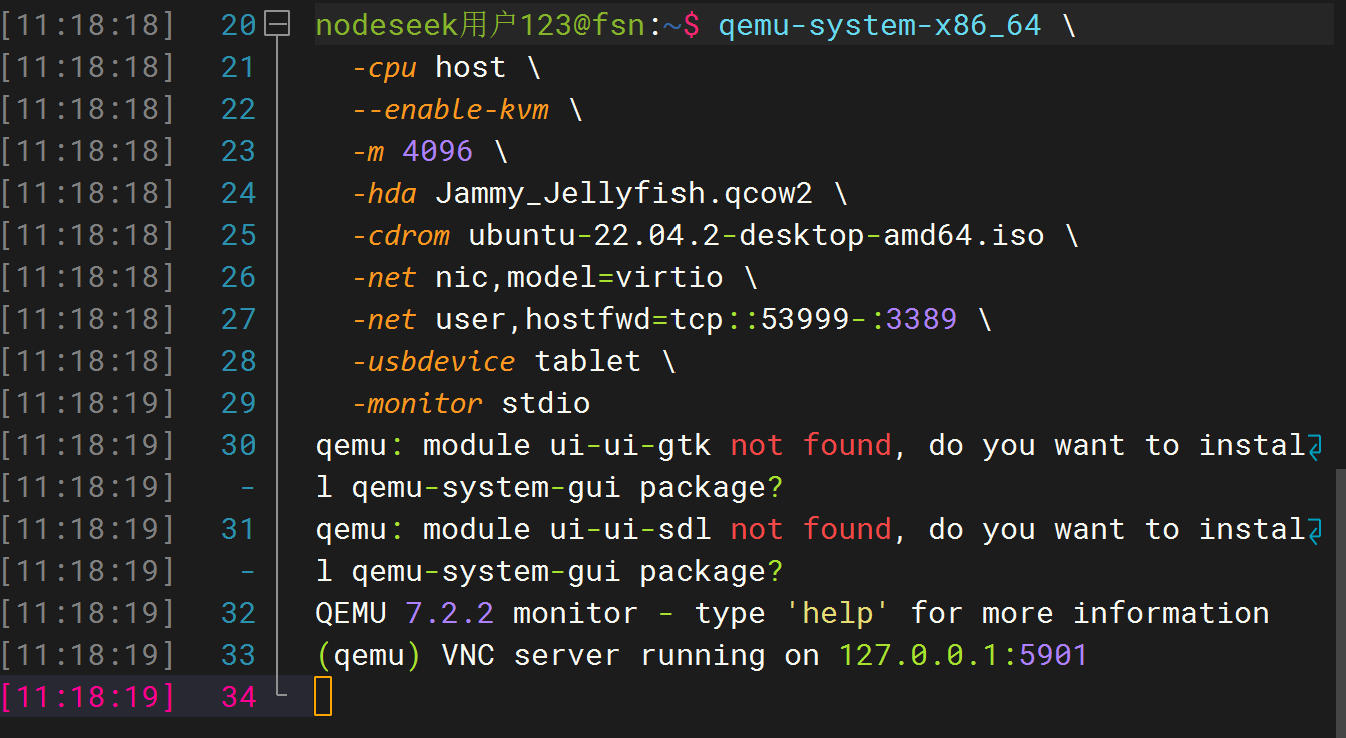
qemu-system-x86_64: This is the command to start the virtual machine. It will call the QEMU program to create the virtual machine.
-cpu host: This option tells QEMU to use the host CPU features to simulate the virtual machine's CPU.
--enable-kvm: This option enables the KVM (Kernel-based Virtual Machine) module, which can improve the performance of the virtual machine.
-m 4096: This option sets the virtual machine's memory size to 4GB.
-hda test.qcow2: This option specifies the hard disk image file of the virtual machine as test.qcow2.
-cdrom ubuntu-22.04.2-desktop-amd64.iso: This option specifies the optical drive image file of the virtual machine as ubuntu-22.04.2-desktop-amd64.iso.
-net nic,model=virtio: This option enables a virtual network interface and uses the virtio model to simulate the network device.
-net user,hostfwd=tcp::53999-:3389: This option maps port 3389 of the virtual machine to port 53999 of the host, so you can remotely connect to the virtual machine via RDP (Remote Desktop Protocol). (This step is critical!!!)
-usbdevice tablet: This option enables a virtual USB device that simulates a touchpad for easy operation in the virtual machine.
-monitor stdio: This option enables a console monitor where commands can be entered in the console to control the virtual machine. stdio indicates using standard input and output as the console
You don't have to use port 53999 like me. You can run in the VPS terminal:
This will filter out some ports that may be available, pick one of your favorite "x ports" from them to replace 53999
Success
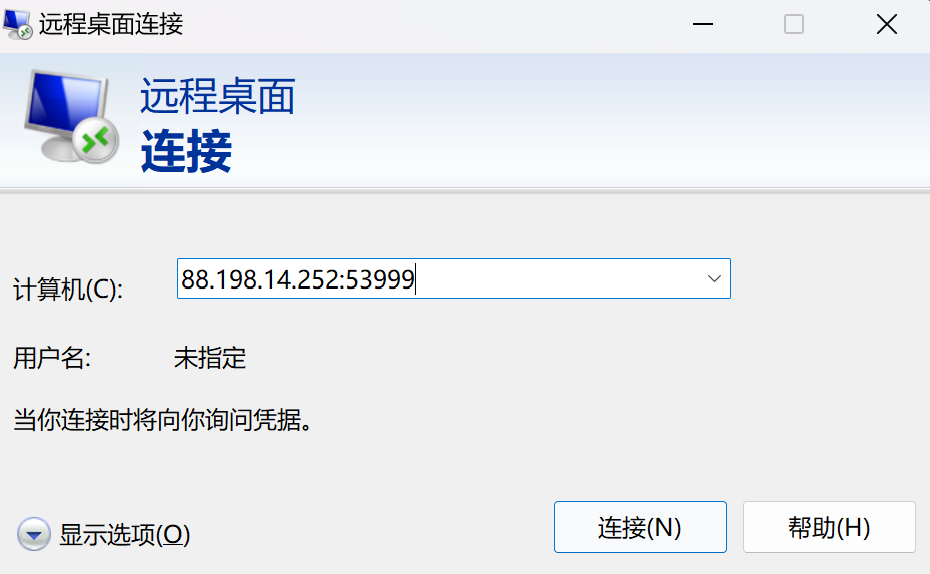
Finally, search and open RDP on Windows, enter @fsn.metalvps.com:53999 or 88.198.14.252:53999 (@fsn.metalvps.com:x or 88.198.14.252:x)
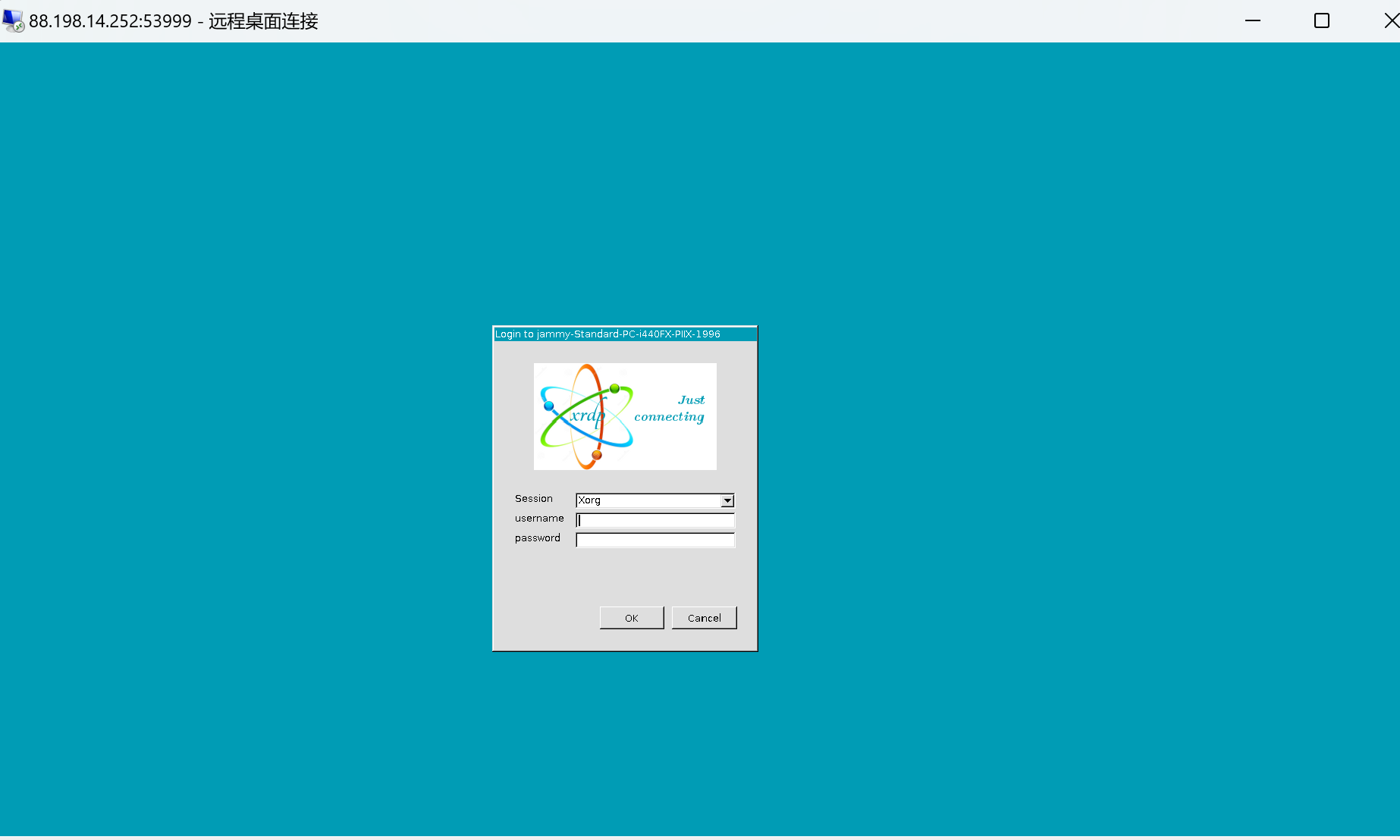
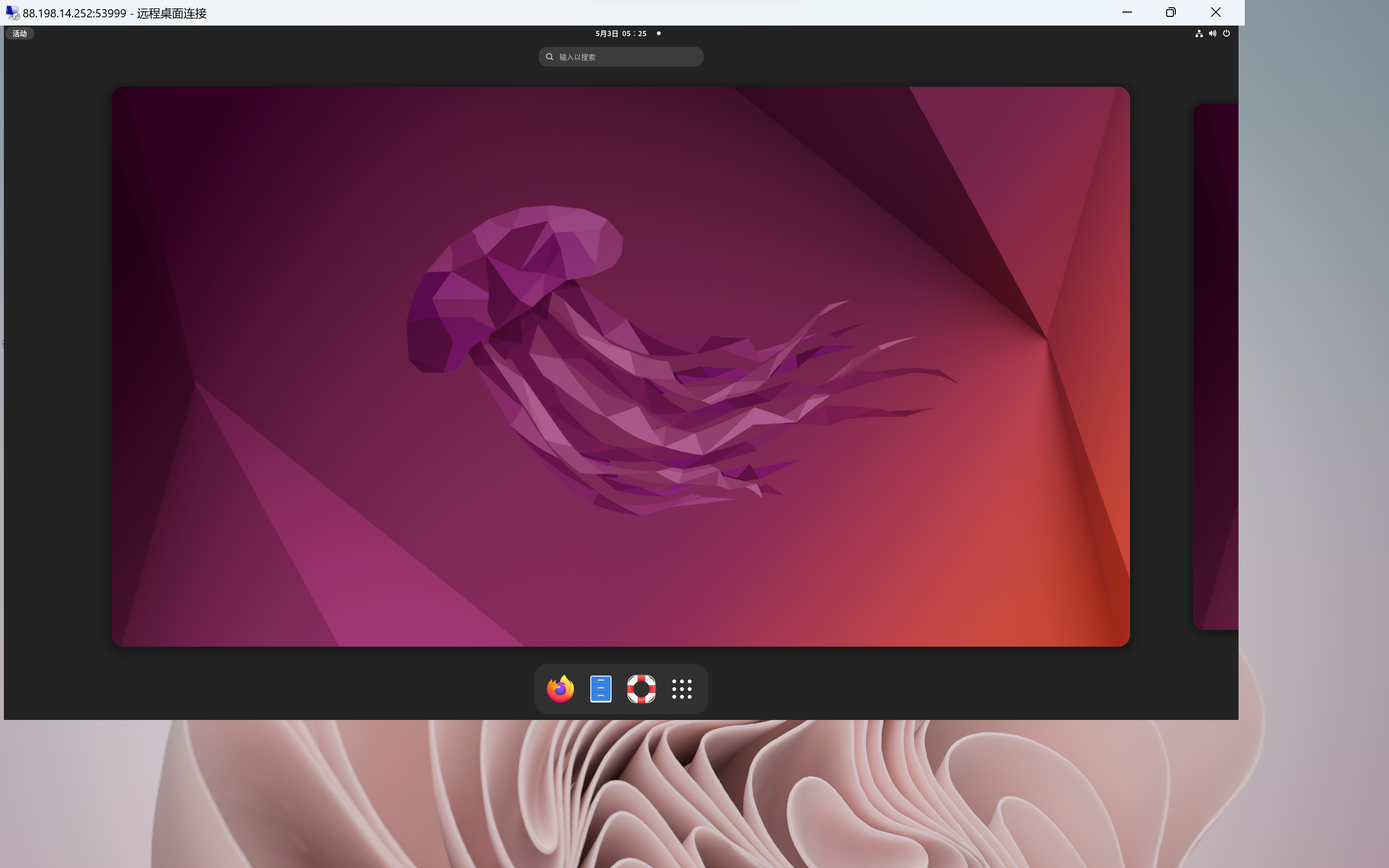
Enter the username and password you set up earlier in Ubuntu
So you should be able to enter @fsn.metalvps.com:59 or 88.198.14.252:59 in VNC Viewer or TigerVNC Viewer, press Enter to connect to your Ubuntu, and then don't forget to complete the installation of the Ubuntu system according to the prompt. Remember the username and password you set
Because of my high network latency, the experience of VNC service is poor, so I want to seek RDP connection, which may improve the situation (it turns out that enabling RDP connection does improve a lot and reduces a lot of stuttering)
Enable xrdp service
It seems that Windows uses the RDP protocol to connect to Ubuntu, requiring the xrdp service to be installed and enabled in advance in Ubuntu:
Press Ctrl+Alt+T in the VNC-Ubuntu interface to enter the Ubuntu terminal
Run in sequence:
sudo apt update
This step updates the Ubuntu software package list to ensure you can install the latest version of the software package
sudo apt install xrdp
This step installs the xrdp package, which is an open source software that allows remote desktop connections.
sudo systemctl enable xrdp
This step enables the xrdp service so that it automatically starts when the system boots.
sudo ufw allow from any to any proto tcp
This step allows remote desktop connections on TCP port 3389 through Ubuntu's firewall.
This will allow other computers to remotely connect to your Ubuntu computer via Remote Desktop.
Then close the VNC window,
Enter quit in the VPS terminal to exit the virtual machine
Port forwarding
Run in the terminal in the VPS home directory (thanks to @itsmepaddi for providing the code):
You can understand these parameters to customize them in the future:
qemu-system-x86_64: This is the command to start the virtual machine. It will call the QEMU program to create the virtual machine.
-cpu host: This option tells QEMU to use the host CPU features to simulate the virtual machine's CPU.
--enable-kvm: This option enables the KVM (Kernel-based Virtual Machine) module, which can improve the performance of the virtual machine.
-m 4096: This option sets the virtual machine's memory size to 4GB.
-hda test.qcow2: This option specifies the hard disk image file of the virtual machine as test.qcow2.
-cdrom ubuntu-22.04.2-desktop-amd64.iso: This option specifies the optical drive image file of the virtual machine as ubuntu-22.04.2-desktop-amd64.iso.
-net nic,model=virtio: This option enables a virtual network interface and uses the virtio model to simulate the network device.
-net user,hostfwd=tcp::53999-:3389: This option maps port 3389 of the virtual machine to port 53999 of the host, so you can remotely connect to the virtual machine via RDP (Remote Desktop Protocol). (This step is critical!!!)
-usbdevice tablet: This option enables a virtual USB device that simulates a touchpad for easy operation in the virtual machine.
-monitor stdio: This option enables a console monitor where commands can be entered in the console to control the virtual machine. stdio indicates using standard input and output as the console
You don't have to use port 53999 like me. You can run in the VPS terminal:
This will filter out some ports that may be available, pick one of your favorite "x ports" from them to replace 53999
Success
Finally, search and open RDP on Windows, enter @fsn.metalvps.com:53999 or 88.198.14.252:53999 (@fsn.metalvps.com:x or 88.198.14.252:x)
Enter the username and password you set up earlier in Ubuntu
There isn't sudo yet! (yep) you can tr y make a vm without sudo like this
@NodeSeek用户123 said: @Not_Oles
ヾ(*゚▽゚)ノ Hello♪
I hope this letter finds you well. I wanted to take a moment to express my gratitude for your concern and support. Your encouragement has been invaluable to me.(◕‿◕)
I wanted to explain that in the first few days, I was researching how to connect to a Linux virtual machine on MetalVPS using RDP (I initially tried Ubuntu). Unfortunately, due to my slow internet speed, VNC services were too laggy for me. However, I was fortunate enough to come across tutorials by @cpsd and @itsmepaddi(salute to them( ̄^ ̄)ゞ), which helped me successfully connect my Win11 to Ubuntu using RDP(•̀ᴗ•́)و ̑̑. Compared to VNC, RDP was much smoother and more efficient.
As a result, I thought it would be helpful to organize my thoughts and share them with others who may have similar needs. I would also appreciate any guidance or feedback from the community.
However, I must admit that I tend to get easily distracted, and I've spent a pretty much time exploring LXC and Docker, so I'm just now starting to formally organize my thoughts and will be sharing them soon.
I do have a few questions that I hope you can help me with:
Is it necessary to use QEMU technology with KVM, or are there other ways to use it?
I would like to try configuring and using Docker, but it seems that I do not have the necessary permissions. If it is convenient for you, could you please add me to the Docker group?(๑•̀ㅂ•́)و✧
I also want to try LXC, but it seems that I do not have the necessary permissions. If it is convenient for you, could you please add me to the LXC group?(๑•̀ㅂ•́)و✧
Thank you again for your support and guidance. I look forward to hearing from you soon.
Also my ping very high, VNC also laggy for me too! I prefer RDP for connection because i cant see the lag on it but its a bit slow and the latency is not good for me, also whats your ping, show me! C:\Users\DinoPotato>ping fsn.metalvps.com
Pinging fsn.metalvps.com [2a01:4f8:222:2dcd::2] with 32 bytes of data: Reply from 2a01:4f8:222:2dcd::2: time=307ms Reply from 2a01:4f8:222:2dcd::2: time=326ms Reply from 2a01:4f8:222:2dcd::2: time=333ms Reply from 2a01:4f8:222:2dcd::2: time=344ms
Ping statistics for 2a01:4f8:222:2dcd::2: Packets: Sent = 4, Received = 4, Lost = 0 (0% loss), Approximate round trip times in milli-seconds: Minimum = 307ms, Maximum = 344ms, Average = 327ms
@dinopotato said: Hello!
So you did a triple wrong in message, there is a option to edit it if it wrong, you can try it out (Only work if you post it > 1 hours )
Just so people don't think you are crazy responding to a comment that is no longer there. I will note that I removed the double post (2nd correction) and the third correction comment that you quoted and fixed the original comment to contain the correct link as stated by the OP, but it does not seem to work for me.
@dinopotato said: Hello!
So you did a triple wrong in message, there is a option to edit it if it wrong, you can try it out (Only work if you post it > 1 hours )
Just so people don't think you are crazy responding to a comment that is no longer there. I will note that I removed the double post (2nd correction) and the third correction comment that you quoted and fixed the original comment to contain the correct link.
Thanks for the recommended by you, i just didn't saw the comment up there! Sorry so much!
Yes, the new server, or another server might become available to you. 🤔
You seem like a great guy, and I notice that you haven't caused us any trouble. On the other hand, we haven't heard much about what you are doing on the server. Do you have any tips for those of us who know less than you? Do you have any questions or any . . . anything?
How do you feel about trying to become more active here in our thread? Maybe you could start becoming more active by telling us more about what you are doing today on the server? Besides what you are doing right now, what would you add or change if you had sudo? What would be the reasons which support your changes? Any disadvantages we might want to consider?
Thanks for this post! It's appreciated! It's great to hear from you!
Best wishes!
Tom
Hi, @Not_Oles
Q: Do you have any tips for those of us who know less than you?
No
Q: How do you feel about trying to become more active here in our thread?
probably good and maybe will become active here
Q: Besides what you are doing right now
uh you writed this message when i was sleeping so nothing
Q: what would you add or change if you had sudo?
only add probably when i find intresting things on the internet
Q:What would be the reasons which support your changes?
I do not understand, if it is ok.
Q: Any disadvantages we might want to consider?
I dont think so
@dinopotato
Sure,I pinged five times, and overall:
Pinging fsn.metalvps.com [88.198.14.252] with 32 bytes of data:
Request timed out.
Reply from 88.198.14.252: bytes=32 time=267ms TTL=51
Reply from 88.198.14.252: bytes=32 time=287ms TTL=51
Reply from 88.198.14.252: bytes=32 time=265ms TTL=51

Ping statistics for 88.198.14.252:
    Packets: Sent = 4, Received = 3, Lost = 1 (25% loss),
Approximate round trip times in milli-seconds:
    Minimum = 265ms, Maximum = 287ms, Average = 273ms
Actually, I have to turn on VPN to use ping. If I don't turn on VPN, it will be like this:
Pinging fsn.metalvps.com [88.198.14.252] with 32 bytes of data:
Request timed out.
Reply from 88.198.14.252: bytes=32 time=267ms TTL=51
Request timed out.
Request timed out.

Ping statistics for 88.198.14.252: Packets:
Sent = 4, Received = 1, Lost = 3 (75% loss),
 Approximate round trip times in milli-seconds:
Minimum = 267ms, Maximum = 267ms, Average = 267ms
Maybe the latency is okay compared to yours, but the packet loss is too high.(x_x)
Want to share a little bit about your studies? What subjects? What especially interesting things did you learn about those subjects? You don't have to talk about your studies unless you want to share. It's okay either way.
Anything about my studies is a secret because of privacy reasons.
You didn't give any reason for why you need access to the other server. Remember, the discussion about the new server started when we were talking about memory resident VMs that somebody wanted to try? And I asked about trying the memory resident VMs on the new server because it has 128GB of RAM?
I want to try the new server because I would like to test how the performance of the new server is, and I want to compare it with the current 64GB RAM MetalVPS server.
By the way, I saw your nice comment over at Nodeseek. I haven't had a chance to reply there yet. But I am delighted to thank you both here and also there!
Is it necessary to use QEMU technology with KVM, or are there other ways to use it?
You do not have to use KVM. But, typically, without KVM, the performance is very significantly slower. I am unaware of additional ways to use Qemu. Probably there are additional ways.
For completeness, you do not have to use Qemu at all. It's possible just to work on the node itself. Working directly on the node should be faster than Qemu with KVM and and much faster than Qemu without KVM. Working directly on the node is also faster than using LXC.
I would like to try configuring and using Docker, but it seems that I do not have the necessary permissions. If it is convenient for you, could you please add me to the Docker group?(๑•̀ㅂ•́)و✧
I haven't used Docker very much. From @yoursunny I heard that adding people to the docker group is equivalent to giving them root on the server. If you Google search "docker group privilege escalation" there seems to be a lot of information available.
I wondered about making a server with just Docker containers. Maybe neighbors could provision Docker containers and root could start the containers for the neighbors? I don't know if this would work, what the limitations would be, or whether it would be interesting to others.
I also want to try LXC, but it seems that I do not have the necessary permissions. If it is convenient for you, could you please add me to the LXC group?(๑•̀ㅂ•́)و✧
I have been waiting for someone to ask about LXC. So far, no one has spoken up about LXC. There are additional configuration steps needed on the node before LXC can function. Maybe someone will want to help get LXC going.
For completeness, there are additional virtualization methods besides Qemu and LXC and Docker.
I am delighted to hear from you! More soon! Have a great day!
Want to share a little bit about your studies? What subjects? What especially interesting things did you learn about those subjects? You don't have to talk about your studies unless you want to share. It's okay either way.
Anything about my studies is a secret because of privacy reasons.
You didn't give any reason for why you need access to the other server. Remember, the discussion about the new server started when we were talking about memory resident VMs that somebody wanted to try? And I asked about trying the memory resident VMs on the new server because it has 128GB of RAM?
I want to try the new server because I would like to test how the performance of the new server is, and I want to compare it with the current 64GB RAM MetalVPS server.
By the way, I saw your nice comment over at Nodeseek. I haven't had a chance to reply there yet. But I am delighted to thank you both here and also there!
No problem!
Here's a life lesson for you. To earn trust you must tell people something about you.
This way people can relate to you and build some emotional connection to you. This is what trust is based upon.
You can keep it to yourself, but then expect people to not help you getting what you want.
Then don't blame people for not being generous with you.
Thank you for your wonderful post here and also for your wonderful blog post via xlog.app!
When I put the above link for xlog.app into Google Translate, I was shown an error page which said something like "Can't translate this page." The error message was accompanied by an image which seemed to be a dog with it's leg tied. I got most of the translation by copying the text off the page and pasting it into Google Translate. I wonder why Google Translate does not work with xlog.app.
Thank you for identifying yourself as a beginner and then reinforcing your self-identification by taking beginner steps such as your use of netstat together with awk.
When I previously was offering here at LES the Alpine Linux server at HE FMT there were a few Chinese guys whose contributions seemed outstanding to me. These outstanding contributions were what motivated me to try making a Nodeseek account and offering this over there. Now I have learned a lot from the Chinese guys both here at LES and over at our neighboring Nodeseek forum.
Your choice of RDP is interesting! I have wanted to try Spice because there is a Spice app on my Chromebook.
I wonder what might be your next step on the server. If you expect to continue.
If you wish, please answer or please do not answer (either way is good) a few off topic questions, which I can not resist asking:
How is your C programming?
How is your wenyanwen and guwen?
Now that I might know one Chinese character (刀, dāo, knife, dollar (informal)), what should be my next character to learn? More generally, by what method should I select additional characters to try to learn?
Thank you for your wonderful contributions to our community here at LES and at MetalVPS!
FWIW, now xlog.app seemingly won't show me @NodeSeek用户123's wonderful blog post a second time. It worked fine the first time I visited, but now I get a blank page. Ideas?
FWIW, now xlog.app seemingly won't show me @NodeSeek用户123's wonderful blog post a second time. It worked fine the first time I visited, but now I get a blank page. Ideas?
I think everyone all blank pages, the page seems died, i also try on my VM and on the same (i didn't visited it on my VM)
@iamvinh123 said: Memory-based/RAM-based installation of Windows 11
The thing requires only 8GB RAM
Yes! In the second image that you posted I see "SVBus Virtual Hard Disk SCSI RAM Device."
Excellent! 🤩 What's next?
Now that you had a chance to try this, @itsmepaddi wanted to get on the second server. Would you, @iamvinh123 and @dinopotato, want @itsmepaddi to join you on the second server? If yes, one of you can please make an account on the second server for @itsmepaddi. And please give him membership in the sudo and kvm groups. Or else it's also okay to ask me to make the account.
Maybe MetalVPS might be on its way to becoming self-administered? 😸
If you still want to use it to explore something new about Linux and virtualization and not using too much resource for yourself (abusing resource), I can say that's a yes.
Also, you did not say much about @dinopotato's question "What kind of VM are you using?" Maybe you could have said something about which OS you are using and what software you are running? Maybe you could have said something about what you are trying to accomplish here at MetalVPS?
You also seemed to have at least four screen sessions open, some from a couple of days ago. Are you forgetting to close your old acreen sessions?
When I asked you and your friend Kadim where you guys met, you both said "online."
I agree that people's privacy is important, but, nevertheless, maybe you guys could have been a bit more specific?
Honestly, it is concerning that you took more resources than the amount to which you had agreed after having been called out by @dinopotato for using the server too heavily. Nobody forced you to agree to @dinopotato's request, but you agreed. Then you took more than the agreed amount! Moreover, it seems you might not want to share details about what you are doing on the server.
I think someone could use even more resources than you originally were using when @dinopotato spoke up. I think, if someone asked here about some specific project or test that he wanted to run, probably everyone would want to be supportive. On the other hand, maybe the guys who take and take, silently, deserve less support from our community?
I suspended your MetalVPS account for awhile so we all can take a moment to think about what happened and how best to proceed. I apologize for the inconvenience. I will keep trying to reinstate your account and to add an account for your friend @Kadim1998.
@dinopotato said: @NgocNguyen8372 What kind of vm are you using?
i saw you run so much resouces in this machine, can you limit it to 8G ram and 4vCPU?
Ok sure
ok did you decrease the resources yet
So . . . 45 minutes after @NgocNguyen8372 says "Ok sure" someone else has to ask! After someone else asks, he takes more than the amount to which he agreed.
@itsmepaddi said: I want to try the new server because I would like to test how the performance of the new server is, and I want to compare it with the current 64GB RAM MetalVPS server.
I asked the guys already on the server to please add you. Any problems, please just let me know.
@Exinjh said:
Guys, who reading this. Please, answer my question: Should Not_Oles restore my account? Again, sorry for abusing the VPS.
Sorry if it took me too long to answer, I was browsing through the comments and just found your restore request.
Yes, your account should be restored.
Should mine also be restored?
@itsmepaddi Thanks for speaking up! It's always good to be generous and kind! @Exinjh@NotRealZeyad I continue to consider reinstating your accounts. @NgocNguyen8372 and @Kadim1998 I am thinking about you guys too. I hope to do the best for everyone. Thank you very much!
Also, you did not say much about @dinopotato's question "What kind of VM are you using?" Maybe you could have said something about which OS you are using and what software you are running? Maybe you could have said something about what you are trying to accomplish here at MetalVPS?
You also seemed to have at least four screen sessions open, some from a couple of days ago. Are you forgetting to close your old acreen sessions?
When I asked you and your friend Kadim where you guys met, you both said "online."
I agree that people's privacy is important, but, nevertheless, maybe you guys could have been a bit more specific?
Honestly, it is concerning that you took more resources than the amount to which you had agreed after having been called out by @dinopotato for using the server too heavily. Nobody forced you to agree to @dinopotato's request, but you agreed. Then you took more than the agreed amount! Moreover, it seems you might not want to share details about what you are doing on the server.
I think someone could use even more resources than you originally were using when @dinopotato spoke up. I think, if someone asked here about some specific project or test that he wanted to run, probably everyone would want to be supportive. On the other hand, maybe the guys who take and take, silently, deserve less support from our community?
I suspended your MetalVPS account for awhile so we all can take a moment to think about what happened and how best to proceed. I apologize for the inconvenience. I will keep trying to reinstate your account and to add an account for your friend @Kadim1998.
@iamvinh123 said: Memory-based/RAM-based installation of Windows 11
The thing requires only 8GB RAM
Yes! In the second image that you posted I see "SVBus Virtual Hard Disk SCSI RAM Device."
Excellent! 🤩 What's next?
Now that you had a chance to try this, @itsmepaddi wanted to get on the second server. Would you, @iamvinh123 and @dinopotato, want @itsmepaddi to join you on the second server? If yes, one of you can please make an account on the second server for @itsmepaddi. And please give him membership in the sudo and kvm groups. Or else it's also okay to ask me to make the account.
Maybe MetalVPS might be on its way to becoming self-administered? 😸
Alright
I'll add him to the new server
Maybe MetalVPS is becoming self-administered
@iamvinh123 said: Memory-based/RAM-based installation of Windows 11
The thing requires only 8GB RAM
Yes! In the second image that you posted I see "SVBus Virtual Hard Disk SCSI RAM Device."
Excellent! 🤩 What's next?
Now that you had a chance to try this, @itsmepaddi wanted to get on the second server. Would you, @iamvinh123 and @dinopotato, want @itsmepaddi to join you on the second server? If yes, one of you can please make an account on the second server for @itsmepaddi. And please give him membership in the sudo and kvm groups. Or else it's also okay to ask me to make the account.
Maybe MetalVPS might be on its way to becoming self-administered? 😸
Alright
I'll add him to the new server
Maybe MetalVPS is becoming self-administered
Added.
root@i9 /home/itsmepaddi # ls -alR
.:
total 28
drwx------ 3 itsmepaddi itsmepaddi 4096 May  4 05:19 .
drwxr-xr-x 5 root       root       4096 May  4 05:16 ..
-rw-r--r-- 1 itsmepaddi itsmepaddi  220 May  4 05:16 .bash_logout
-rw-r--r-- 1 itsmepaddi itsmepaddi 3526 May  4 05:16 .bashrc
-rw-r--r-- 1 itsmepaddi itsmepaddi    0 May  4 05:16 .cloud-locale-test.skip
-rw------- 1 itsmepaddi itsmepaddi   17 May  4 05:17 password
-rw-r--r-- 1 itsmepaddi itsmepaddi  807 May  4 05:16 .profile
drwx------ 2 itsmepaddi itsmepaddi 4096 May  4 05:20 .ssh

./.ssh:
total 12
drwx------ 2 itsmepaddi itsmepaddi 4096 May  4 05:20 .
drwx------ 3 itsmepaddi itsmepaddi 4096 May  4 05:19 ..
 -rw------- 1 itsmepaddi itsmepaddi  100 May  4 05:20 authorized_keys
root@i9 /home/itsmepaddi # cat .ssh/authorized_keys
ssh-ed25519 AAAAC3NzaC1lZDI1NTE5AAAAIH1AJ0O0J9IrWbGK0eJ6o/4+K8tXOH7uCafQ4djYTB8r eddsa-key-20230419
@Not_Oles said: You do not have to use KVM. But, typically, without KVM, the performance is very significantly slower. I am unaware of additional ways to use Qemu. Probably there are additional ways.
In fact, when I asked ChatGPT what KVM is, it introduced me to the process of creating virtual machines with KVM, that is, configuring virtual machines through virt-manager or virsh command line tools. However, it seems that our node does not have virt-manager or virsh command line tools installed, so I was confused about this. Later I learned that KVM technology is often a means to assist other virtualization technologies, and it is not necessary to directly use it to create virtual machines. My doubts were also dispelled. (◕‿◕)
@Not_Oles said: For completeness, you do not have to use Qemu at all. It's possible just to work on the node itself. Working directly on the node should be faster than Qemu with KVM and and much faster than Qemu without KVM. Working directly on the node is also faster than using LXC.
Yes, you are right, working directly on the node will be faster, but I do not have root privileges on the node, and many of the things I want to do require root privileges. So I am looking to create a faster VM so that I can use root privileges in the VM. It would be even better if this VM could have a decent graphical interface. This is the original intention of my seeking a solution to connect to the virtual machine with lower latency.
@Not_Oles said: I haven't used Docker very much. From @yoursunny I heard that adding people to the docker group is equivalent to giving them root on the server. If you Google search "docker group privilege escalation" there seems to be a lot of information available
Haha, I have to say, I haven't really configured and used Docker myself. I only saw that many projects on GitHub can run on Docker. I think Docker is a popular and practical technology. Out of curiosity, I made this request to you. I don't know if there is a way to run Docker without directly using root privileges. Thank you for your suggestion. I have been reading some articles on "docker group privilege escalation". When I find the answer, I will let you know. (๑•̀ㅂ•́)و✧
@Not_Oles said: I have been waiting for someone to ask about LXC. So far, no one has spoken up about LXC. There are additional configuration steps needed on the node before LXC can function. Maybe someone will want to help get LXC going.
Compared to Docker, I am afraid I am more unfamiliar with LXC. Hope someone will want to help get LXC going.(:3 」∠)
Thank you for your patient answers. Have a nice day too!⭐
@Not_Oles said: When I put the above link for xlog.app into Google Translate, I was shown an error page which said something like "Can't translate this page." The error message was accompanied by an image which seemed to be a dog with it's leg tied. I got most of the translation by copying the text off the page and pasting it into Google Translate. I wonder why Google Translate does not work with xlog.app.
@Not_Oles said: Thank you for identifying yourself as a beginner and then reinforcing your self-identification by taking beginner steps such as your use of netstat together with awk.
In fact, I am indeed a beginner! I am just trying to review my thoughts as clearly as possible. I don't want to be confused about this article in a few months, but want it to become my quick reference guide, and the same for others.
@Not_Oles said: When I previously was offering here at LES the Alpine Linux server at HE FMT there were a few Chinese guys whose contributions seemed outstanding to me. These outstanding contributions were what motivated me to try making a Nodeseek account and offering this over there. Now I have learned a lot from the Chinese guys both here at LES and over at our neighboring Nodeseek forum.
Yes, indeed there are many generous and skilled people on Nodeseek forum who are willing to help.(Like Just纱世里,he is a great forum administrator) .I like LES and nodeseek equally.
@Not_Oles said: I wonder what might be your next step on the server. If you expect to continue.
Hmm...I haven't tried Spice yet. I want to understand Docker first before trying Spice.
I am a freshman student. I feel that my C language is not good, although it is enough to cope with the exams. But I have not really put C language into practice for a project. I just memorized the knowledge, but I am still unfamiliar with it, including the Java I am learning now. I am confused and worried. Thank you for mentioning this issue. I hope you can give me some advice!
As for wenyanwen (classical Chinese literature) and guwen (ancient prose), and because I chose the software engineering major, so my wenyanwen and guwen have not continued to study after high school. I dare not say that I am very good at it, but I may still remember some basic common sense.
@Not_Oles said: Now that I might know one Chinese character (刀, dāo, knife, dollar (informal)), what should be my next character to learn? More generally, by what method should I select additional characters to try to learn?
I am very happy to know your interest in learning Chinese. I still remember when we were young, we first learned "拼音" when we learned Chinese. Learning Pinyin enables us to spell Chinese characters, similar to phonetic symbols in English. Then we will learn "偏旁与部首“(radicals and components). Radicals and components help us understand the same/similar meanings of some Chinese characters, similar to "roots", "prefixes" and "suffixes" in English. As for the order of Chinese characters to learn,seriously, I recommend looking at primary school or even kindergarten Chinese textbooks. They usually mark "Pinyin" which will help you pronounce. And the characters that appear in primary school/kindergarten Chinese textbooks are often the most basic and commonly used, aren't they?
I can't click either of the links. Last i checked, double dash (--) are invalid for domain/subdomains and my browser refuse to recognize that as a valid URL.
Edit:
I mean this part xn--j28h
I speak fluent sarcasm and broken logic. | I would agree with you, but thæn we’d both be wrong.
I can't click either of the links. Last i checked, double dash (--) are invalid for domain/subdomains and my browser refuse to recognize that as a valid URL.
Edit:
I mean this part xn--j28h
I guess you are using the Firefox browser, right? I have tested it on Edge and Chrome and it can be opened, but on Firefox, as you said, it cannot be recognized as a website. Even redirection does not work. It is said that this is because the link contains non-standard Unicode characters (such as "xn--j28h-1963"). In addition to using another browser to access, I may not have a better solution. If you find a better way, please let me know. Thank you for your attention.😊
😁Thanks! In fact, at that time I didn't think of what ID to take, I just used the browser's phrase filler casually. I thought that non-letters and numbers were illegal, but I didn't expect they can really be used.🤣
@NodeSeek用户123 said:
I guess you are using the Firefox browser, right?
Yep, as firefox has better ads/tracking blocking while chrome is trying to remove support for ad-blockers...
@NodeSeek用户123 said:
In addition to using another browser to access, I may not have a better solution. If you find a better way, please let me know. Thank you for your attention.😊
Using a web proxy works. Just used one of the freely available online web proxy like: https://www.proxysite.com/
I speak fluent sarcasm and broken logic. | I would agree with you, but thæn we’d both be wrong.
@somik said: Yep, as firefox has better ads/tracking blocking while chrome is trying to remove support for ad-blockers...
Yes, I heard that many programmers like to use Firefox because Firefox does a good job in privacy protection, ad tracking interception and so on.
I have also thought about switching to Firefox, but habits are hard to change. If someday they really delete support for ad blockers, I would be happy to use Firefox...
@itsmepaddi said: I want to try the new server because I would like to test how the performance of the new server is, and I want to compare it with the current 64GB RAM MetalVPS server.
I asked the guys already on the server to please add you. Any problems, please just let me know.


Comments
Is there anything else you would like to learn, have learned, or can help with on MetalVPS?
Maybe something that is not in a legal gray area like RDPWrap. (There are statements on the internet that it is legal, statements that it is illegal and statements that there is no definite answer for it).
I didn't know that rdpwrapper was illegal, but I did learn how to operate qemu using my friends and a bit and port forwarding
Also learned a lot about ssh which was my goal!
Anyways, @Not_Oles , can you unsuspend my account?
@Not_Oles
ヾ(*゚▽゚)ノ Hello♪
I hope this letter finds you well. I wanted to take a moment to express my gratitude for your concern and support. Your encouragement has been invaluable to me.(◕‿◕)
I wanted to explain that in the first few days, I was researching how to connect to a Linux virtual machine on MetalVPS using RDP (I initially tried Ubuntu). Unfortunately, due to my slow internet speed, VNC services were too laggy for me. However, I was fortunate enough to come across tutorials by @cpsd and @itsmepaddi(salute to them( ̄^ ̄)ゞ), which helped me successfully connect my Win11 to Ubuntu using RDP(•̀ᴗ•́)و ̑̑. Compared to VNC, RDP was much smoother and more efficient.
As a result, I thought it would be helpful to organize my thoughts and share them with others who may have similar needs. I would also appreciate any guidance or feedback from the community.
However, I must admit that I tend to get easily distracted, and I've spent a pretty much time exploring LXC and Docker, so I'm just now starting to formally organize my thoughts and will be sharing them soon.
I do have a few questions that I hope you can help me with:
Is it necessary to use QEMU technology with KVM, or are there other ways to use it?
I would like to try configuring and using Docker, but it seems that I do not have the necessary permissions. If it is convenient for you, could you please add me to the Docker group?(๑•̀ㅂ•́)و✧
I also want to try LXC, but it seems that I do not have the necessary permissions. If it is convenient for you, could you please add me to the LXC group?(๑•̀ㅂ•́)و✧
Thank you again for your support and guidance. I look forward to hearing from you soon.
Create Ubuntu VMs on VPS and connect via RDP using QEMU and port forwarding
Create virtual disk files using QEMU technology
First locate the VPS terminal in the home directory:
To create a 20G virtual disk:
If you are afraid of not having enough space, you can expand the disk by 10G:
Use curl to download iso files
Install curl:
Go to the official website of the linux distribution you want to use and extract the download link, here is ubuntu-22.04.2 as an example, run:
This will download:
So you should have in your home directory:
Create and connect virtual machines with VNC using QEMU virtualization technology
Run in the terminal in the home directory of the VPS (thanks to @cpsd for the code):
So you should be able to enter @fsn.metalvps.com:59 or 88.198.14.252:59 in VNC Viewer or TigerVNC Viewer, press Enter to connect to your Ubuntu, and then don't forget to complete the installation of the Ubuntu system according to the prompt. Remember the username and password you set
Because of my high network latency, the experience of VNC service is poor, so I want to seek RDP connection, which may improve the situation (it turns out that enabling RDP connection does improve a lot and reduces a lot of stuttering)
Enable xrdp service
It seems that Windows uses the RDP protocol to connect to Ubuntu, requiring the xrdp service to be installed and enabled in advance in Ubuntu:
Press Ctrl+Alt+T in the VNC-Ubuntu interface to enter the Ubuntu terminal
Run in sequence:
sudo apt update
This step updates the Ubuntu software package list to ensure you can install the latest version of the software package
sudo apt install xrdp
This step installs the xrdp package, which is an open source software that allows remote desktop connections.
sudo systemctl enable xrdp
This step enables the xrdp service so that it automatically starts when the system boots.
sudo ufw allow from any to any proto tcp
This step allows remote desktop connections on TCP port 3389 through Ubuntu's firewall.
This will allow other computers to remotely connect to your Ubuntu computer via Remote Desktop.
Then close the VNC window,
Enter quit in the VPS terminal to exit the virtual machine
Port forwarding
Run in the terminal in the VPS home directory (thanks to @itsmepaddi for providing the code):
You can understand these parameters to customize them in the future:
You don't have to use port 53999 like me. You can run in the VPS terminal:
This will filter out some ports that may be available, pick one of your favorite "x ports" from them to replace 53999
Success
Finally, search and open RDP on Windows, enter @fsn.metalvps.com:53999 or 88.198.14.252:53999 (@fsn.metalvps.com:x or 88.198.14.252:x)
Enter the username and password you set up earlier in Ubuntu
enjoy! ~(˘▾˘)~
btw: I hosted this as my first blog at:
https://xn-j28h-1963.xlog.app/shi-yong-QEMU-he-duan-kou-zhuan-fa-ji-shu-zai-VPS-shang-chuang-jian-Ubuntu-xu-ni-ji-bing-tong-guo-RDP-lian-jie
It looks more beautiful and readable
Chinese-speaking buddies can go and see
Thank you for your support. I have really learned a lot from you guys (ɔ ̆⌣ ̆) ̆⌣ ̆ c)
Memory-based/RAM-based installation of Windows 11


The thing requires only 8GB RAM
There isn't sudo yet! (yep) you can tr y make a vm without sudo like this

Also my ping very high, VNC also laggy for me too! I prefer RDP for connection because i cant see the lag on it but its a bit slow and the latency is not good for me, also whats your ping, show me!
C:\Users\DinoPotato>ping fsn.metalvps.comPinging fsn.metalvps.com [2a01:4f8:222:2dcd::2] with 32 bytes of data:Reply from 2a01:4f8:222:2dcd::2: time=307msReply from 2a01:4f8:222:2dcd::2: time=326msReply from 2a01:4f8:222:2dcd::2: time=333msReply from 2a01:4f8:222:2dcd::2: time=344msPing statistics for 2a01:4f8:222:2dcd::2:Packets: Sent = 4, Received = 4, Lost = 0 (0% loss),Approximate round trip times in milli-seconds:Minimum = 307ms, Maximum = 344ms, Average = 327msC:\Users\DinoPotato>@NgocNguyen8372 What kind of vm are you using?

i saw you run so much resouces in this machine, can you limit it to 8G ram and 4vCPU?
Ok sure
Just so people don't think you are crazy responding to a comment that is no longer there. I will note that I removed the double post (2nd correction) and the third correction comment that you quoted and fixed the original comment to contain the correct link as stated by the OP, but it does not seem to work for me.
Thanks for the recommended by you, i just didn't saw the comment up there! Sorry so much!
ok did you decrease the resources yet
Hi, @Not_Oles
Q: Do you have any tips for those of us who know less than you?
No
Q: How do you feel about trying to become more active here in our thread?
probably good and maybe will become active here
Q: Besides what you are doing right now
uh you writed this message when i was sleeping so nothing
Q: what would you add or change if you had
sudo?only add probably when i find intresting things on the internet
Q:What would be the reasons which support your changes?
I do not understand, if it is ok.
Q: Any disadvantages we might want to consider?
I dont think so
9GB ram and 5 cpu
Sorry if it took me too long to answer, I was browsing through the comments and just found your restore request.
Yes, your account should be restored.
Should mine also be restored?
@dinopotato
Sure,I pinged five times, and overall:
Actually, I have to turn on VPN to use ping. If I don't turn on VPN, it will be like this:
Maybe the latency is okay compared to yours, but the packet loss is too high.(x_x)
Anything about my studies is a secret because of privacy reasons.
I want to try the new server because I would like to test how the performance of the new server is, and I want to compare it with the current 64GB RAM MetalVPS server.
No problem!
Thanks for your questions!
You do not have to use KVM. But, typically, without KVM, the performance is very significantly slower. I am unaware of additional ways to use Qemu. Probably there are additional ways.
For completeness, you do not have to use Qemu at all. It's possible just to work on the node itself. Working directly on the node should be faster than Qemu with KVM and and much faster than Qemu without KVM. Working directly on the node is also faster than using LXC.
I haven't used Docker very much. From @yoursunny I heard that adding people to the docker group is equivalent to giving them root on the server. If you Google search "docker group privilege escalation" there seems to be a lot of information available.
I wondered about making a server with just Docker containers. Maybe neighbors could provision Docker containers and root could start the containers for the neighbors? I don't know if this would work, what the limitations would be, or whether it would be interesting to others.
I have been waiting for someone to ask about LXC. So far, no one has spoken up about LXC. There are additional configuration steps needed on the node before LXC can function. Maybe someone will want to help get LXC going.
For completeness, there are additional virtualization methods besides Qemu and LXC and Docker.
I am delighted to hear from you! More soon! Have a great day!
Here's a life lesson for you. To earn trust you must tell people something about you.
This way people can relate to you and build some emotional connection to you. This is what trust is based upon.
You can keep it to yourself, but then expect people to not help you getting what you want.
Then don't blame people for not being generous with you.
DM us for private tracker invite.
[Tutorial] Create Ubuntu VMs on VPS and connect via RDP using QEMU and port forwarding
Dear @NodeSeek用户123!
Thank you for your wonderful post here and also for your wonderful blog post via xlog.app!
When I put the above link for xlog.app into Google Translate, I was shown an error page which said something like "Can't translate this page." The error message was accompanied by an image which seemed to be a dog with it's leg tied. I got most of the translation by copying the text off the page and pasting it into Google Translate. I wonder why Google Translate does not work with xlog.app.
Thank you for identifying yourself as a beginner and then reinforcing your self-identification by taking beginner steps such as your use of
netstattogether withawk.When I previously was offering here at LES the Alpine Linux server at HE FMT there were a few Chinese guys whose contributions seemed outstanding to me. These outstanding contributions were what motivated me to try making a Nodeseek account and offering this over there. Now I have learned a lot from the Chinese guys both here at LES and over at our neighboring Nodeseek forum.
Your choice of RDP is interesting! I have wanted to try Spice because there is a Spice app on my Chromebook.
I wonder what might be your next step on the server. If you expect to continue.
If you wish, please answer or please do not answer (either way is good) a few off topic questions, which I can not resist asking:
Thank you for your wonderful contributions to our community here at LES and at MetalVPS!
Yes, but if again, there is no second chances for you
https://xn-j28h-1963.xlog.app/shi-yong-QEMU-he-duan-kou-zhuan-fa-ji-shu-zai-VPS-shang-chuang-jian-Ubuntu-xu-ni-ji-bing-tong-guo-RDP-lian-jie
It looks more beautiful and readable
FWIW, now xlog.app seemingly won't show me @NodeSeek用户123's wonderful blog post a second time. It worked fine the first time I visited, but now I get a blank page. Ideas?
I think everyone all blank pages, the page seems died, i also try on my VM and on the same (i didn't visited it on my VM)
Yes! In the second image that you posted I see "SVBus Virtual Hard Disk SCSI RAM Device."
Excellent! 🤩 What's next?
Now that you had a chance to try this, @itsmepaddi wanted to get on the second server. Would you, @iamvinh123 and @dinopotato, want @itsmepaddi to join you on the second server? If yes, one of you can please make an account on the second server for @itsmepaddi. And please give him membership in the sudo and kvm groups. Or else it's also okay to ask me to make the account.
Maybe MetalVPS might be on its way to becoming self-administered? 😸
If you still want to use it to explore something new about Linux and virtualization and not using too much resource for yourself (abusing resource), I can say that's a yes.
Hi @NgocNguyen8372!
You said "Ok sure" to @dinopotato's request for an 8G / 4vCPU limit. But now I am seeing 9G / cores = 5.
Also, you did not say much about @dinopotato's question "What kind of VM are you using?" Maybe you could have said something about which OS you are using and what software you are running? Maybe you could have said something about what you are trying to accomplish here at MetalVPS?
You also seemed to have at least four screen sessions open, some from a couple of days ago. Are you forgetting to close your old acreen sessions?
When I asked you and your friend Kadim where you guys met, you both said "online."
I agree that people's privacy is important, but, nevertheless, maybe you guys could have been a bit more specific?
Honestly, it is concerning that you took more resources than the amount to which you had agreed after having been called out by @dinopotato for using the server too heavily. Nobody forced you to agree to @dinopotato's request, but you agreed. Then you took more than the agreed amount! Moreover, it seems you might not want to share details about what you are doing on the server.
I think someone could use even more resources than you originally were using when @dinopotato spoke up. I think, if someone asked here about some specific project or test that he wanted to run, probably everyone would want to be supportive. On the other hand, maybe the guys who take and take, silently, deserve less support from our community?
I suspended your MetalVPS account for awhile so we all can take a moment to think about what happened and how best to proceed. I apologize for the inconvenience. I will keep trying to reinstate your account and to add an account for your friend @Kadim1998.
Best wishes and kindest regards!
Tom
So . . . 45 minutes after @NgocNguyen8372 says "Ok sure" someone else has to ask! After someone else asks, he takes more than the amount to which he agreed.
I asked the guys already on the server to please add you. Any problems, please just let me know.
@itsmepaddi Thanks for speaking up! It's always good to be generous and kind! @Exinjh @NotRealZeyad I continue to consider reinstating your accounts. @NgocNguyen8372 and @Kadim1998 I am thinking about you guys too. I hope to do the best for everyone. Thank you very much!
I was running VMware on it
Also did the server dead or something because I can’t access to it
@Not_Oles@dinopotato,Thank you for your interest in my blog. This is the correct link:
https://xn--j28h-1963.xlog.app/shi-yong-QEMU-he-duan-kou-zhuan-fa-ji-shu-zai-VPS-shang-chuang-jian-Ubuntu-xu-ni-ji-bing-tong-guo-RDP-lian-jie
Interestingly, my incorrect link differed from this correct link by only one "-" and I really don't know how I made that mistake at the time.🤣
Alright
I'll add him to the new server
Maybe MetalVPS is becoming self-administered
I was running windows 11
I wanna upgrade every single windows 10 beta build
I only use 1 VM
Added.
In fact, when I asked ChatGPT what KVM is, it introduced me to the process of creating virtual machines with KVM, that is, configuring virtual machines through virt-manager or virsh command line tools. However, it seems that our node does not have virt-manager or virsh command line tools installed, so I was confused about this. Later I learned that KVM technology is often a means to assist other virtualization technologies, and it is not necessary to directly use it to create virtual machines. My doubts were also dispelled. (◕‿◕)
Yes, you are right, working directly on the node will be faster, but I do not have root privileges on the node, and many of the things I want to do require root privileges. So I am looking to create a faster VM so that I can use root privileges in the VM. It would be even better if this VM could have a decent graphical interface. This is the original intention of my seeking a solution to connect to the virtual machine with lower latency.
Haha, I have to say, I haven't really configured and used Docker myself. I only saw that many projects on GitHub can run on Docker. I think Docker is a popular and practical technology. Out of curiosity, I made this request to you. I don't know if there is a way to run Docker without directly using root privileges. Thank you for your suggestion. I have been reading some articles on "docker group privilege escalation". When I find the answer, I will let you know. (๑•̀ㅂ•́)و✧
Compared to Docker, I am afraid I am more unfamiliar with LXC. Hope someone will want to help get LXC going.(:3 」∠)
Thank you for your patient answers. Have a nice day too!⭐
@NodeSeek用户123 nice username on LES
OK, the reason is simple, because I posted the wrong link again.
Incorrect link:
https://xn--j28h-1963.xlog.app/shi-yong-QEMU-he-duan-kou-zhuan-fa-ji-shu-zai-VPS-shang-chuang-jian-Ubuntu-xu-ni-ji-bing-tong-guo-RDP-lian-jie
Correct link:
https://xn--j28h-1963.xlog.app/shi-yong-QEMU-he-duan-kou-zhuan-fa-ji-shu-zai-VPS-shang-chuang-jian-Ubuntu-xu-ni-ji-bing-tong-guo-RDP-lian-jie
Because the incorrect link was only missing a "-" compared to the correct link, I didn't notice this error. This is the first time I have written a blog, and it is also the first time I have used xlog.app. Because I am not familiar with it, I have posted the wrong link twice in a row before. Thanks to the kind @FrankZ who helped me correct the error. At that time, I swore to him that there was no error. As a result, this third error still came.
In short, I am glad to know that you are interested in this little blog, but in fact, I have translated all the content into English and posted it in the comment section (that's the one!).
btw: There is no new content in the blog, just a better layout.
In fact, I am indeed a beginner! I am just trying to review my thoughts as clearly as possible. I don't want to be confused about this article in a few months, but want it to become my quick reference guide, and the same for others.
Yes, indeed there are many generous and skilled people on Nodeseek forum who are willing to help.(Like Just纱世里,he is a great forum administrator) .I like LES and nodeseek equally.
Hmm...I haven't tried Spice yet. I want to understand Docker first before trying Spice.
I am a freshman student. I feel that my C language is not good, although it is enough to cope with the exams. But I have not really put C language into practice for a project. I just memorized the knowledge, but I am still unfamiliar with it, including the Java I am learning now. I am confused and worried. Thank you for mentioning this issue. I hope you can give me some advice!
As for wenyanwen (classical Chinese literature) and guwen (ancient prose), and because I chose the software engineering major, so my wenyanwen and guwen have not continued to study after high school. I dare not say that I am very good at it, but I may still remember some basic common sense.
I am very happy to know your interest in learning Chinese. I still remember when we were young, we first learned "拼音" when we learned Chinese. Learning Pinyin enables us to spell Chinese characters, similar to phonetic symbols in English. Then we will learn "偏旁与部首“(radicals and components). Radicals and components help us understand the same/similar meanings of some Chinese characters, similar to "roots", "prefixes" and "suffixes" in English. As for the order of Chinese characters to learn,seriously, I recommend looking at primary school or even kindergarten Chinese textbooks. They usually mark "Pinyin" which will help you pronounce. And the characters that appear in primary school/kindergarten Chinese textbooks are often the most basic and commonly used, aren't they?
? Helo When will my key be added
I can't click either of the links. Last i checked, double dash (--) are invalid for domain/subdomains and my browser refuse to recognize that as a valid URL.
Edit:
I mean this part
xn--j28hI guess you are using the Firefox browser, right? I have tested it on Edge and Chrome and it can be opened, but on Firefox, as you said, it cannot be recognized as a website. Even redirection does not work. It is said that this is because the link contains non-standard Unicode characters (such as "xn--j28h-1963"). In addition to using another browser to access, I may not have a better solution. If you find a better way, please let me know. Thank you for your attention.😊
😁Thanks! In fact, at that time I didn't think of what ID to take, I just used the browser's phrase filler casually. I thought that non-letters and numbers were illegal, but I didn't expect they can really be used.🤣
Yep, as firefox has better ads/tracking blocking while chrome is trying to remove support for ad-blockers...
Using a web proxy works. Just used one of the freely available online web proxy like: https://www.proxysite.com/
Yes, I heard that many programmers like to use Firefox because Firefox does a good job in privacy protection, ad tracking interception and so on.
I have also thought about switching to Firefox, but habits are hard to change. If someday they really delete support for ad blockers, I would be happy to use Firefox...
Wow!😮 I didn't know there was such a website before. You have opened my eyes widely today. I can't wait to experience it! 🤩
Hi @Not_Oles didnt you miss my request?
@Not_Oles When will my account be reinstated?
your account suspended, did you read the comment